iOS 17: Revamp Your Home Screen With These Apps Featuring Interactive Widgets - MacRumorsOpen MenuShow RoundupsShow Forums menuVisit ForumsOpen Sidebar
Skip to Content

iOS 17: Revamp Your Home Screen With These Apps Featuring Interactive Widgets

Apple today released iOS 17 to the public after months of beta testing, which means the new operating system update is available to all iPhone users. iOS 17 makes widgets far more useful than before, adding a new interactive element that allows you to use them from the Lock Screen, Home Screen, or StandBy interface without having to open up an app.
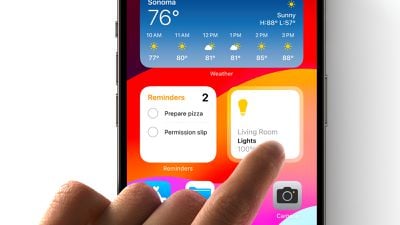
iOS 17 Interactive Widgets
We've rounded up a list of apps that take advantage of interactive widgets so you can update your widget workflow. Note that interactive widgets work on iPhone, iPad, and will even be accessible on the Mac when macOS Sonoma comes out thanks to new interconnectivity between the iOS and macOS.

WidgetSmith (Free, Premium Subscription)

WidgetSmith has several interactive widgets to choose from, including a series of photo galleries that you can tap to flip through your photos and multi-purpose widgets where you can tap between things like photos and step count, hiding useful information behind images.
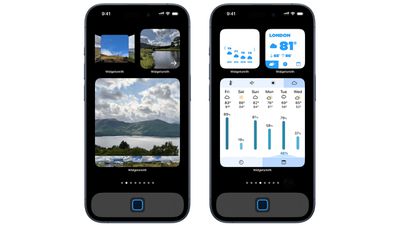
ios 17 widget smith
The app also includes a Music widget for flipping through music albums and playlists, a weather widget for swiping through the upcoming weather forecast without having to open the app, a calendar widget so you can see the day's upcoming events, and a number-adding tile game.

Spark Mail (Free, Premium Subscription)

Spark's interactive widgets let users delete or mark emails as done to archive them without having to open up the Spark app. Spark will also have options to view emails directly from different categories (People, Priority, Newsletters, Notifications, and All Emails) in the Spark widget.
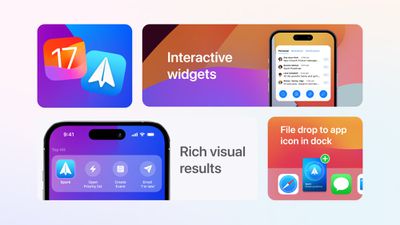
spark ios 17
Spark is also gaining new Drag and Drop features on the ‌iPad‌ for adding attachments, and App Shortcuts for creating calendar events, opening a priority list, and more.

Rise Sleep Tracker (Free, Premium Subscription)

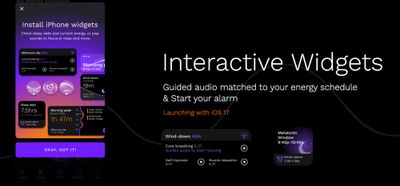
Sleep tracking app Rise has widgets that can be used for managing alarms and sleep sounds without opening up the app. The app also includes outdoor light exposure monitoring so you can see how light exposure affects sleep, and there is a dedicated ‌iPad‌ app.

ios 17 rise app

Copilot (Free, Premium Subscription

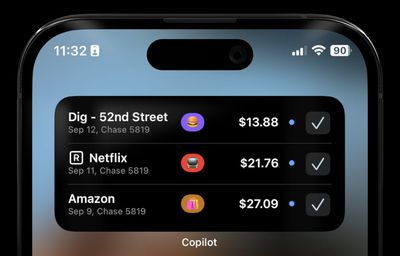
Budgeting and money tracking app Copilot has added a Review Transactions widget that can be used to view and confirm all of your purchases without having to open the app. Copilot lets you track all of your spending and investments in one place.
ios 17 copilot

Launcher (Free, Various Premium Unlocks)

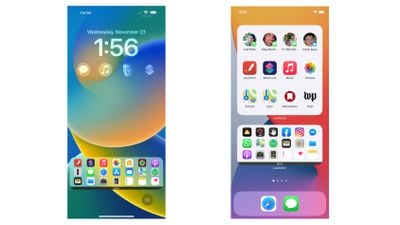
App launching app Launcher has interactive folder widgets so you can nest several actions in one folder, accessing them with a tap without having to go into the Launcher app. There are also multi-contact widgets so you can do things like quickly contact a friend, and there are options for music controls.
launcher ios 17

Other Apps With Interactive Widgets

  • Things ($9.99) - Task management app Things now supports interactive widgets so you can complete to-dos right from the ‌Home Screen‌.
  • TripIt (Free, Premium Subscription) - Travel planning app TripIt has interactive widgets that let you scroll through your entire travel itinerary from the ‌Home Screen‌.
  • Calendars ($30) - Calendars includes new widgets, such as a Load Indicator widget, an icon with the current date, and month calendar options, all of which can be used without opening the app. There's also support for StandBy mode.
  • Focus (Free, Premium Subscription) - Interactive widgets in productivity app Focus let you start a timer with a tap from the Home or Lock Screen. There's also a StandBy Focus widget and a redesigned Apple Watch app.
  • Timery for Toggl (Free, Premium Subscription) - Time-tracking app Timery, which is designed to work with Toggl, has interactive widgets that can be used for quickly setting timers, tracking time, and showing report details. There's a StandBy widget and a refreshed design for the Apple Watch.
  • Chronicling (Free, Premium Subscription) - Event tracking app Chronicling has interactive widgets for event logging from the ‌Home Screen‌, as well as a new watchOS app and StandBy support.
  • SmartGym (Free, Premium Subscription) - Fitness app SmartGym has an interactive widget that lets you swap between various metrics like heart rate and calories burned for your workouts. There's also a redesigned Apple Watch app and support for StandBy mode on iPhone.
  • Liftin' (Free, Premium Subscription) - Weightlifting app Liftin' has interactive widgets that let you start a workout, plus there are widgets optimized for the Apple Watch Smart Stack and Live Activities.
  • Home Widget (Free, Premium Upgrade) - HomeKit app Home Widget offers a selection of widgets that can be used to control smart home devices from the ‌Home Screen‌.
  • Overcast (Free, $9.99 Premium Option) - Podcast app Overcast has interactive widgets that let you control episode playback without having to open the app.

Read More

Find an app with interactive widgets that we didn't mention here? Let us know in the comments below.


Related Forums: iOS 17, iPadOS 17

Popular Stories

apple pro tell logo

Apple Launching Five New Products Today

Thursday November 5, 2026 12:59 am PST by
Apple is launching five new products on Friday, November 6, following pre-orders that opened last week, including its first touchscreen MacBook Pro models. The following new products will be available from today: iPad mini with OLED display and A20 Pro chip iMac with M6 chip 14-inch MacBook Pro with M6 chip 14-inch MacBook Pro with OLED touchscreen 16-inch MacBook Pro with OLED...

duo aquarium

More Fun iPhone Duo Apps: 30 New Picks to Try

Friday November 6, 2026 3:27 pm PST by
When the iPhone Duo launched, we shared a list of some of the fun apps developers created for the new form factor. Two weeks out, developers are continuing to come up with fresh ideas, so we thought we'd share some of our favorites. Games Marbles Unhinged ($2.99) - Marbles Unhinged is a marble maze designed for the Duo. When you fold it, the floor turns into a ramp. If you stand the top...
silver iphone 18 pro

Apple Rumored to Drop the iPhone's Action Button Next Year

Friday November 6, 2026 6:07 am PST by
Apple plans to merge the iPhone's Action button with the Camera Control starting next year, according to the leaker known as "Instant Digital." In a new post on Weibo, the leaker claimed that a single press of the combined button would open the camera, while a long press would trigger the function assigned to the Action button. They explicitly clarified that the dedicated Action button would ...

Top Rated Comments

WiiDSmoker Avatar
41 months ago
subscriptions, subscriptions, subscriptions.

screw off
Score: 30 Votes (Like | Disagree)
MrGimper Avatar
41 months ago
“Premium Subscription” is 4 out of 5 listed.

Detest subscriptions.
Score: 29 Votes (Like | Disagree)
cocky jeremy Avatar
41 months ago
I want to love widgets, but they seem pretty worthless at this point. Half the time I have to click them to make them refresh. I may as well just open the actual app.
Score: 10 Votes (Like | Disagree)
41 months ago
I used to download so many apps, and would happily pay for them when it was a one time purchase, but nowadays as soon as I see ‘subscription’ I don’t even bother.
Score: 8 Votes (Like | Disagree)
Tig Bitties Avatar
41 months ago
I'm an Android guy, but what's up with these weird subscriptions needed for iOS apps?

I would never a pay monthly fee for an app, I'd rather pay a one time purchase of like $20 if needed. But no way a $4.99/month sub, that's a terrible trend to start.
Score: 8 Votes (Like | Disagree)
dannyyankou Avatar
41 months ago
I'd like to see a list of non-freemium apps, but maybe I'll look at these at least
Score: 6 Votes (Like | Disagree)
Latest Stories
Early Apple Black Friday Deals on Apple Watch, MacBook Air, and More
8 hours ago
'Backglow' Lets You Customize New MacBook Pro's Glowing Apple Logo
8 hours ago
Top Stories: Apple Product Launches, iOS 27.3 Beta, and More
15 hours ago
More Fun iPhone Duo Apps: 30 New Picks to Try
1 day ago
Hands-On With Apple's New OLED Touchscreen MacBook Pro
1 day ago
Apple Store With All-New Design Opening Soon in Southern California
1 day ago
Control the Glowing Apple Logo on Your New MacBook Pro
1 day ago
Apple Shares New 'Apple Card: Apply and Use in Minutes' Ad
2 days ago
Apple Says More Than 100,000 Apps Optimized for iPhone Duo, Here's What's Still Missing
2 days ago
Early Black Friday Deals Kickoff With Steep Discounts on Apple Watch Ultras and More
2 days ago
The MacRumors Show: iOS 27.3 Looks Like a Huge Update
2 days ago
Best Buy's Black Friday Event Begins With Sitewide Savings on Apple, TVs, More
2 days ago
Apple Releasing Yet Another Two New Products Next Week
2 days ago
MacBook Air Drops to Lowest Price in Months With Amazon's $250 Discount
2 days ago
Apple Rumored to Drop the iPhone's Action Button Next Year
2 days ago
Apple's Extended Return Policy Now in Effect for 2026 Holiday Season
2 days ago
Apple Music Classical Updated With New Icon and Refreshed Design
2 days ago
OLED iPad Mini, M6 iMac, and New MacBook Pros Available From Today
2 days ago
Apple Surveys iPhone Duo Buyers About Crease and Camera
2 days ago
Apple's First Touchscreen Mac is Now Arriving to Customers
2 days ago
Claude Gets Personal Finance Feature With Bank Account Linking
2 days ago
Apple Arcade Adds Crossy Road Rush and NBA 2K27
2 days ago
Apple's New HomeView Smart Home Hub: Here's How Much RAM It Has
2 days ago
iPad Mini vs. iPad Air Buyer's Guide: Now Just $50 Apart
2 days ago
First iOS 27.3 and macOS Golden Gate 27.3 Public Betas Now Available
2 days ago
Apple Announces a New Mac Sales Record
2 days ago
Paid $200 for Logic Pro? Apple Says You Won't Get This New Feature
2 days ago
Instagram's Edits Video Editor is Now Available on Mac
2 days ago
Prevent Siri and Search From Accessing Specific iPhone Apps
3 days ago
Best Early Black Friday Deals on iPhone 18 Pro and iPhone Duo
3 days ago