Astropad Slate iPad App Lets You Control Your Mac With Apple Pencil - MacRumorsOpen MenuShow RoundupsShow Forums menuVisit ForumsOpen Sidebar
Skip to Content

Astropad Slate iPad App Lets You Control Your Mac With Apple Pencil

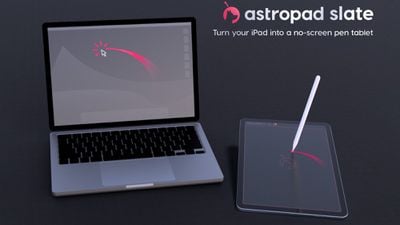
Astropad today announced a new iPad app called Astropad Slate, which can be used to control the Mac with an Apple Pencil. Astropad Slate is available as a public beta, and because it's still in testing, it is free for everyone.
astropad slate ipad
There are several Mac functions that can be performed with the ‌Apple Pencil‌. It works as a cursor for controlling the desktop mouse, with a tap on the screen serving as a click. Handwriting done on the ‌iPad‌ will be translated into typed text on the Mac. Astropad Slate supports the ‌Apple Pencil‌ hover gestures on newer iPads, and there is a simulated hover option on older iPads, plus you can use two-finger touch gestures for actions like scrolling and zoom.


You can also use the ‌iPad‌ as a pen tablet with Mac apps that support drawing, sketching, and other creative work. The Astropad Slate app basically turns the ‌iPad‌ into a no-screen drawing tablet so you can focus on your work on the Mac. A Mac and an ‌iPad‌ can be connected using Wi-Fi, Peer-to-Peer networking, or an appropriate USB cable. Requirements include iPadOS 15 or later and macOS 11 or later.

The Astropad Slate app can be accessed by signing up for the beta on the Astropad website.

Popular Stories

iCloud iPhone 17 Pro

iPhone Users Who Pay for iCloud Storage Get Two New Perks on iOS 27

Thursday July 2, 2026 6:10 am PDT by
If you pay for certain iCloud+ storage plans beyond the 5GB that Apple offers for free, you will receive two more perks on iOS 27 at no additional cost. A summary of the two new iCloud+ perks on iOS 27:Increased daily usage limits for some new Apple Intelligence features, including image generation in the revamped Image Playground app. HomeKit Secure Video cameras receive generated video...
iPhone 4 on Black Feature

Apple Facing One of Its Worst Leaks Since the iPhone 4

Thursday July 2, 2026 9:53 am PDT by
Apple supplier Tata Electronics recently suffered a cyberattack that resulted in thousands of confidential files being published on the dark web, and this reportedly included some photos and documents related to the upcoming iPhone 18 Pro. We have elected not to share any of the leaked photos in this story due to the illegal nature in which they were obtained, but they can easily be found...
American Express Gold Apple Pay Feature

American Express Announces New Apple Pay Feature

Tuesday June 30, 2026 10:27 am PDT by
American Express today announced that you can now redeem Membership Rewards points when checking out with Apple Pay on the web and in apps on the iPhone and iPad. When checking out with Apple Pay on iOS 18 or iPadOS 18 or later, tap on your eligible American Express card (Platinum, Gold, Green, and others) and select the Membership Rewards points option. You can use points to cover all or...

Top Rated Comments

36 months ago

Hmmm… I can type faster than I write… I also have a mouse and trackpad to control the cursor. I guess it’s great for photo editing when you’re connected to a large display.
I have arthritis since 25 years and can't use a mouse at all. I've been using Wacom tablets. So the idea of using an iPad is not bad. Lag and precision would be key for the app.
Score: 6 Votes (Like | Disagree)
rembert Avatar
36 months ago
Nice, but no thanks as this will likely require a subscription, just like their flagship project. I only buy software which can be used “indefinitely” where it will be my choice to decide to upgrade to a newer version. They’ll have to convince me to upgrade - a subscription based solution lacks that incentive: why would they, the money is being received, why bother too much (I’m looking at you, Adobe). For instance I’ll skip the latest DxO upgrade as it doesn’t bring me anything I require. The previous version is more than capable (for me).
Score: 3 Votes (Like | Disagree)
aevan Avatar
36 months ago

It seems like a simple Wacom tablet is still the best option here; isn't using beta software, it's cheaper, and for illustration you're better off working on the iPad itself
Sure, but this is like a Wacom tablet that turns into an actual screen tablet. If you want both, this might be the cheaper option then buying both the iPad and the tablet.

I have the latest Intuos Pros in L and M sizes and an iPad Pro, but I can imagine using this in a pinch when I'm in the office with just my iPad and my office computer.
Score: 3 Votes (Like | Disagree)
baryon Avatar
36 months ago
It would be so cool if MacBook trackpads could work with the Apple pencil. It could replace a Wacom in many cases.
Score: 3 Votes (Like | Disagree)
36 months ago
Interesting idea. Wonder how the pricing will be after the beta.
Score: 3 Votes (Like | Disagree)
lovehateapple Avatar
36 months ago

Pretty cool. I wanted a device/functionality like this for a while.
Same here, definitely going to give it a try.
Score: 3 Votes (Like | Disagree)


















