

iOS 17.2 Beta Adds Translate Option for Action Button - MacRumorsOpen MenuShow RoundupsShow Forums menuVisit ForumsOpen Sidebar
Skip to Content

iOS 17.2 Beta Adds Translate Option for Action Button

iPhone 15 Pro and iPhone 15 Pro Max users can select a new "Translate" option for the Action Button with the new iOS 17.2 beta. Apple promised that a Translate option was coming for the Action Button, but said that it would not be available right when the new iPhones launched in September.
ios 17 translate
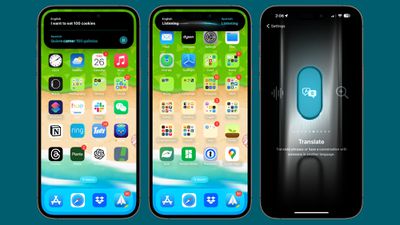
When the Action Button is set as Translate, pressing to hold causes the iPhone to pop up a Translate window that listens for spoken text. It is able to translate from one set language to another, using the languages that you have previously set up in the Translate app.

The languages you translate between can be changed by selecting different languages in the Translate app. The Translate app supports Chinese, English, Dutch, French, German, Indonesian, Italian, Spanish, Korean, Japanese, Polish, Portuguese, Russian, Thai, Turkish, Ukrainian, and Vietnamese.

To choose the Translate option for the Action Button, open up the Settings app, scroll down to Action Button, and then swipe through until you get to the Translate function.


Related Forums: iOS 17, iPadOS 17

Popular Stories

iCloud iPhone 17 Pro

iPhone Users Who Pay for iCloud Storage Get Two New Perks on iOS 27

Thursday July 2, 2026 6:10 am PDT by
If you pay for certain iCloud+ storage plans beyond the 5GB that Apple offers for free, you will receive two more perks on iOS 27 at no additional cost. A summary of the two new iCloud+ perks on iOS 27:Increased daily usage limits for some new Apple Intelligence features, including image generation in the revamped Image Playground app. HomeKit Secure Video cameras receive generated video...
American Express Gold Apple Pay Feature

American Express Announces New Apple Pay Feature

Tuesday June 30, 2026 10:27 am PDT by
American Express today announced that you can now redeem Membership Rewards points when checking out with Apple Pay on the web and in apps on the iPhone and iPad. When checking out with Apple Pay on iOS 18 or iPadOS 18 or later, tap on your eligible American Express card (Platinum, Gold, Green, and others) and select the Membership Rewards points option. You can use points to cover all or...
series 10 apple watch titanium digital crown

Report: Apple Watch Redesign Coming Next Year With New Band System

Tuesday June 30, 2026 8:45 am PDT by
A "major overhaul" of the Apple Watch's design is due to arrive next year with a new system for connecting bands, according to a known Weibo leaker. In a set of recent posts, the leaker known as "Instant Digital" linked the new claim to older rumors about an "Apple Watch X" model, which was said to introduce a fresh design and break compatibility with the existing watch band system. Citing...

Top Rated Comments

Apple Knowledge Navigator Avatar
35 months ago
“Mister Spock, analysis please”

“Well Jim according to my calculations, Siri is still just as bad.”
Score: 10 Votes (Like | Disagree)
chalkdiesel Avatar
35 months ago
That's cool but I'm eyeing the wallpaper right now!!
Score: 5 Votes (Like | Disagree)
nutmac Avatar
35 months ago

This appears to be the glaring omission to me as well. The button should be capable of at least three configurations. Press, long press and double press.

Example:

Press = mute

Long press = translate

Double press = flashlight
Press needs to be long press to prevent accidental trigger.

But surely, the Action button should be able to support click-then-hold and double-clicks-then-hold.

Alternatively, different Action button trigger for different focus mode.
Score: 4 Votes (Like | Disagree)
appleguy123 Avatar
35 months ago
90 day fiancé just got way less interesting.
Score: 4 Votes (Like | Disagree)
tweaknmod Avatar
35 months ago
As someone whose in-laws all speak another language, this is spectacular news!
Score: 4 Votes (Like | Disagree)
35 months ago

iPhone 15 Pro and iPhone 15 Pro Max users can select a new "Translate" option for the Action Button with the new iOS 17.2 beta. Apple promised that a Translate option was coming for the Action Button, but said that it would not be available right when the new iPhones launched in September.

MacRumors content image

When the Action Button is set as Translate, pressing to hold causes the iPhone to pop up a Translate window that listens for spoken text. It is able to translate from one set language to another, using the languages that you have previously set up in the Translate app.

The languages you translate between can be changed by selecting different languages in the Translate app. The Translate app supports Chinese, English, Dutch, French, German, Indonesian, Italian, Spanish, Korean, Japanese, Polish, Portuguese, Russian, Thai, Turkish, Ukrainian, and Vietnamese.

To choose the Translate option for the Action Button, open up the Settings app, scroll down to Action Button, and then swipe through until you get to the Translate function.

Article Link: iOS 17.2 Beta Adds Translate Option for Action Button ('https://www.macrumors.com/2023/10/26/ios-17-2-translate-action-button/')
Apple needs to do more with the action button, like a different option with a double tap. Perhaps that’s in the works?
Score: 4 Votes (Like | Disagree)













