

watchOS 10.2 Beta Reintroduces Option to Change Apple Watch Faces With a Swipe - MacRumorsOpen MenuShow RoundupsShow Forums menuVisit ForumsOpen Sidebar
Skip to Content

watchOS 10.2 Beta Reintroduces Option to Change Apple Watch Faces With a Swipe

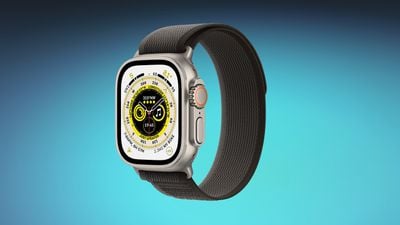
The third watchOS 10.2 beta that Apple released this week reintroduces an Apple Watch feature for swapping watch faces that was initially removed with the upgrade to watchOS 10.
apple watch ultra blue
Users can now choose to use a swipe gesture to switch the active Apple Watch face by enabling the option in the Apple Watch Settings app. With the feature turned on, swiping left or right on the watch face scrolls through the available watch faces that have been set up.

Switching watch faces with a swipe gesture was the default in watchOS 9, but Apple updated the interaction because of complaints that it was too easy to accidentally change watch faces. The current gesture requires long pressing before swiping to change the active watch face.


With watchOS 10.2, Apple Watch owners who preferred the prior method of changing their watch faces can choose to enable the setting if desired. The option is under Settings > Clock in the third beta.

watchOS 10.2 is available to both developers and public beta testers at this time, and it is expected to see a public launch in December.

Related Roundup: watchOS 26
Related Forum: Apple Watch

Popular Stories

Apple Watch Series 10 Jet Black Touch ID

Apple Watch Series 12 and watchOS 27: What to Expect Later This Year

Friday May 8, 2026 2:07 pm PDT by
While not too much has been reported about the next Apple Watch models, there are a few rumors about potential design changes and watchOS 27 features. Apple Watch Series 12 and Apple Watch Ultra 4 models are expected to be released in September, and we have outlined some of the key rumored hardware and software changes below. A new Apple Watch SE is not expected this year, as that model was...
ios 26 5 luminance colors 2

A Closer Look at watchOS 26.5's New Luminance Watch Face

Friday May 8, 2026 3:38 pm PDT by
With watchOS 26.5, Apple is introducing a Pride Luminance face, and it's one of the most versatile and customizable watch faces. There are pre-configured color options, but the face also supports custom colors. You can select 1 to 12 colors from a palette that has every color of the rainbow, some in-between shades, and black, white, brown, and gray. The colors you pick are distributed...
watchos 26 gradient light

Apple Releases watchOS 26.5 With New Pride Luminance Watch Face

Monday May 11, 2026 10:03 am PDT by
Apple today released watchOS 26.5, the fifth major update to the watchOS 26 operating system that came out in September. watchOS 26.5 comes a month and a half after Apple released watchOS 26.4. watchOS 26.5 can be downloaded for free on an iPhone running iOS 26.5 by opening up the Apple Watch app and going to General > Software Update, or initiating an update in the Settings app on the...

Top Rated Comments

33 months ago
THANK YOU! This change has bothered me SO much.
Score: 64 Votes (Like | Disagree)
Osxguy Avatar
33 months ago
Unpopular option but the push side button for control center is stupid!!! What happened in the watch team? Like a new team came in and made unnecessary changes? I’d understand it if it wasn’t a swipe for all the rest of the devices but it’s always been a swipe. At least make it a customizable option.
Score: 51 Votes (Like | Disagree)
Cobra Kai Avatar
33 months ago
How about they let give us our side button back. Why they moved control center (something I don’t even use) to the side button and removing the ability to have a favorites dock is beyond me. Feels like this years OS’s updates have been worse.
Score: 51 Votes (Like | Disagree)
33 months ago

Really don't know why they changed it, it was perfect for many years. The layout is now stupid, you scroll the crown up for the smart stack, swipe up for the smart stack and tap your fingers for the smart stack on the newer watches, so three ways to get to the same damn thing 🤦‍♂️

And then they moved the control center swipe up to the side button which I still hate, ridiculous change.

I would have had it like this, swipe up for the control center as it used to be, crown up for the smart stack and finger tap for the smart stack.

And as as the side button on a single press now does nothing, maybe we could customise it to make it a second shortcut button. Or we could press the side button once to bring up the apps instead of double pressing the crown which is annoying.
Best option of all: Let the user customize what button does what function.
Score: 20 Votes (Like | Disagree)
MrGimper Avatar
33 months ago
Agree with others .... pointless change and glad it's back.

And also agree with changing side button back to a dock and swipe up for CC .... absolute numpty changes!
Score: 16 Votes (Like | Disagree)
haruhiko Avatar
33 months ago

Unpopular option but the push side button for control center is stupid!!! What happened in the watch team? Like a new team came in and made unnecessary changes? I’d understand it if it wasn’t a swipe for all the rest of the devices but it’s always been a swipe. At least make it a customizable option.
Totally agree. As if they find that the side button is used too rarely and purposefully force us to use it.
Score: 16 Votes (Like | Disagree)













