Apple Says Vision Pro Syncs Data When Not in Use, Explains Battery Light Charge Indicator - MacRumorsOpen MenuShow RoundupsShow Forums menuVisit ForumsOpen Sidebar
Skip to Content

Apple Says Vision Pro Syncs Data When Not in Use, Explains Battery Light Charge Indicator

Now that Apple Vision Pro has launched in the U.S., Apple has released additional support documentation for the device, including how to connect and charge the Vision Pro battery.
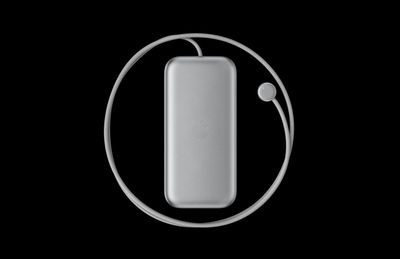
vision pro battery pack
Notably, Apple's document reveals that the external battery also powers ‌Apple Vision Pro‌ when you're not wearing it, allowing the device to sync your mail, photos, and more. If the headset isn't worn for 24 hours though, it turns off automatically.

To check if Apple Vision Pro is still powered on when you're not wearing it, pick up the device. If it's powered on, the light on the power cable will turn on briefly. If Apple Vision Pro has turned off, press and hold the top button for three seconds to turn it back on. After about a minute, Apple Vision Pro makes a tone that means it's ready to use, and the light on the power cable will be solid.

Apple recommends disconnecting the battery if you know in advance that you won't be using the headset for an extended length of time. To disconnect the battery from ‌Apple Vision Pro‌, users are advised to first save any open documents — since disconnecting the battery turns off the device — then turn the power cable counterclockwise until it detaches.

Additionally, Apple outlines what the battery's light tells users about its charge level when it is first connected to power, or moved or tapped while charging:

  • Green for several seconds: the battery is charged to capacity.
  • Amber for several seconds: the battery's charge level is less than 100%, but has enough charge for you to use ‌Apple Vision Pro‌.
  • Amber pulsing slowly: the battery's charge level is too low to power your ‌Apple Vision Pro‌. Keep charging the battery for 10 minutes, or until the light shows amber steadily (not pulsing) when you tap the battery.

Apple also explains what the battery light's color changes mean when users disconnect it from power, or moved or tapped when it's not charging:

  • Green for several seconds: the battery is charged to 50% or higher.
  • Amber for several seconds: the battery's charge level is between 1% and 49%.
  • Amber pulsing slowly: the battery's charge level is too low to power your ‌Apple Vision Pro‌. Charge the battery for 10 minutes, or until the light shows amber steadily (not pulsing) when you tap the battery.

Apple also cautions users not to sit down with the battery in their back pocket, pull the battery off a desk when standing up, or let it fall between seats on an airplane.

According to Apple, Vision Pro batteries can be used for up to 2 hours of general use or 2.5 hours of 2D video watching when fully charged, or all day when connected to power. Apple sells additional Vision Pro battery packs for $200 a piece, but they are not hot-swappable.

Related Roundup: Apple Vision Pro
Buyer's Guide: Vision Pro (Neutral)
Related Forum: Apple Vision Pro

Popular Stories

Apple Remnants Vision Pro

Apple Unveils Immersive Horror Film Coming Exclusively to Vision Pro

Tuesday October 13, 2026 5:26 am PDT by
Apple on Monday announced Remnants, an immersive horror film that will be released exclusively on the Vision Pro on Friday, October 16. The film will be in the Apple Immersive Video format, meaning it will be a 3D video recorded in 8K resolution with a 180-degree field of view and Spatial Audio. Apple shared a short video of people reacting to the film while wearing the Vision Pro....
apple vision pro orange

Apple Releases visionOS 27.2

Monday October 26, 2026 10:46 am PDT by
Apple today released visionOS 27.2, the first big update for the visionOS 27 operating system that runs on the Apple Vision Pro. visionOS 27.2 can be downloaded by opening the Settings app, selecting the General section, and choosing Software Update. Installing the update requires the headset to be removed, and a progress bar appears on the EyeSight display. The visionOS 27.2 update...


General visionOS watchOS and tvOS Betas Feature Redux

Apple Seeds watchOS 27.2, tvOS 27.2 and visionOS 27.2 Release Candidates

Monday October 19, 2026 10:25 am PDT by
Alongside new betas of iOS 27.2, iPadOS 27.2, and macOS Golden Gate 27.2, Apple has seeded the release candidate versions of watchOS 27.2, tvOS 27.2 and visionOS 27.2. The RCs come a week after Apple released the fourth betas. Registered developers can download the betas through the Settings app on each device. There's no word on what's being added in visionOS 27.2 and tvOS 27.2, but...

Top Rated Comments

36 months ago

having amber and green lights take on different meanings depending on if you are using it or not, taking it off or not, is just confusing. I would prefer they just put a battery icon on the outside screen.
yeah but AirPods Pro seemingly have the same LED indicator system but I never know what it means, except that green is good. I'll continue just checking the battery levels from my iPhone probably.
Score: 4 Votes (Like | Disagree)
36 months ago

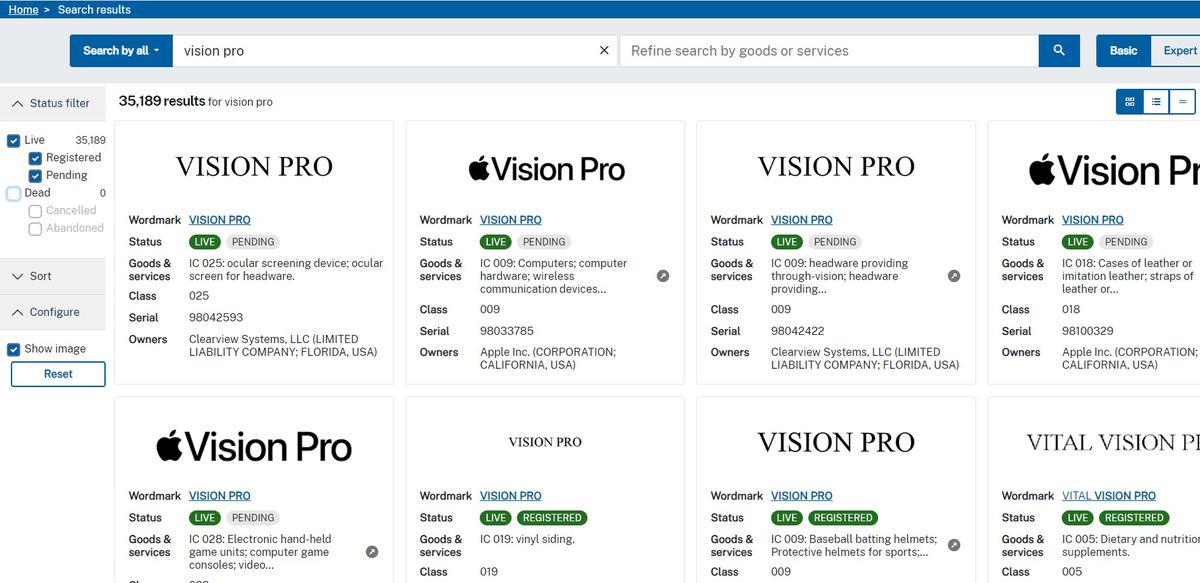
Isn't "Vision Pro" distinct enough of a trademark?
Apparently not.

Search TESS ('https://tmsearch.uspto.gov/search/search-information')and see.


Attachment Image
Score: 4 Votes (Like | Disagree)
36 months ago
Good to know about the various indicators on the battery.
Score: 1 Votes (Like | Disagree)
contacos Avatar
36 months ago
why does Apple hate power buttons?* so weird and yes, I turn off my MBP every evening

*this rings different in my head
Score: 1 Votes (Like | Disagree)
erikkfi Avatar
36 months ago
I didn't notice until yesterday that they've made "Apple" part of the product name. I wonder why they did this. It made sense for the Watch because "Watch" is a generic word. Like if they called Vision Pro "Headset" instead, "Apple Headset" would be a terrible name but still make sense having "Apple" tacked on. Isn't "Vision Pro" distinct enough of a trademark?
Score: 1 Votes (Like | Disagree)
Latest Stories
Apple Taking New Approach to Developing iOS 28 and macOS 28
1 hour ago
Early Apple Black Friday Deals on Apple Watch, MacBook Air, and More
20 hours ago
'Backglow' Lets You Customize New MacBook Pro's Glowing Apple Logo
20 hours ago
Top Stories: Apple Product Launches, iOS 27.3 Beta, and More
1 day ago
More Fun iPhone Duo Apps: 30 New Picks to Try
2 days ago
Hands-On With Apple's New OLED Touchscreen MacBook Pro
2 days ago
Apple Store With All-New Design Opening Soon in Southern California
2 days ago
Control the Glowing Apple Logo on Your New MacBook Pro
2 days ago
Apple Shares New 'Apple Card: Apply and Use in Minutes' Ad
2 days ago
Apple Says More Than 100,000 Apps Optimized for iPhone Duo, Here's What's Still Missing
2 days ago
Early Black Friday Deals Kickoff With Steep Discounts on Apple Watch Ultras and More
2 days ago
The MacRumors Show: iOS 27.3 Looks Like a Huge Update
2 days ago
Best Buy's Black Friday Event Begins With Sitewide Savings on Apple, TVs, More
2 days ago
Apple Releasing Yet Another Two New Products Next Week
2 days ago
MacBook Air Drops to Lowest Price in Months With Amazon's $250 Discount
2 days ago
Apple Rumored to Drop the iPhone's Action Button Next Year
2 days ago
Apple's Extended Return Policy Now in Effect for 2026 Holiday Season
2 days ago
Apple Music Classical Updated With New Icon and Refreshed Design
2 days ago
OLED iPad Mini, M6 iMac, and New MacBook Pros Available From Today
2 days ago
Apple Surveys iPhone Duo Buyers About Crease and Camera
3 days ago
Apple's First Touchscreen Mac is Now Arriving to Customers
3 days ago
Claude Gets Personal Finance Feature With Bank Account Linking
3 days ago
Apple Arcade Adds Crossy Road Rush and NBA 2K27
3 days ago
Apple's New HomeView Smart Home Hub: Here's How Much RAM It Has
3 days ago
iPad Mini vs. iPad Air Buyer's Guide: Now Just $50 Apart
3 days ago
First iOS 27.3 and macOS Golden Gate 27.3 Public Betas Now Available
3 days ago
Apple Announces a New Mac Sales Record
3 days ago
Paid $200 for Logic Pro? Apple Says You Won't Get This New Feature
3 days ago
Instagram's Edits Video Editor is Now Available on Mac
3 days ago
Prevent Siri and Search From Accessing Specific iPhone Apps
3 days ago