Hands-On With the Apple Vision Pro: Unboxing, Initial Thoughts and More - MacRumorsOpen MenuShow RoundupsShow Forums menuVisit ForumsOpen Sidebar
Skip to Content

Hands-On With the Apple Vision Pro: Unboxing, Initial Thoughts and More

Apple's first major new product category in almost a decade launched today, with the Vision Pro now in the hands of consumers in the United States. We picked up a Vision Pro this morning, and spent the day testing it out and filming our first impressions.


Fit appointments at the Apple Store are useful because we've already heard of several situations where the initial ‌Apple Store‌ readings were off in terms of fit. If you're experiencing an issue with light leakage or comfort, Apple employees can get you a new Light Seal or help you adjust the straps to get the headset working the right way.

At over 1.3 pounds, the Vision Pro is undeniably heavy, but the weight is distributed well with the right fit. It can get heavy to wear over time, but you'll mostly notice the weight when you take it off and feel the relief of not having 1.3 pounds on your face. We've had some light leaking in around the nose even with a solid fit, but the displays seem to work well enough even with that little bit of light.

Putting on the Vision Pro for the first time is absolutely a "holy crap" moment because it's such a different experience, especially with the demo that ‌Apple Store‌ employees provide. The immersive content is mind blowing, especially when digging in to your own panoramas and spatial videos.

Navigation is intuitive for the most part, but the virtual keyboard is kind of a miss. You can enter text one character at a time and that's fine, but you're going to want a Bluetooth keyboard for any extensive writing. Poking at the keyboard to type feels the most natural, but you can also look at the letters and pinch.

The built-in speakers are great and do an awesome job with spatial audio, but be warned that people around you can hear what's going on so you might want to wear AirPods.

Anything you're seeing in the real world is being relayed through passthrough cameras, so if you're not in the best lighting, you're not going to have the best view. Passthrough video quality can be hit or miss for this reason.

Have you had a chance to try out the Vision Pro? Let us know in the comments below. Apple's retail stores are holding demos all weekend long, and starting Monday, you can book an appointment to get a demonstration if you don't have a Vision Pro yourself.

Related Roundup: Apple Vision Pro
Buyer's Guide: Vision Pro (Neutral)
Related Forum: Apple Vision Pro

Popular Stories

Apple Remnants Vision Pro

Apple Unveils Immersive Horror Film Coming Exclusively to Vision Pro

Tuesday October 13, 2026 5:26 am PDT by
Apple on Monday announced Remnants, an immersive horror film that will be released exclusively on the Vision Pro on Friday, October 16. The film will be in the Apple Immersive Video format, meaning it will be a 3D video recorded in 8K resolution with a 180-degree field of view and Spatial Audio. Apple shared a short video of people reacting to the film while wearing the Vision Pro....

apple vision pro orange

Apple Releases visionOS 27.2

Monday October 26, 2026 10:46 am PDT by
Apple today released visionOS 27.2, the first big update for the visionOS 27 operating system that runs on the Apple Vision Pro. visionOS 27.2 can be downloaded by opening the Settings app, selecting the General section, and choosing Software Update. Installing the update requires the headset to be removed, and a progress bar appears on the EyeSight display. The visionOS 27.2 update...
General visionOS watchOS and tvOS Betas Feature Redux

Apple Seeds watchOS 27.2, tvOS 27.2 and visionOS 27.2 Release Candidates

Monday October 19, 2026 10:25 am PDT by
Alongside new betas of iOS 27.2, iPadOS 27.2, and macOS Golden Gate 27.2, Apple has seeded the release candidate versions of watchOS 27.2, tvOS 27.2 and visionOS 27.2. The RCs come a week after Apple released the fourth betas. Registered developers can download the betas through the Settings app on each device. There's no word on what's being added in visionOS 27.2 and tvOS 27.2, but...

Top Rated Comments

karranz Avatar
36 months ago
A $ 3,500 promising solution for a non existent problem.
Score: 34 Votes (Like | Disagree)
36 months ago
I've been playing around with it for about 4 hours now.
Some initial thoughts and observations:
Text is crisp and video is amazing. The immersive videos are jaw dropping.
I grew quickly fatigued using the solo band. The dual solved that.
There's a little light leakage around the bottom of my nose. It's a little distracting. I can also see my eyes dimly reflected when watching movies. Also a little distracting.
Netflix and Hulu work in the browser, but you are limited to a fairly small "screen."
I couldn't sign into Peacock: sign in page wouldn't load. Paramount plus won't play videos. You start a video and it crashes back to the title page. I thought I read reviews where they watched football on Paramount, hopefully this will be an easy fix.
When it works, using it as a display for my MacBook Pro is great. But about 25% of the time I can't get it to sync.
Passthrough is adequate, but it's fuzzy when you are moving and it's not terribly clear when you are not. Definitely won't mistake it for real life.
Controlling things with eyes and pinching works pretty well, but doesn't work enough to be annoying.
I entered the wrong password for Disney a couple of times and it just froze on the sign in screen. I had to uninstall the app to get it to work.
It's hard to drink when you have the goggles on. I was watching Ready Player one through AppleTV in 3D in the theater environment. Looks and sounds amazing. I got some popcorn and a glass of soda. It's a little weird. You can see your hands, but you can't see the popcorn or the glass. I was very worried about setting the glass down on the edge of the side table. It's also difficult to drink with the goggles on. The upper rim of the glass hits the goggles. You need to tilt your head all the way back.
Score: 29 Votes (Like | Disagree)
36 months ago
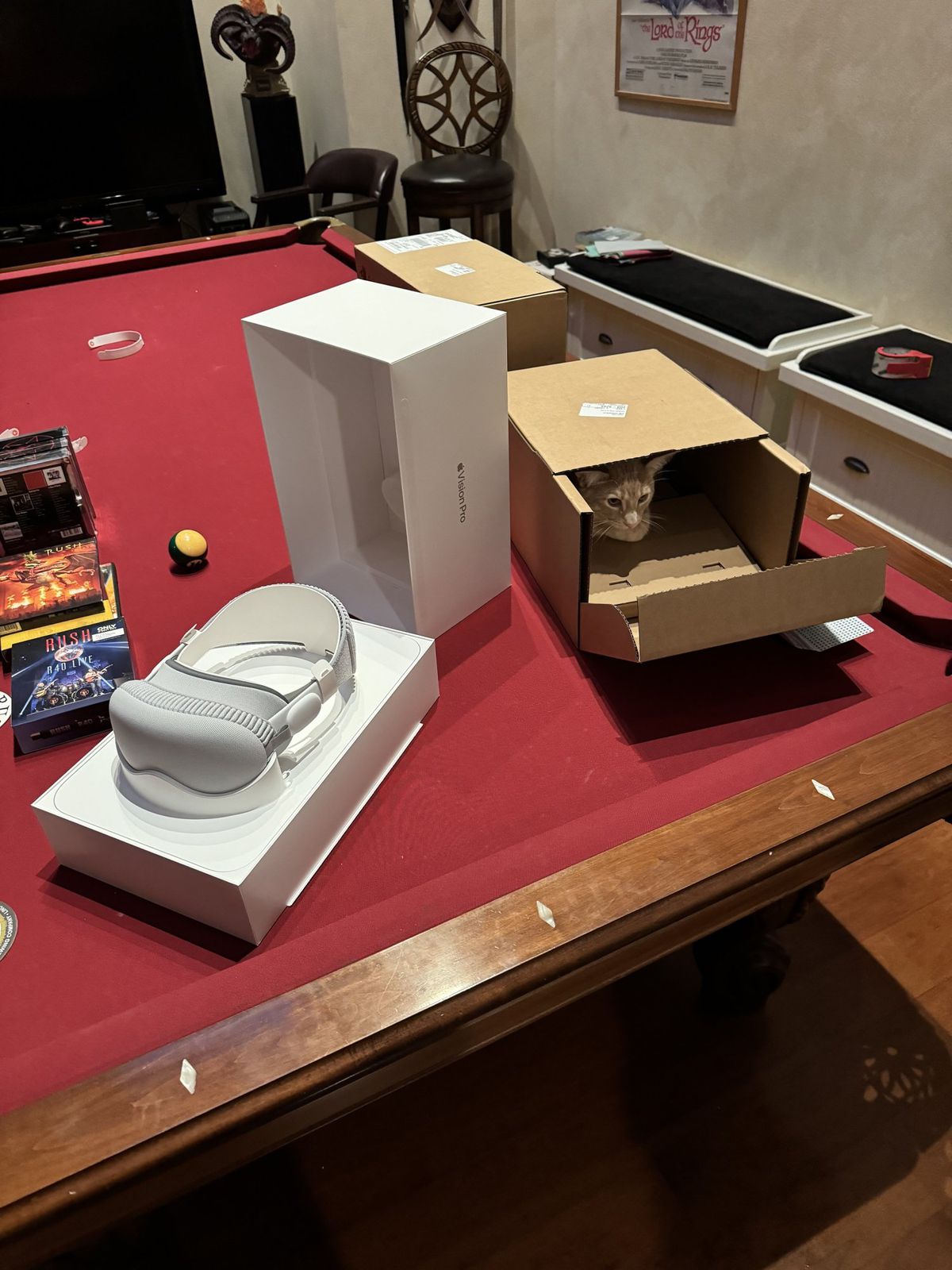
I suspected my 7 month old cat would find his way into the box immediately after I opened it!

Attachment Image
Score: 18 Votes (Like | Disagree)
36 months ago

I've been playing around with it for about 4 hours now.
Some initial thoughts and observations:
Text is crisp and video is amazing. The immersive videos are jaw dropping.
I grew quickly fatigued using the solo band. The dual solved that.
There's a little light leakage around the bottom of my nose. It's a little distracting. I can also see my eyes dimly reflected when watching movies. Also a little distracting.
Netflix and Hulu work in the browser, but you are limited to a fairly small "screen."
I couldn't sign into Peacock: sign in page wouldn't load. Paramount plus won't play videos. You start a video and it crashes back to the title page. I thought I read reviews where they watched football on Paramount, hopefully this will be an easy fix.
When it works, using it as a display for my MacBook Pro is great. But about 25% of the time I can't get it to sync.
Passthrough is adequate, but it's fuzzy when you are moving and it's not terribly clear when you are not. Definitely won't mistake it for real life.
Controlling things with eyes and pinching works pretty well, but doesn't work enough to be annoying.
I entered the wrong password for Disney a couple of times and it just froze on the sign in screen. I had to uninstall the app to get it to work.
It's hard to drink when you have the goggles on. I was watching Ready Player one through AppleTV in 3D in the theater environment. Looks and sounds amazing. I got some popcorn and a glass of soda. It's a little weird. You can see your hands, but you can't see the popcorn or the glass. I was very worried about setting the glass down on the edge of the side table. It's also difficult to drink with the goggles on. The upper rim of the glass hits the goggles. You need to tilt your head all the way back.
you will have to buy some straws
Score: 15 Votes (Like | Disagree)
itsMaxDigital Avatar
36 months ago
Dont even feel like opening it ever since i saw all the reviews

Attachment Image
Score: 14 Votes (Like | Disagree)
erikkfi Avatar
36 months ago

A $ 3,500 promising solution for a non existent problem.
What if the problem is that I need to buy a new monitor and I want to way overspend on it?
Score: 9 Votes (Like | Disagree)
Latest Stories
Apple Taking New Approach to Developing iOS 28 and macOS 28
1 hour ago
Early Apple Black Friday Deals on Apple Watch, MacBook Air, and More
20 hours ago
'Backglow' Lets You Customize New MacBook Pro's Glowing Apple Logo
20 hours ago
Top Stories: Apple Product Launches, iOS 27.3 Beta, and More
1 day ago
More Fun iPhone Duo Apps: 30 New Picks to Try
2 days ago
Hands-On With Apple's New OLED Touchscreen MacBook Pro
2 days ago
Apple Store With All-New Design Opening Soon in Southern California
2 days ago
Control the Glowing Apple Logo on Your New MacBook Pro
2 days ago
Apple Shares New 'Apple Card: Apply and Use in Minutes' Ad
2 days ago
Apple Says More Than 100,000 Apps Optimized for iPhone Duo, Here's What's Still Missing
2 days ago
Early Black Friday Deals Kickoff With Steep Discounts on Apple Watch Ultras and More
2 days ago
The MacRumors Show: iOS 27.3 Looks Like a Huge Update
2 days ago
Best Buy's Black Friday Event Begins With Sitewide Savings on Apple, TVs, More
2 days ago
Apple Releasing Yet Another Two New Products Next Week
2 days ago
MacBook Air Drops to Lowest Price in Months With Amazon's $250 Discount
2 days ago
Apple Rumored to Drop the iPhone's Action Button Next Year
2 days ago
Apple's Extended Return Policy Now in Effect for 2026 Holiday Season
2 days ago
Apple Music Classical Updated With New Icon and Refreshed Design
2 days ago
OLED iPad Mini, M6 iMac, and New MacBook Pros Available From Today
2 days ago
Apple Surveys iPhone Duo Buyers About Crease and Camera
3 days ago
Apple's First Touchscreen Mac is Now Arriving to Customers
3 days ago
Claude Gets Personal Finance Feature With Bank Account Linking
3 days ago
Apple Arcade Adds Crossy Road Rush and NBA 2K27
3 days ago
Apple's New HomeView Smart Home Hub: Here's How Much RAM It Has
3 days ago
iPad Mini vs. iPad Air Buyer's Guide: Now Just $50 Apart
3 days ago
First iOS 27.3 and macOS Golden Gate 27.3 Public Betas Now Available
3 days ago
Apple Announces a New Mac Sales Record
3 days ago
Paid $200 for Logic Pro? Apple Says You Won't Get This New Feature
3 days ago
Instagram's Edits Video Editor is Now Available on Mac
3 days ago
Prevent Siri and Search From Accessing Specific iPhone Apps
3 days ago