Adobe Lightroom Gains AI-Based Generative Remove Tool for Eliminating Unwanted Objects - MacRumorsOpen MenuShow RoundupsShow Forums menuVisit ForumsOpen Sidebar
Skip to Content

Adobe Lightroom Gains AI-Based Generative Remove Tool for Eliminating Unwanted Objects

Adobe today updated its Lightroom software for the iPad and Mac with Generative Remove, an AI-powered feature that can remove any element from a photo with a single click. Generative Remove eliminates unwanted objects in images non-destructively, intelligently matching the removed area with AI-generated content that matches the surrounding photo.
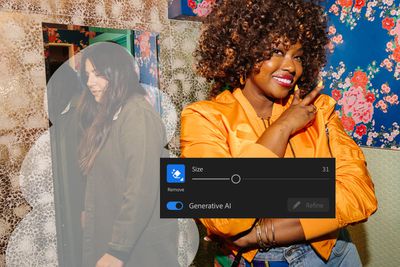
lightroom generative remove
Generative Remove is able to fix everything from an unwanted reflection in water to wrinkles in a tablecloth in food photography. It works with complicated backgrounds, and can be used for removing distractions from images or retouching photos.

According to Adobe, users can expect to see "high-quality, realistic and stunning results." The Generate Remove feature is powered by Adobe Firefly, generative AI features that have previously been available in Photoshop. Generative Remove is available today as an early access feature for Lightroom for mobile, desktop, ‌iPad‌, Web, and Classic.

Along with Generative Remove, Adobe is also adding automatic presets for Lens Blur, a feature that is able to add blur effects to any part of a photograph, plus Lens Blur includes improved subject detection. Other improvements include HDR optimization, a streamlined mobile toolbar on the ‌iPad‌, and instant access to photo libraries in the ‌iPad‌ and Mac apps for faster editing.

The new features are free for existing Lightroom users, with Lightroom access available starting at $9.99 per month.

Note: MacRumors is an affiliate partner with Adobe. When you click a link and make a purchase, we may receive a small payment, which helps us keep the site running.


Tag: Adobe

Popular Stories

iCloud iPhone 17 Pro

iPhone Users Who Pay for iCloud Storage Get Two New Perks on iOS 27

Thursday July 2, 2026 6:10 am PDT by
If you pay for certain iCloud+ storage plans beyond the 5GB that Apple offers for free, you will receive two more perks on iOS 27 at no additional cost. A summary of the two new iCloud+ perks on iOS 27:Increased daily usage limits for some new Apple Intelligence features, including image generation in the revamped Image Playground app. HomeKit Secure Video cameras receive generated video...
iPhone 4 on Black Feature

Apple Facing One of Its Worst Leaks Since the iPhone 4

Thursday July 2, 2026 9:53 am PDT by
Apple supplier Tata Electronics recently suffered a cyberattack that resulted in thousands of confidential files being published on the dark web, and this reportedly included some photos and documents related to the upcoming iPhone 18 Pro. We have elected not to share any of the leaked photos in this story due to the illegal nature in which they were obtained, but they can easily be found...
American Express Gold Apple Pay Feature

American Express Announces New Apple Pay Feature

Tuesday June 30, 2026 10:27 am PDT by
American Express today announced that you can now redeem Membership Rewards points when checking out with Apple Pay on the web and in apps on the iPhone and iPad. When checking out with Apple Pay on iOS 18 or iPadOS 18 or later, tap on your eligible American Express card (Platinum, Gold, Green, and others) and select the Membership Rewards points option. You can use points to cover all or...

Top Rated Comments

turbineseaplane Avatar
28 months ago
This should be handy after divorces and breakups

Click + Delete the Ex!
Score: 21 Votes (Like | Disagree)
28 months ago
All these degenerative apps look great in marketing demos and edited YouTube videos but 80% of the time when you use them yourself the results are WTF levels of entertainment.
Score: 13 Votes (Like | Disagree)
MrGimper Avatar
28 months ago

This should be handy after divorces and breakups

Click + Delete the Ex!
Yep, she makes money disappear from your bank accounts

You make her disappear from photos.
Score: 8 Votes (Like | Disagree)
28 months ago
Retouching has been done since the invention of photography. Paintings always have been an interpretation of what is real way before that. We might argue that film, developing chemicals treatment, even exposure and fstop, framing, the lens you chose… and even choosing a situation and a specific moment to capture from a specific viewpoint is distorting the objective truth. Every detail about photography is not about representation of reality but a subjective chain of decisions. Look at any Cartier-Bresson, who was a photo reporter and you will see decisions that turn reality into a subjective authorship. Whether black and white or Polaroid, these images always were chemical transcriptions of reality, 2D simulacra.
Same with photography. Even an untouched, unedited, straight from the Camera, no-filters photo is already edited, not truthful anymore. It is important to understand that images represent, re-interpret and see that as what IS photography. It never was about reality.

Personally, as someone who took or edited images daily since the early 90s, this is an important distinction. Images are narrative and the job is to capture or find that narrative and use tools like Photoshop to elevate and fine-tune the image. Over the top colors or edits, black and white, subtle minor repairs… it always depends on what you want the photo to be. But even a «real» photo is a narrative choice and edited to look untouched.

One of the reasons for that is that cameras can capture stuff your brain will filter out. People will see things in photos they have not seen in real life even in their daily surroundings, we once had a client that seemed to notice a door in his shop for the first time in the photos we took of his interior.

So the job is to find a narrative. When you do portrait the job is to find the beauty and essence of the person captured. In architecture you might want to edit out stuff that distracts from the building, cars, people, signs etc. I personally have the tendency to take out distractions, the granular stuff that distracts the eye, to make the image a bit cleaner and lighter. Reflections, creases, fire alarms, buttons, cigarette butts, signage - the detritus, the distractions to the eye. And if the tools get better to do that, as they have done since the invention of photography, if we have more choice how to represent reality, all the better.
Score: 7 Votes (Like | Disagree)
steggerwoof Avatar
28 months ago

Luminar Neo has a great feature that can remove lens/sensor dust spots in a single click. I'd love to see Adobe copy this so I don't have to round-trip into Photoshop to fire up Luminar to do the removal. Right now it looks like I would have to still click on each dust spot.
Or you could clean your sensor 🤣
Score: 6 Votes (Like | Disagree)
28 months ago
For the mods/article writer - might be worth including the fact that they've added support for the neural engine on AS Macs when AI denoising! Quite topical given AI stuff lately
Score: 6 Votes (Like | Disagree)