Apple Music Features Improved Spotify-Like Queue System on iOS 18 - MacRumorsOpen MenuShow RoundupsShow Forums menuVisit ForumsOpen Sidebar
Skip to Content

Apple Music Features Improved Spotify-Like Queue System on iOS 18

Apple has revamped the song queuing system in the Music app on iOS 18, and early reaction to the changes has been overwhelmingly positive.
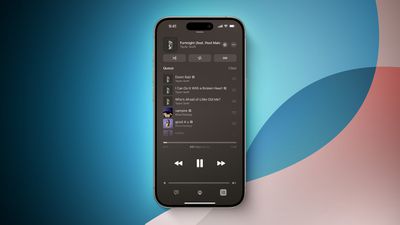
iOS 18 Music Queue
Notable changes include a new "Add Songs to Queue" button at the bottom of the queue, an option to clear the entire queue all at once, and the ability to change the currently playing song without having the queue disappear. In addition, the former "Play Last" menu option has been replaced with "Add to Queue." While listening to a playlist, it is now possible to add a song to the queue for immediate playback after the current song, whereas the song would previously get added to the end of the playlist.

These changes bring Apple Music's queuing system on iPhone more in line with Spotify, and the Android version of the Apple Music app. It also brings Apple Music's queuing system more in line with how it worked back on iOS 9.

iOS 18 is currently available in beta for members of the Apple Developer Program, with a public beta to follow in July. The update should be widely released in September, allowing everyone to try out the new queuing system.

Related Forums: iOS 18, iPadOS 18

Popular Stories

wigmore hall

Apple Music Classical Announces New Partnership With London's Wigmore Hall

Wednesday June 3, 2026 4:59 am PDT by
Wigmore Hall Live today relaunches as a digital-only platform in partnership with Apple Music Classical, with all recording royalties passed directly to artists, Gramophone reports. Wigmore Hall is a prestigious 550-seat concert hall on Wigmore Street in London's Marylebone, widely regarded as one of the world's foremost venues for chamber music, early music, and vocal recitals. Opened in...
macOS 27 on MacBook Pro

Apple Says macOS 27 Won't Be Compatible With These Macs

Wednesday June 3, 2026 8:29 am PDT by
During WWDC 2025, Apple revealed that macOS 26 Tahoe would be the final major macOS version for Intel-based Macs. macOS 27 will be compatible with Apple silicon Macs only, meaning that you will need a Mac with an M-series chip or a MacBook Neo with an A18 Pro chip in order to install the software update. Apple will unveil macOS 27 during its WWDC 2026 keynote this Monday, June 8, and the...
MacBook Neo on Yellow Feature

MacBook Neo is So Popular That Apple Reportedly Doubled Production

Wednesday June 3, 2026 9:24 am PDT by
On an earnings call in late April, Apple's CEO Tim Cook said that customer response to the MacBook Neo was "off the charts," and the popularity of the laptop has reportedly led the company to significantly boost production. Apple supply chain analyst Ming-Chi Kuo this week said he believes that MacBook Neo shipments to Apple were doubled from an initial target of 5 million units to 10...

Top Rated Comments

26 months ago
FINALLY!!!!

This is how it worked all the way back in iOS 9 (and on the music app on macOS this whole time). Glad to see they came back around :)
Score: 10 Votes (Like | Disagree)
MakeAppleAwesomeAgain Avatar
26 months ago
Please fix local music libraries on macOS, it’s so bad you won’t believe it. Navigation is totally broken when searching. Sometimes I wish we’d go back to the latest iTunes version with Cover Flow. I don’t care that it was bloated, it was brilliant for local music libraries.
Score: 9 Votes (Like | Disagree)
26 months ago
Words aren’t enough to express how happy I am about this change. The current/old queuing system is so frustrating, convoluted, and tedious. It’s been my biggest complaint about Apple Music. This upgrade alone makes me tempted to jump on the iOS 18 beta.
Score: 9 Votes (Like | Disagree)
phuklok1 Avatar
26 months ago
We're up to IOS 18. Can we please have a real custom EQ?! you know with individual frequency bands like they were able to do in the 70s? Can it remember independent settings for each bluetooth device it is attached to? that way you don't have to keep messing with it when you connect to a small bluetooth speaker, a car, or home system? Maybe swipe gestures for skipping tracks? there were JB tweaks for my iphone 4 that could do those things over a decade ago! you know, real simple, usefull and basic things...I think it's time...Please?! LOL
Score: 8 Votes (Like | Disagree)
Steve Job's Cousin Avatar
26 months ago

If you are complaining about Apple Music, wait until you see Spotify. I get popups when I open the app even though I literally pay for Premium.
I've never gotten a single popup on Spotify, I don't know what you're talking about.
Score: 6 Votes (Like | Disagree)
26 months ago
I would be very happy if I could just play the music I put on my iPhone, without any advertisement or suggestions from Apple. But I guess that would be too much to ask.
Score: 6 Votes (Like | Disagree)