iOS 18 Adds Control Center Options to Action Button on iPhone 15 Pro - MacRumorsOpen MenuShow RoundupsShow Forums menuVisit ForumsOpen Sidebar
Skip to Content

iOS 18 Adds Control Center Options to Action Button on iPhone 15 Pro

iPhone 15 Pro and iPhone 15 Pro Max models have an Action button in place of the Ring/Silent switch on older iPhones, and iOS 18 makes it even more useful.

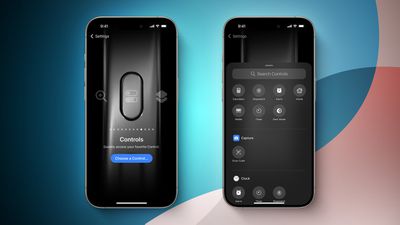
iOS 18 Control Center Toggles for Action Button FeatureScreenshot Credit: Aaron Perris

iOS 18 allows the Action button to be assigned to one of the dozens of controls available in the new Control Center gallery, allowing the Action button to invoke Dark Mode, Airplane Mode, Personal Hotspot, and more. Options like Low Power Mode and Orientation Lock do not appear to be available as of iOS 18 beta 1, but the Shortcut action already allows the Action button to be assigned to those options if desired.

These new options are in addition to the actions that were already available for the Action button on iOS 17, including Ring/Silent, Do Not Disturb, Camera, Flashlight, Voice Memo, Magnifier, Translate, Shortcut, and Accessibility. Some of the new Control Center options were already possible with the Shortcut or Accessibility options.

It has been rumored that the Action button will be expanded to all four iPhone 16 models later this year, so these new controls will come to even more devices.

iOS 18 is currently in beta and should be released in September.

Related Forums: iOS 18, iPadOS 18

Popular Stories

Apple Card iPhone 16 Pro Feature

Apple Card Promo to Offer Free AirPods Pro 3

Friday May 15, 2026 8:59 am PDT by
Starting as early as next week, customers who sign up for an Apple Card at Apple's retail stores in the U.S. will receive $249 cash back when they purchase AirPods Pro 3, according to Bloomberg's Mark Gurman. The promotion has yet to be officially announced by Apple, so exact terms and conditions are not available at this time. AirPods Pro 3 are priced at $249 in the U.S., so customers who...
Apple WWDC25 iOS 26 CarPlay Light mode 250609

Six Popular iPhone Apps Now Available on CarPlay

Thursday May 14, 2026 9:10 am PDT by
Apple's CarPlay system for accessing iPhone apps on a vehicle's dashboard screen has received six popular apps in recent weeks: ChatGPT, Perplexity, Grok, Google Meet, WhatsApp, and the indie artist streaming platform Audiomack. Make sure you have the latest version of each app and they will automatically appear on CarPlay. ChatGPT Starting with iOS 26.4, CarPlay supports voice-based...
ipad mini 7 blue

OLED iPad Mini: Release Date, Pricing, and What to Expect

Thursday May 14, 2026 5:08 am PDT by
According to the latest rumors, Apple is close to launching its next-generation iPad mini. So what should we expect from the successor to the iPad mini 7 that Apple released over a year ago? Read on to find out. Processor and Performance Apple is working on a next-generation version of the iPad mini (codename J510/J511) that features the A19 Pro chip, according to information found in code...

Top Rated Comments

25 months ago
ORIENTATION LOCK YYYYAAAAAASSSS

dang I might have to ruin my life and install the beta on my main

edit: seems the writer was wrong :/ oh well. I use shortcuts right now, but I was hoping for something a bit more native with synced haptics and stuff
Score: 9 Votes (Like | Disagree)
Joe Rossignol Avatar
25 months ago

ORIENTATION LOCK YYYYAAAAAASSSS

dang I might have to ruin my life and install the beta on my main
I wrote the MacRumors story, and unfortunately I made an error. I thought the Action button could be assigned to ANY control in the Control Center gallery, but it turns out that options like Orientation Lock and Low Power Mode are not available, at least as of iOS 18 beta 1.

Truly sorry to get your hopes up! I messed up that one.

EDIT: But as the comment below me pointed out, you can already map the Action button to Orientation Lock via Shortcuts on iOS 17, so the end result is still completely possible.
Score: 8 Votes (Like | Disagree)
kirky29 Avatar
25 months ago
This is pretty cool, I now wish you could change the volume up and down buttons to whatever, I'd be happy to control my volume manually from control centre and have, say, my volume up button as orientation lock, and volume down as quick access to the home app. Or something like that!
Score: 8 Votes (Like | Disagree)
FishyFish Avatar
25 months ago
But no way to use the button to actually just bring up Control Center which would be the most useful shortcut of all.
Score: 7 Votes (Like | Disagree)
mrat93 Avatar
25 months ago

This is pretty cool, I now wish you could change the volume up and down buttons to whatever, I'd be happy to control my volume manually from control centre and have, say, my volume up button as orientation lock, and volume down as quick access to the home app. Or something like that!
Anytime there’s an article about the Action Button, I’m reminded of the Jailbreak app Activator from over 10 years ago. You could assign literally over 100 actions systemwide similarly. It is so sad that Apple is restricting this to one action for one button.
Score: 6 Votes (Like | Disagree)
AppleInLVX Avatar
25 months ago
I feel like between adding things to control center, colorizing app icons, and making the Action button more robust, I'll finally be able to reach minimal iPhone using only native functionality, and that will be lovely.
Score: 5 Votes (Like | Disagree)