macOS Sequoia: How Window Tiling and Snapping Currently Works - MacRumorsOpen MenuShow RoundupsShow Forums menuVisit ForumsOpen Sidebar
Skip to Content

macOS Sequoia: How Window Tiling and Snapping Currently Works

With macOS Sequoia, Apple has introduced a new window tiling management feature that aims to make it easy to arrange open windows into a layout that works best for you.

macos 15 tiling
PC users have had tiling since at least Windows 7 and Aero Snap, and if you've ever used those, the new window tiling feature in macOS Sequoia will be familiar. In the absence of the feature, Mac users have relied on several third-party tools like Magnet, Moom, and Rectangle to achieve similar results, but as things stand, in beta 1, window management in macOS still needs some work before it can approach the utility of those apps.
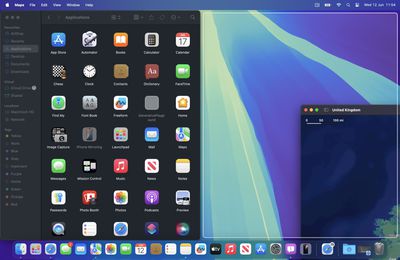
tiling macos two apps
When you drag a window to the edge of the screen, macOS Sequoia suggests a tiled position by displaying a frame, and you release the window to drop it right into place. This way, you can quickly arrange two app windows side by side, or place four windows in corners to keep several apps in view at once. When a window has been dragged to tile on one side or the other, dragging it back immediately resizes it to its original width and height, which is a nice touch.
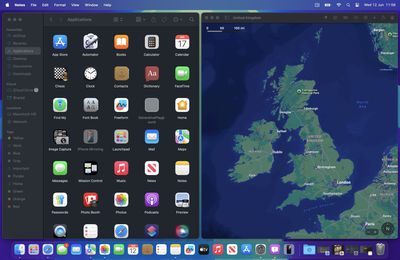
macos tiled two apps
The dragging system is far from infallible though. If you drag a window to the side of the screen and hold it for more than a couple of seconds, you can sometimes unintentionally switch to an adjacent desktop space if one is active. It can also be quite tricky to place certain app windows so that they snap to corners.
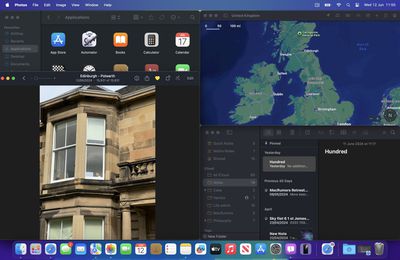
macos tiling overlapping
Also, some apps by design will not reduce down beyond a certain size, so you can end up with tiled windows overlapping each other or falling off the screen. If you have a group of apps that play nice together when tiled, the tiling system can leave unsightly gaps between the windows where the desktop wallpaper is exposed, but there's a setting that can rectify this.
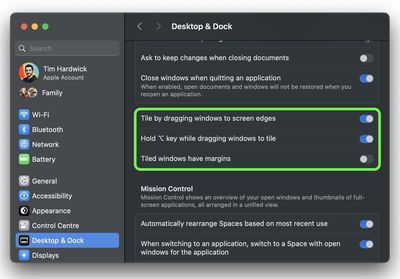
system settings tiling
In System Settings, you'll find tiling options in a new section in the Desktop & Dock menu. For example, tiling can be activated by holding the Option key while dragging windows. You can also toggle off "Tiled windows have margins," which reduces gaps between windows.
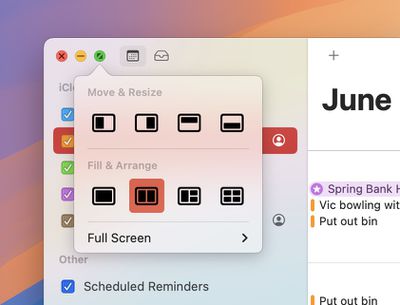
tiling options green traffic light

Image credit: MacRumors forum member Danbalsh

macOS 15 also adds new tiling options to the green traffic light in the top corner of windows. Hover your pointer over the green button, and a menu appears with options to move and resize or fill and arrange all open windows. These options generally seem to work better than the drag-to-snap tiling system in its current state.

Overall, tiling windows in macOS Sequoia does not feel properly implemented yet, but this is developer beta 1, and Apple will surely refine its functionality before we get to the public release of macOS 15 in September.


Related Forum: macOS Sequoia

Popular Stories

iOS 27 Next to iPhone

Here's When iOS 27 Rolls Out Today in Every Time Zone [Update: It's Out]

Sunday September 13, 2026 3:00 am PDT by
Update 10:04 a.m.: iOS 27 is rolling out now, though it may take a bit for all users to see it, so keep checking! Apple is about to release iOS 27, which will finally deliver more advanced Siri AI capabilities as well as a variety of other refinements, improvements, and new features to iPhones. It's Apple's biggest software update of the year, and Apple announced at Wednesday's iPhone event...
iOS 27 Icon iPhone

iOS 27 Available Now With These 8 New Features

Monday September 14, 2026 9:00 am PDT by
Update — 10 a.m. Pacific Time: Apple has released iOS 27. During its iPhone 18 Pro and iPhone Duo event last week, Apple announced that iOS 27 will be released widely on Monday, September 14. iOS 27 should be available around 10 a.m. Pacific Time / 1 p.m. Eastern Time today via the Settings app, under General → Software Update. Below, we have highlighted eight new features and...
Apple iCloud Plus expansion hero

iCloud+ Now Includes Apple TV, Apple Arcade, and Curated Apple Music Stations in Over 100 Countries

Tuesday September 15, 2026 1:43 am PDT by
Apple today announced a new subscription initiative that turns paid iCloud+ subscriptions into a broader services bundle in more than 100 countries. In select countries, Apple says every paid iCloud+ plan, including the cheapest 50GB tier, now includes Apple TV and Apple Arcade "at no additional cost," while family sharing extends the storage, TV and Arcade access to up to five people....

Top Rated Comments

PsykX Avatar
30 months ago
Finally we can have this feature built-in.

Perhaps the only major thing where I have always preferred Windows over macOS is that in macOS I often find myself having a mess of windows all over the place. Windows Aero has been really useful for the last like 15 years...
Score: 23 Votes (Like | Disagree)
30 months ago
This type of windows management should have been built in 15 plus years ago. It’s so fundamental to the OS to be able to manage windows without resorting to third party apps.

As a user of windows and Mac I was just shocked year after year Mac OS not having a decent windows management built in. It’s a no brainer.
Score: 18 Votes (Like | Disagree)
Cookie285 Avatar
30 months ago
For those wondering, fn + control + arrow keys seem to work as global shortcuts to move windows. fn + control + R returns to the previous state. Oddly enough it doesn't seem to work in every app yet?
Score: 16 Votes (Like | Disagree)
jonnysods Avatar
30 months ago
This is a huge step in the right direction. I tell you what would be nice as well - when in Finder using the columns view that column width is the same width as the file name. The amount of fiddling around so I can navigate every single time is a pain!
Score: 11 Votes (Like | Disagree)
B4U Avatar
30 months ago
Would be real nice to have a bigger screen than 24" on the current iMac to make great use of this.
Score: 11 Votes (Like | Disagree)
30 months ago

Meh. I’ve lived without it and I have zero interest in my Mac looking anything like Windows which I cannot stand. At least it can be turned off.
Being able to position windows on your screen isn't making your Mac look like Windows...it's functionality, sort of like a mouse cursor, dragging windows, menus, etc., don't make your Mac look like Windows despite they both have the same functions.
Score: 10 Votes (Like | Disagree)