watchOS 11 Lets You Schedule Activity Goals for Each Day of the Week - MacRumorsOpen MenuShow RoundupsShow Forums menuVisit ForumsOpen Sidebar
Skip to Content

watchOS 11 Lets You Schedule Activity Goals for Each Day of the Week

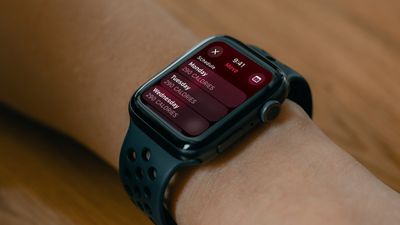
In the watchOS 11 beta, the Activity app for Apple Watch lets you schedule custom activity goals for different days of the week, and also lets you pause your goals if you need to rest up.
watchos 11 schedule activity goals
If you tap the +/- button when viewing your Move, Exercise, or Stand goals in the Activity app, a new Change Daily Goal option takes you to a schedule list for the days of the week, allowing you to set each one individually.

So if you want to set custom workout goals for, say, Monday, Wednesday, and Friday, with lower goals during the weekend, you'll soon be able to do that.

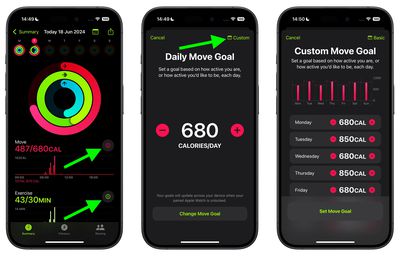
This schedule can also be managed through the Fitness app in iOS 18. The Move, Exercise, and Stand activity summaries include the same +/- button that lets you adjust the goal for just today, or adjust your schedule for each day of the week.

In addition, if you tap the main Activity Rings display on Apple Watch, there's also a new Pause Rings option that mutes coaching and goal tracking while maintaining your Move streak. So if you're aiming for a streak and something unexpected upends your efforts (if you fall ill, for example) you can pause tracking without losing out and having to start again.
fitness app activity goals schedule
You can initiate a pause for just today, until next week, for the whole month, or until a date of your choosing. Currently, you can pause your rings for up to 90 days and resume at any time.

watchOS 11 is in developer beta, so it's worth noting that some features could always change or be removed completely before Apple releases the new Apple Watch software in the fall.

Related Roundup: watchOS 26
Related Forum: Apple Watch

Popular Stories

Apple Watch Series 10 Jet Black Touch ID

Apple Watch Series 12 and watchOS 27: What to Expect Later This Year

Friday May 8, 2026 2:07 pm PDT by
While not too much has been reported about the next Apple Watch models, there are a few rumors about potential design changes and watchOS 27 features. Apple Watch Series 12 and Apple Watch Ultra 4 models are expected to be released in September, and we have outlined some of the key rumored hardware and software changes below. A new Apple Watch SE is not expected this year, as that model was...
ios 26 5 luminance colors 2

A Closer Look at watchOS 26.5's New Luminance Watch Face

Friday May 8, 2026 3:38 pm PDT by
With watchOS 26.5, Apple is introducing a Pride Luminance face, and it's one of the most versatile and customizable watch faces. There are pre-configured color options, but the face also supports custom colors. You can select 1 to 12 colors from a palette that has every color of the rainbow, some in-between shades, and black, white, brown, and gray. The colors you pick are distributed...
watchos 26 gradient light

Apple Releases watchOS 26.5 With New Pride Luminance Watch Face

Monday May 11, 2026 10:03 am PDT by
Apple today released watchOS 26.5, the fifth major update to the watchOS 26 operating system that came out in September. watchOS 26.5 comes a month and a half after Apple released watchOS 26.4. watchOS 26.5 can be downloaded for free on an iPhone running iOS 26.5 by opening up the Apple Watch app and going to General > Software Update, or initiating an update in the Settings app on the...

Top Rated Comments

tedwill Avatar
26 months ago
You mean, I can finally take a break? I have a 2600 day streak going. Lots of personal stuff happened during that time, including medical issues, graduations of kids, etc.

Hitting pause would be great.

Attachment Image
Score: 6 Votes (Like | Disagree)
jonblatho Avatar
26 months ago

How about a setting to make the stupid rings go away?

Not everybody is an exercise freak.
You are able to delete the Fitness app on both the watch and iPhone. You can also disable fitness tracking altogether — that is, disable the sensors — in privacy settings, and you can disable Fitness notifications while keeping the Fitness app.

The options are there if you choose to look instead of complain.
Score: 5 Votes (Like | Disagree)
vertsix Avatar
26 months ago
Thank god. As an athlete, the rings streak and grind is cool but it's nice Apple understood that priorities differ from day to day and life isn't always tied to a schedule.
Score: 5 Votes (Like | Disagree)
WeatherWeasel Avatar
26 months ago
It would be nice if it would track food eaten, such as amount of carbs , etc
Score: 5 Votes (Like | Disagree)
26 months ago
This should have been there from the beginning. People take rest/recovery days, and sometimes get sick or injured. Weekends you may want to work out more than on weekdays. It's not realistic to work out with the same goals every day.
Score: 4 Votes (Like | Disagree)
DocMultimedia Avatar
26 months ago
A superb addition for those that do marathons and other sports where you need certain rest days. And so I can be really lazy on football Sundays. Lol
Score: 4 Votes (Like | Disagree)