macOS Sequoia Lets You Customize AirPods Audio in System Settings - MacRumorsOpen MenuShow RoundupsShow Forums menuVisit ForumsOpen Sidebar
Skip to Content

macOS Sequoia Lets You Customize AirPods Audio in System Settings

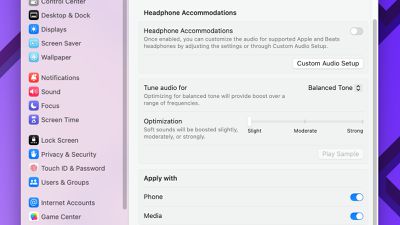
macOS Sequoia expands a long-existing accessibility feature on the iPhone and iPad to the Mac: Headphone Accommodations.
macOS Sequoia Headphone Accommodations
On the macOS Sequoia beta, the Headphone Accommodations options are in the System Settings app under Accessibility → Audio. The settings allow you to customize the audio for all AirPods and select Beats headphones. For example, Apple says you can amplify soft sounds and adjust certain frequencies to help music, phone calls, and more sound more crisp.

When a user configures Headphone Accommodations settings for second-generation AirPods Pro on macOS, the adjusted audio will persist when the headphones are connected to other audio sources, according to a note on Apple's developer website.

These settings were previously only available in the Settings app on the iPhone and iPad.

macOS Sequoia is currently in beta for developers, with a public beta to follow in July. The update will likely be widely released in September or October.

Related Forum: macOS Sequoia

Popular Stories

Aston Martin CarPlay Ultra Screen

Apple Says CarPlay Ultra is Coming to These Vehicle Brands

Thursday May 21, 2026 11:53 am PDT by
Last year, Apple launched CarPlay Ultra, the long-awaited next-generation version of its CarPlay software system for vehicles. Nearly a year later, CarPlay Ultra is still limited to Aston Martin's latest luxury vehicles, but that should change fairly soon. In May 2025, Apple said many other vehicle brands planned to offer CarPlay Ultra, including Hyundai, Kia, and Genesis. CarPlay Ultra...
iphone 18 pro blue%402x

iPhone 18 Pro: Dark Cherry, Light Blue, and Dark Gray Chassis Leaked [Update]

Thursday June 4, 2026 5:18 am PDT by
Update: Since publication, new information has come to light suggesting the images have been AI-manipulated and are not in fact iPhone 18 Pro chassis parts. The original article follows. The color options Apple is reportedly planning for the upcoming iPhone 18 Pro and ‌iPhone 18 Pro‌ Max have appeared online today in the form of images of chassis parts of unknown authenticity....
iOS 27 All the New App Features

iOS 27: All the Rumored App Features

Wednesday June 3, 2026 3:48 pm PDT by
Siri is getting a major overhaul in iOS 27, but Apple also has some big updates planned for apps like Camera, Photos, and Wallet. There are multiple new AI features in the works, plus some non-AI upgrades. Camera Apple is moving Visual Intelligence from the Camera Control button to the Camera app in iOS 27, according to Bloomberg. There will be a Siri mode that will be available alongside...

Top Rated Comments

26 months ago

Seriously, anybody over 40 with AirPods, regardless of whether you think you've got any hearing deterioration or not: do a full (free) hearing test with the mimi hearing test app, save the audiogram it generates, go into Accessibility>Headphone Accommodations, select Tune Audio for: Audiogram and upload the audiogram you generated from mimi. Your iPhone/Mac will then slightly boost frequencies that you may have lost some sensitivity to. Basically it corrects the sound to what it should sound like, based on your personal hearing profile.

My hearing's still pretty good for my age, but listening to music this was still transformational for me, I rediscovered so much detail in songs that I'd forgotten was there. At least try it!
Great advice. This is an amazing feature. I'm middle aged, and the Headphone Accomodations really fills out the highs for me that have gone flat with deterioration in my hearing over time.* I think Apple undersells this feature by having it buried in Accessibility. It's a lot more powerful than having a simple EQ to futz with.

* And now, a lecture: for you younger people, for the love of god use some hearing protection before you go out to super loud music venues. I seriously cringe when I remember how in my 20s I sonically raw-dogged a ton of punk shows and didn't think a thing of it when I'd walk out with my ears ringing. Now I've got a little tinnitus, which is awful, and generally my hearing is in worse shape than if I'd been smarter back then. They make really nice earplugs now which are acoustically neutral, but even jamming some wadded up tissue in there in a pinch is better than nothing.
Score: 13 Votes (Like | Disagree)
NightFox Avatar
26 months ago
Seriously, anybody over 40 with AirPods, regardless of whether you think you've got any hearing deterioration or not: do a full (free) hearing test with the mimi hearing test app, save the audiogram it generates, go into Accessibility>Headphone Accommodations, select Tune Audio for: Audiogram and upload the audiogram you generated from mimi. Your iPhone/Mac will then slightly boost frequencies that you may have lost some sensitivity to. Basically it corrects the sound to what it should sound like, based on your personal hearing profile.

My hearing's still pretty good for my age, but listening to music this was still transformational for me, I rediscovered so much detail in songs that I'd forgotten was there. At least try it!
Score: 12 Votes (Like | Disagree)
Realityck Avatar
26 months ago
Four years later this accessibility feature finally makes it to MacOS. It’s a very useful feature for users who have some hearing issues.


In iOS 14, Apple continues to build out its extensive accessibility features, and here we're going to show you how you can use the new Headphone Accommodations to amplify certain sounds if you're having difficulty hearing them.
Score: 7 Votes (Like | Disagree)
jblank Avatar
26 months ago

I can't think of anything less cumbersome than "it happens without you doing anything at all".

Except when it doesn't. There's innumerable examples of people whose Airpod Pro's won't upgrade. I'm one of the lucky ones who can prompt an update 100% of the time but the "it just happens" isn't universal. Channels like Zollotech on YT have talked about the process being problematic for some people. Also, some people experience bugs, the products aren't infallible, and I'm sure they'd like to apply bug fixes asap.

People want an update method where the user can initiate it, like on almost every other Apple product, isn't too much to ask and seems to be a common request. So you can laugh emoji if you want but many people would like a better process to be implemented.
Score: 5 Votes (Like | Disagree)
26 months ago
It would be super helpful if they would alphabetize everything in system settings...just a thought
Score: 3 Votes (Like | Disagree)
jblank Avatar
26 months ago
That's great advice @NightFox. Thanks for posting that.
Score: 3 Votes (Like | Disagree)