

iCloud 'Keep Downloaded' Option Included in iOS 18 and macOS Sequoia - MacRumorsOpen MenuShow RoundupsShow Forums menuVisit ForumsOpen Sidebar
Skip to Content

iCloud 'Keep Downloaded' Option Included in iOS 18 and macOS Sequoia

In iOS 18, iPadOS 18, and macOS Sequoia, Apple has added a new "Keep Downloaded" option when browsing items in iCloud, allowing users to designate which files and folders should remain permanently available locally on their device.
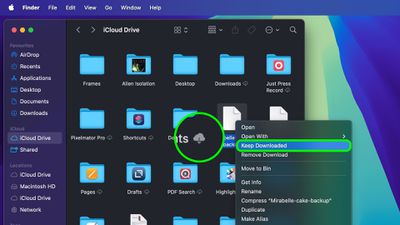
macos 15 keep downloaded
In previous versions of iOS and macOS, users had limited control over which files and folders were kept offline. iCloud's automatic management system would offload files from the device to free up space, potentially removing files that you might want to keep available at all times.

Apple offered no straightforward way to prevent this – until now. In macOS Sequoia, when browsing iCloud Drive in Finder, right-clicking a file or folder reveals the new "Keep Downloaded" option. When enabled, the cloud symbol next to the item is opaque instead of transparent, indicating that it will remain on the device.

In iOS 18 and iPadOS 18, the same option can be found in the Files app when a file or folder is long pressed to bring up the contextual menu. Users can now explicitly mark files to remain on their device, regardless of how much storage they take up.

The ability to prevent iCloud items from being offloaded should be particularly welcomed by users who need to frequently access documents or files during travel or in areas with poor connectivity. macOS Sequoia, iOS 18, and iPadOS 18 are available in a beta capacity right now, and are limited to developers. The new option should be available to all users when the software launches to the public this fall.


Tag: iCloud

Popular Stories

iCloud General Feature Redux

iCloud+ Subscribers Get Higher Apple Intelligence Usage Limits in iOS 27

Tuesday June 9, 2026 6:05 am PDT by
Certain Apple Intelligence features in iOS 27 will carry daily usage limits, with iCloud+ subscribers receiving higher allowances than free users. The company reiterated the details in its press release accompanying yesterday's Apple Intelligence announcements. Apple said the limits apply to features that rely on "powerful server models," with image generation cited as the primary example....
iCloud iPhone 17 Pro

iPhone Users Who Pay for iCloud Storage Get Two New Perks on iOS 27

Thursday July 2, 2026 6:10 am PDT by
If you pay for certain iCloud+ storage plans beyond the 5GB that Apple offers for free, you will receive two more perks on iOS 27 at no additional cost. A summary of the two new iCloud+ perks on iOS 27:Increased daily usage limits for some new Apple Intelligence features, including image generation in the revamped Image Playground app. HomeKit Secure Video cameras receive generated video...
iCloud General Feature Redux

Apple's New Hide My Email Domain Makes It Easier to Block iCloud Aliases

Wednesday June 17, 2026 7:41 am PDT by
Apple's decision to move Hide My Email to a dedicated "private.icloud.com" domain appears to have the consequence of making it easier for platforms that want to block iCloud aliases to do so. Apple is unifying the email domains used by Sign in with Apple and iCloud+ Hide My Email under a single private.icloud.com domain later this summer. Sign in with Apple currently uses...

Top Rated Comments

fatTribble Avatar
26 months ago
Fantastic! 🥳

At the risk of sounding greedy, can we have this in Photos now? 🤓
Score: 21 Votes (Like | Disagree)
robgreene Avatar
26 months ago
Much needed addition. The "Remove Download" and "Keep Downloaded" language still leaves great room for confusion compared to Dropbox's "Make Available Offline" and "Make Online-Only".... the "Remove" language in particular is easily confused with "am I deleting the file if I press this?"
Score: 16 Votes (Like | Disagree)
26 months ago
A basic option/feature that really should have always been there from the beginning.

I mean in the meetings about how people use such file management did no one put their hands up and mention this one aspect?

Were they more concerned about how thin it was? Offloading files
Score: 14 Votes (Like | Disagree)
oldmacs Avatar
26 months ago
So so so glad they've added this.

iCloud Drive needs so much more work. It's so limited and does some really stupid things sometimes. Wish there was the ability to sync downloads between devices - really the option to sync more places as well.
Score: 10 Votes (Like | Disagree)
26 months ago
Very happy to see this feature returning. It was removed in Sonoma for some reason, glad it's back.
Score: 9 Votes (Like | Disagree)
joecomo Avatar
26 months ago
Finally - what ever made them wait this out …
Score: 8 Votes (Like | Disagree)














