MacStadium Releases Free Orka Desktop macOS Virtualization Software - MacRumorsOpen MenuShow RoundupsShow Forums menuVisit ForumsOpen Sidebar
Skip to Content

MacStadium Releases Free Orka Desktop macOS Virtualization Software

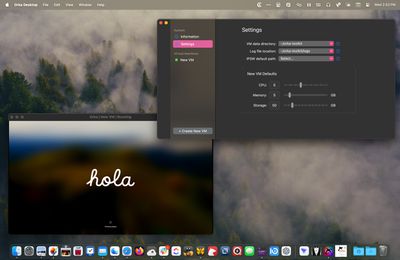
Mac cloud services provider MacStadium today unveiled Orka Desktop, a free virtualization tool that allows Mac users to create and manage macOS virtual machines locally via an easy-to-use admin panel.

orka desktop
Orka users can create or download custom macOS images locally for their own personal use, or to collaborate with team members using a familiar workflow, versioning, audit, and review controls. The tool has been designed for iOS/macOS Developers, DevOps Engineers, and IT Admins, as well as students, hobbyists, technologists, and others.

MacStadium claims it is the "ideal tool" for those who want to learn more about Mac virtualization and learn how an image can be built and tested locally, then uploaded to the cloud.

"Orka Desktop provides the tools to allow developers to create many different macOS image versions locally, commit those into a shared repository, and pass them around for collaboration. Developers can also scale further by pulling those resources into an Orka Cluster at MacStadium where you can orchestrate workloads with cloud resources," said Chris Chapman, MacStadium's chief technology officer."

MacStadium says Orka Desktop achieves near-native performance on Apple Silicon, with virtualization overhead as low as 5% in most cases. Orka Desktop also wraps and compresses macOS images with an Open Container Initiative (OCI)-compliant specification, which allows it to reduce a 90GB image by as much as 80%, shrinking it to nearly 15GB, making it much easier to move around.

There are two options for creating a new VM in Orka: Clean Install, where the image is created from an existing IPSW file, and Pull Image, where the image is pulled from an Image Repository. There is also an option to pull the latest IPSW directly from Apple's servers. More information can be found in Orka's documentation.
orka desktop macos
The new VM application requires macOS Ventura or macOS Sonoma running on an Apple silicon Mac with at least 8GB of RAM and more than 50GB of free disk space. Orka Desktop can be downloaded for free from the MacStadium website.


Tag: Orka

Popular Stories

macOS 27 on MacBook Pro

Apple Says macOS 27 Won't Be Compatible With These Macs

Wednesday June 3, 2026 8:29 am PDT by
During WWDC 2025, Apple revealed that macOS 26 Tahoe would be the final major macOS version for Intel-based Macs. macOS 27 will be compatible with Apple silicon Macs only, meaning that you will need a Mac with an M-series chip or a MacBook Neo with an A18 Pro chip in order to install the software update. Apple will unveil macOS 27 during its WWDC 2026 keynote this Monday, June 8, and the...
MacBook Neo on Yellow Feature

MacBook Neo is So Popular That Apple Reportedly Doubled Production

Wednesday June 3, 2026 9:24 am PDT by
On an earnings call in late April, Apple's CEO Tim Cook said that customer response to the MacBook Neo was "off the charts," and the popularity of the laptop has reportedly led the company to significantly boost production. Apple supply chain analyst Ming-Chi Kuo this week said he believes that MacBook Neo shipments to Apple were doubled from an initial target of 5 million units to 10...
iphone 18 pro blue%402x

iPhone 18 Pro: Dark Cherry, Light Blue, and Dark Gray Chassis Leaked [Update]

Thursday June 4, 2026 5:18 am PDT by
Update: Since publication, new information has come to light suggesting the images have been AI-manipulated and are not in fact iPhone 18 Pro chassis parts. The original article follows. The color options Apple is reportedly planning for the upcoming iPhone 18 Pro and ‌iPhone 18 Pro‌ Max have appeared online today in the form of images of chassis parts of unknown authenticity....

Top Rated Comments

JosephAW Avatar
25 months ago
Would rather have Intel emulation on Apple silicon at 5% utilization and near 100% speeds so I can keep a copy of Mojave operating for legacy software.
For now using an Intel Mac mini to run my old software. :rolleyes:
Score: 5 Votes (Like | Disagree)
sirdir Avatar
25 months ago
I’d install that on my iPad in a heartbeat, if it would exist…
Score: 4 Votes (Like | Disagree)
25 months ago

Is this just a rewarmed UTM? My hunch is yes.
Nah. Apple made it incredibly easy to make a macOS VM host. A bare bones version takes about 100 lines of Swift code. Most of the work will be the UI for settings.
Score: 4 Votes (Like | Disagree)
25 months ago

Surprised how many people don’t know about Virtual Buddy which is open source and totally amazing
Howard Oakley from eclecticlight.co has a free macOS VM as well. It's not open source though.

Viable ('https://eclecticlight.co/virtualisation-on-apple-silicon/')

He also has a similar download for running Linux in a VM.

Liviable ('https://eclecticlight.co/virtualisation-on-apple-silicon/')
Score: 3 Votes (Like | Disagree)
25 months ago

This looks promising for DevOps. I’m looking forward to experimenting with it as another way of keeping a pristine base Mac config while experimenting/prototyping/developing.
You may prefer this https://tart.run/
Score: 2 Votes (Like | Disagree)
25 months ago
Surprised how many people don’t know about Virtual Buddy which is open source and totally amazing
Score: 2 Votes (Like | Disagree)