Apple Releases Fourth Beta of visionOS 1.3 to Developers - MacRumorsOpen MenuShow RoundupsShow Forums menuVisit ForumsOpen Sidebar
Skip to Content

Apple Releases Fourth Beta of visionOS 1.3 to Developers

Apple today released the fourth beta of an upcoming visionOS 1.3 update to developers, allowing them to test new features ahead of the software seeing a public launch. The fourth visionOS 1.3 beta comes a week after the release of the third beta.
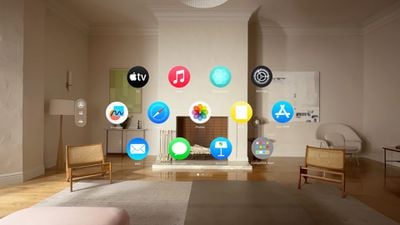
visionOS Home Screen
The visionOS beta can be downloaded by going to the Settings app on the device and toggling on developer betas. A registered developer account is required, and Apple recommends making a backup before installing new software.

Apple may make further improvements to Personas, EyeSight, and other features with visionOS 1.3, as well as implement additional bug fixes. No new features were found in the first three visionOS 1.3 betas.

Related Roundup: Apple Vision Pro
Buyer's Guide: Vision Pro (Neutral)
Related Forum: Apple Vision Pro

Popular Stories

visionOS 26 Feature

Apple Releases visionOS 26.5

Monday May 11, 2026 10:01 am PDT by
Apple today released visionOS 26.5, the fifth update to the visionOS 26 operating system that launched in September. visionOS 26.5 comes close to two months after Apple released visionOS 26.4. ‌visionOS 26‌.5 can be downloaded on all Vision Pro headsets by navigating to the Settings app, selecting the General section, and choosing the Software Update option. To install an update, the...
M5 Vision Pro Thumb 2

Gurman: New Apple Vision Pro Won't Arrive for at Least Two Years

Monday May 11, 2026 5:16 am PDT by
Apple hasn't fully abandoned the Vision Pro, but anyone hoping for a successor will be waiting at least two more years, according to Bloomberg's Mark Gurman. Writing in his latest Power On newsletter, Gurman resisted suggestions that Apple has walked away from the headset entirely. The well-connected reporter says the company continues to develop new technologies and materials behind the...
General visionOS watchOS and tvOS Betas Feature Redux

Apple Releases First watchOS 26.6, tvOS 26.6 and visionOS 26.6 Betas

Tuesday May 26, 2026 10:03 am PDT by
Apple today provided developers with the first betas of upcoming watchOS 26.6, tvOS 26.6, and visionOS 26.6 betas for testing purposes. The software two weeks after Apple launched the 26.5 versions of each platform. The software updates are available through the Settings app on each device, and because these are developer betas, a free developer account is required. There's no word on...

Top Rated Comments

Amazing Iceman Avatar
25 months ago

Does eye tracking and pinch gestures work on apps that are being mirrored to the avp from a Mac or can you only use the Bluetooth keyboard to control the mirrored apps?
Not at this time.
If you are using TeamViewer or VNC then yes.
Score: 1 Votes (Like | Disagree)
Amazing Iceman Avatar
25 months ago

The Vision goggles can see my hands, it could most likely see my fingers typing on a keyboard placed on the table. The "angle" would be like a keyboard on the table in-front of me. I look down and it's there.

The point is Vision Pro will also be a great mobile device and I don't want to carry around a keyboard and mouse. Use surfaces around me...horizontal, vertical, curved...Simply put on the goggles and everything I need appears.
On 2.0 using a Magic Keyboard, you will be able to see the whole keyboard even when immersed.
Hopefully other keyboards will be supported. I have a foldable keyboard, and would love to be able to see it while immersed.
Score: 1 Votes (Like | Disagree)
25 months ago

Any advantages over current VisionOS 2.0 Beta?
This is the v1.3 beta. I made the mistake of thinking it was v2.0 and wondered why I couldn't update. I imagine v2.0 beta 3 is still way superior.
Score: 1 Votes (Like | Disagree)
anthogag Avatar
25 months ago
I recently tried Vision Pro at an Apple Store. I am guessing they don't use VisionOS 2 for store demos.

Vision Pro is spectacular. I definitely will be getting one.

Can VisionOS 2 place the virtual keyboard on the table if I am sitting at a table? A keyboard button press would coincide with touching the table surface.
Score: 1 Votes (Like | Disagree)