Apple Wallet App Now Works With PRESTO Fare Card in Toronto Area - MacRumorsOpen MenuShow RoundupsShow Forums menuVisit ForumsOpen Sidebar
Skip to Content

Apple Wallet App Now Works With PRESTO Fare Card in Toronto Area

Apple and Metrolinx today announced that the PRESTO card can now be added to the Wallet app, allowing commuters in Toronto, Canada and the surrounding area to tap an iPhone or Apple Watch to pay for a fare on buses, streetcars, trains, and the subway. Funds can be loaded onto the card directly in the Wallet app for added convenience.
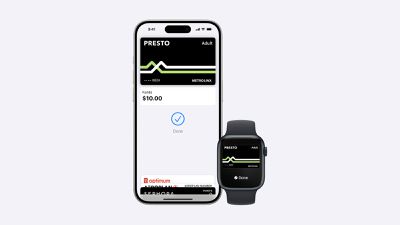
Apple Wallet PRESTO
Express Mode allows commuters to simply hold their iPhone or Apple Watch near a payment reader to pay for their ride, without needing to unlock or wake the device. This mode even works for up to five hours after your iPhone runs out of battery power.

Transit agencies that accept the PRESTO card in the Wallet app include the TTC and UP Express in Toronto, HSR in Hamilton, MiWay in Mississauga, Brampton Transit, Burlington Transit, Durham Region Transit, Oakville Transit, and York Region Transit, as well as the GO Transit network. The feature does not work with OC Transpo in Ottawa.

To add the PRESTO card to the Wallet app, tap on the plus sign in the top-right corner, select Transit Card, and select PRESTO. A physical PRESTO card can also be converted for use in the Wallet app, but the physical card will no longer work. The version in the Wallet app supports various fare types, and Ontario's new One Fare program.

Adding a PRESTO card to the Wallet app requires an iPhone 8 or later with iOS 16.4 or later, or an Apple Watch Series 4 or later with watchOS 9.4 or later.

For additional information, read the PRESTO in Apple Wallet page and FAQ.

(Thanks, Apollo Zhao!)
Popular Stories

iPhone 18 Pro and Pro Max Feature

'Apple Upgrade' Program Reportedly Launching Next Week

Tuesday July 21, 2026 8:30 am PDT by
Apple and Klarna are partnering on a new "Apple Upgrade" leasing program set to launch in the U.S. on Tuesday, July 28, according to Bloomberg's Mark Gurman. The program will allow you to finance most iPhone, iPad, Mac, and Apple Watch models, with a 24-month term for iPhones and Apple Watches and a 36-month term for iPads and Macs. Customers will be able to pay off the device early during...
iPhone 18 Pro Deep Red Feature

iPhone 18 Pro Launching in Two Months With These 12 New Features

Friday July 17, 2026 10:39 am PDT by
It is now mid-July, and that means the iPhone 18 Pro and iPhone 18 Pro Max are now just two months away. The devices are expected to look similar to the iPhone 17 Pro and iPhone 17 Pro Max, but there will still be many year-over-year changes, with rumored features including a smaller Dynamic Island, 5G via satellite, and more. Apple is expected to unveil the iPhone 18 Pro, iPhone 18 Pro Max, ...
iPhone 18 Pro Deep Red Feature

iPhone 18 Pro Launching in Two Months With These 12 New Features

Tuesday July 21, 2026 6:22 am PDT by
It is now mid-July, and that means the iPhone 18 Pro and iPhone 18 Pro Max are now just two months away. The devices are expected to look similar to the iPhone 17 Pro and iPhone 17 Pro Max, but there will still be many year-over-year changes, with rumored features including a smaller Dynamic Island, 5G via satellite, and more. Apple is expected to unveil the iPhone 18 Pro, iPhone 18 Pro Max, ...

Top Rated Comments

26 months ago

This hasn't been explained very well, so it's worth noting that adding a Presto card directly in the Wallet app will create a new virtual Presto card and ask you to load some money onto it. To convert an existing physical Presto card, you need to use the latest version of the Presto iPhone app. The option should appear as soon as you open the app, provided your card's already registered; otherwise, you'll need to go through the process of adding it to the Presto app first.
Thanks. What wasn't clear to me was whether only one phone or watch can use the expresspass feature. Given the setup, it looks like I only set up one device, pick your phone or watch per card.
Score: 4 Votes (Like | Disagree)
danakin Avatar
26 months ago

I tried it today and it worked perfectly on my Apple Watch on the TTC.
TTC short for Take The Car
Score: 4 Votes (Like | Disagree)
26 months ago

Thanks. What wasn't clear to me was whether only one phone or watch can use the expresspass feature. Given the setup, it looks like I only set up one device, pick your phone or watch per card.
Yup, that's apparently how transit cards work everywhere in Apple Wallet. It's an Apple limitation rather than a Presto one.

You can move the card between the iPhone and Apple Watch as often as you like, but it can only be active on one device at a time.

You can also transfer or buy a second Presto card for the other device, but it will be handled as a separate card, just like it would if you had two physical Presto cards. That means two balances and two sets of transfer windows (e.g., you have to use the same device to get free transfers throughout your trip, just like using Apple Pay with a credit or debit card).
Score: 2 Votes (Like | Disagree)
26 months ago
This hasn't been explained very well, so it's worth noting that adding a Presto card directly in the Wallet app will create a new virtual Presto card and ask you to load some money onto it. To convert an existing physical Presto card, you need to use the latest version of the Presto iPhone app. The option should appear as soon as you open the app, provided your card's already registered; otherwise, you'll need to go through the process of adding it to the Presto app first.
Score: 2 Votes (Like | Disagree)
fwmireault Avatar
26 months ago
I can't wait until the end of this century, when this feature will be available in Montreal!
Score: 2 Votes (Like | Disagree)
26 months ago
Note that to obtain a senior or student discount, you need to transfer a physical card, you cannot buy one electronically.
Score: 1 Votes (Like | Disagree)