

Version 7.0 of the popular system monitoring tool iStat Menus is now available, bringing a comprehensive redesign and range of new features.
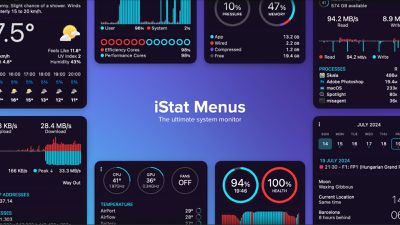
The redesign of iStat Menus 7.0 includes an updated interface with new menu bar modes, such as stacked labels and values, and new menu bar items, such as the Wi-Fi network name and GPU frames per second. For users of Apple silicon Macs, the update brings frequency monitoring and additional sensor support. Users can now choose from more theme options and menu background colors. Fan speeds can be controlled with greater precision, allowing for gradual ramp-up and complete control over the speed curve.
The time menu has been enhanced with 7-day and 14-day rolling calendar modes, providing users with flexible scheduling options. The combined mode has undergone a major overhaul, allowing any item to be displayed in the menu bar with unique settings and more menu sections available in the dropdown menu.
Weather monitoring has also seen improvements, offering a detailed view of current conditions, hourly forecasts, and weekly overviews. Users can access information such as temperature, wind speed and direction, chance of rain, humidity, UV index, and more, with data available for their current location or almost anywhere in the world.
iStat Menus 7.0 offers more extensive notification capabilities, allowing users to set alerts for a wide range of events related to CPU, GPU, memory, disks, network, sensors, battery, power, and weather. Notifications can be customized to inform users about changes such as public IP updates, internet connection issues, CPU usage spikes, low disk space, and more.
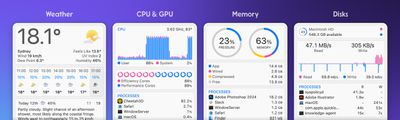
The app also provides detailed CPU information, including usage for individual cores, history graphs, load averages, uptime, and CPU frequency. GPU monitoring covers processor usage, memory, temperature, and frequency. Memory statistics include usage, history, memory pressure, compressed memory, swap, and a list of apps using the most memory.
Disk usage and activity monitoring are also enhanced, showing used space, free space, and disk activity. S.M.A.R.T. status monitoring and detailed per-app disk usage are now available. Network monitoring features include history graphs, current bandwidth usage, a bandwidth breakdown for top apps, detailed connection info, IP addresses, and an internet connectivity indicator.
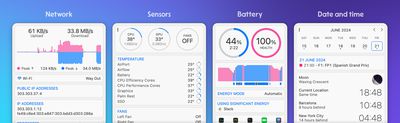
Battery and power information is extensive, providing detailed current state information and configurable menu items that change based on whether the device is draining, charging, or fully charged. Battery levels for Bluetooth devices like AirPods, Magic Mouse, and Magic Trackpad are also displayed. Real-time sensor listings include temperatures, fan speeds, voltages, current, and power, with customizable fan speed control based on temperature and battery state.
The date and time features are highly customizable, with menu bar clocks, a calendar with upcoming events, and world clocks that include detailed sun and moon information. Each world clock can be given a custom name, making it easier to track time for colleagues or family members in different time zones. Combined mode is particularly useful for laptops, allowing multiple items to be combined into a single menu bar item to save space while still providing access to all relevant information.
iStat Menus 7.0 is available for download with a 14-day free trial, allowing users to explore its new features and enhancements before committing to a purchase. Additionally, it is available via Setapp, a subscription service that offers access to iStat Menus and over 250 other Mac apps for $9.99 per month, with no additional fees or ads.

















