

iOS 18, iPadOS 18, and macOS Sequoia Introduce Support for Wired Xbox Controllers - MacRumorsOpen MenuShow RoundupsShow Forums menuVisit ForumsOpen Sidebar
Skip to Content

iOS 18, iPadOS 18, and macOS Sequoia Introduce Support for Wired Xbox Controllers

Apple's latest operating system updates iOS 18, iPadOS 18, and macOS 15 Sequoia bring a notable enhancement for gamers: official support for wired Xbox controllers.

apple game controller graphic
Previously, Apple devices supported wireless Xbox and PlayStation controllers via Bluetooth, but when it came to wired connections, only PlayStation controllers were compatible. This update marks a step forward in broadening gaming accessory support across Apple’s ecosystem.

As noted by Apple engineer (and one of the key contributors to the original Xbox) Nat Brown back in June, Xbox uses a custom USB protocol for its wired controllers, and with its latest operating system updates, Apple now directly supports the protocol to allow for native wired Xbox controller connections.

Connecting to Apple Devices with Lightning Ports

If you're using an iOS device with a Lightning port—such as older iPhones or iPads—you'll need a Lightning to USB Camera Adapter to connect your wired Xbox controller. This requirement mirrors the setup process for wired PlayStation controllers on these devices. The adapter facilitates the necessary USB connection, ensuring your controller communicates effectively with your device.

Connecting to Apple Devices with USB-C Ports

Simply plug the controller in using a USB-C to USB-C cable to establish the wired connection.
xbox controller wired mac 1

What to Expect When Connecting

Upon connecting your wired Xbox controller:

  • On iOS 18 and iPadOS 18: The wired Xbox controller does not appear in the Bluetooth settings since it's connected via USB, not Bluetooth.
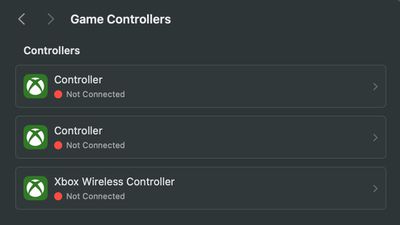
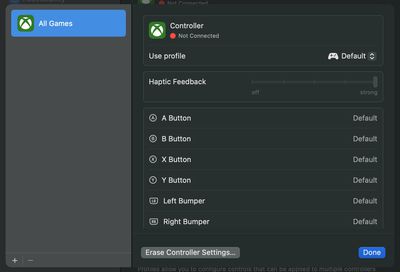
  • On macOS 15 Sequoia: Upon initial connection, macOS presents an accessory permissions dialog asking the user: "Do you want to connect Microsoft Controller to this Mac?" The controller appears as "Controller" in the Game Controller settings pane, displaying the Xbox logo next to it. However, the "Identify" feature doesn't function with the wired Xbox controller—the controller doesn't vibrate when prompted.

Despite the minor hiccup with the "Identify" feature on macOS, the controller functions as expected within games and applications that support game controllers.
xbox controller wired mac 2
Support for wired Xbox controllers on Apple's platforms is a welcome addition for gamers who prefer the reliability and low-latency of a wired connection or own wired-only Xbox controllers. By accommodating a wider range of controllers, Apple's move aligns with the growing trend of cross-platform gaming and the increasing popularity of game streaming services, where controller support is critical for an optimal experience.


Popular Stories

iOS 27 Next to iPhone

Here's When iOS 27 Rolls Out Today in Every Time Zone [Update: It's Out]

Sunday September 13, 2026 3:00 am PDT by
Update 10:04 a.m.: iOS 27 is rolling out now, though it may take a bit for all users to see it, so keep checking! Apple is about to release iOS 27, which will finally deliver more advanced Siri AI capabilities as well as a variety of other refinements, improvements, and new features to iPhones. It's Apple's biggest software update of the year, and Apple announced at Wednesday's iPhone event...
iOS 27 Icon iPhone

iOS 27 Available Now With These 8 New Features

Monday September 14, 2026 9:00 am PDT by
Update — 10 a.m. Pacific Time: Apple has released iOS 27. During its iPhone 18 Pro and iPhone Duo event last week, Apple announced that iOS 27 will be released widely on Monday, September 14. iOS 27 should be available around 10 a.m. Pacific Time / 1 p.m. Eastern Time today via the Settings app, under General → Software Update. Below, we have highlighted eight new features and...
Apple iCloud Plus expansion hero

iCloud+ Now Includes Apple TV, Apple Arcade, and Curated Apple Music Stations in Over 100 Countries

Tuesday September 15, 2026 1:43 am PDT by
Apple today announced a new subscription initiative that turns paid iCloud+ subscriptions into a broader services bundle in more than 100 countries. In select countries, Apple says every paid iCloud+ plan, including the cheapest 50GB tier, now includes Apple TV and Apple Arcade "at no additional cost," while family sharing extends the storage, TV and Arcade access to up to five people....

Top Rated Comments

MrGimper Avatar
25 months ago
This is huge for me as I play GeForce Now using an Xbox elite controller. It’s paired to my Xbox and my MacBook, so can now use with iPad via cable too.
Score: 4 Votes (Like | Disagree)
northernmunky Avatar
25 months ago
Being Apple I'm surprised they didn't use the red ring of death to represent the Xbox controller icon.
Score: 3 Votes (Like | Disagree)
25 months ago
Great to see that wired controllers are now supported.
Score: 2 Votes (Like | Disagree)
25 months ago

How is gaming with Crossover? I bought a lifetime sub to it. Mainly because I was going to get a Mac at the time but never did and I was happy to support Codeweavers regardless.
If you look past short coming with anti-cheat, which isn't really their fault anyway, it's pretty awesome and works with a lot of games. This was made even better once GPTK came out, and even better now with GPTK2 allowing AVX games to run.
Score: 2 Votes (Like | Disagree)
25 months ago
I just pulled a wired Xbox 360 controller to my M1 Macbook. It works plug and plus just like my Series X Controllers.

No more unpairing and pairing between devices. Instead I csn use the wired 360 controller with my ipad for roblox and COD.
Score: 1 Votes (Like | Disagree)
kfury77 Avatar
25 months ago
amazing news. Surprised this wasn't reported sooner! 10 years back I used to use a workaround solution (https://github.com/360Controller/360Controller#xbox-controller-driver-for-macos) to get my wired Xbox 360 controller working on my 2011 27" iMac and used subsequent updates but it became less reliable with each macOS update and eventually stopped working altogether. Happy to see it officially supported. Just tested it with Steam :)
Score: 1 Votes (Like | Disagree)














