Testing the New iOS 18.1 Hearing Aid Functionality - MacRumorsOpen MenuShow RoundupsShow Forums menuVisit ForumsOpen Sidebar
Skip to Content

Testing the New iOS 18.1 Hearing Aid Functionality

With iOS 18.1, Apple is adding a new set of hearing health features to the AirPods Pro 2. The iOS 18.1 release candidate for developers and public beta testers includes the full hearing aid functionality, so we thought we'd give it a try to see just how it works.


To use the new hearing health features, you need to connect your AirPods Pro 2 to an iPhone running iOS 18.1, or an iPad with iPadOS 18.1. From there, if you tap into the AirPods Pro section, you'll see an option to take a hearing test, which should be your first stop.

Apple's hearing test mimics the hearing tests you might have had conducted at a doctor's office or by an audiologist, and it's meant to determine whether you have any hearing loss. If you do have hearing loss, the test determines which frequencies you're struggling with.

With the AirPods in your ears, you can tap "Get Started" to take the hearing test. The test takes approximately five minutes, starting first with the left ear and then moving on to the right ear. You'll hear a series of tones at different frequencies and sound levels, and the idea is to tap the iPhone's screen whenever you hear a sound. The tones that you hear test for four frequencies, including 500Hz, 1kHz, 2kHz, and 4kHz.

Apple puts your iPhone in Do Not Disturb mode for the test, and also uses your AirPods to make sure it's quiet enough for the test to be conducted. The test is designed for adults that are 18 years or older, and it shouldn't be done when you have allergies, a cold, an ear infection, or a sinus issue, which can affect the results. Apple also recommends waiting to take the test at least 24 hours after you've been exposed to loud noise like a concert or construction, as this can also impact the hearing test.

After going through the hearing test steps, you'll get your Hearing Test results, with separate decibel levels detected for each ear. If you get a 5 dBHL reading for each ear, for example, you have little to no hearing loss and will not need adjustments to your AirPods.

Apple says that results up to 25 dBHL indicate little to no hearing loss. 26 to 40 dBHL is a sign of mild hearing loss, while results of 41 to 60 dBHL suggest moderate hearing loss. 61 to 80 dBHL is severe hearing loss, and a result above 80 dBHL is considered profound hearing loss.

For context, a whisper is around 20 decibels, while a person breathing is somewhere around 10 decibels. Rainfall is 50 decibels, and a standard conversation is 60 decibels. With no hearing loss, you can hear a whisper, and with mild loss, you can still hear and repeat words spoken in a normal voice from three feet away. With moderate loss, you can hear and repeat words spoken in a raised voice from three feet away.

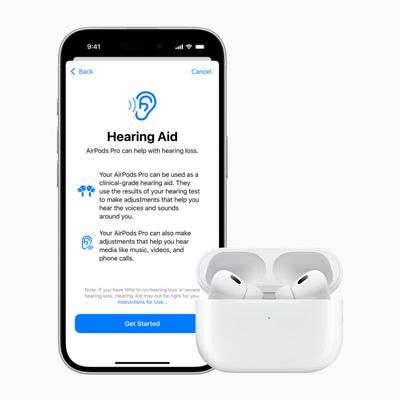
If your test shows mild to moderate hearing loss, you'll have the option to turn on the Hearing Aid feature of the AirPods Pro. With this enabled, the AirPods Pro can use the data from your test to boost the frequencies that you have trouble hearing, making it easier to hear voices and other sounds around you.

There's also a Media Assist feature that goes along with the Hearing Aid function, and it adjusts music, videos, and calls so you can hear them better. You can also turn on the Hearing Aid feature using an audiogram from an audiologist if you don't want to take the test on the iPhone.

Note that if your test showed no hearing loss, Apple will not recommend changes to your AirPods tuning, and there will not be an option to turn on the Hearing Aid feature.

To see even more information from your Hearing Test, you can go to the Hearing section of the Health app and tap into the test to see a graph of which frequencies you had the most trouble with.

Along with Hearing Assistance, the AirPods Pro 2 also offer Hearing Protection as part of Apple's Hearing Health feature set. This includes a Loud Sound Reduction option that is enabled automatically. Loud Sound Reduction listens for loud noises around you in Transparency and Adaptive Modes, and reduces the level of the noise to prevent hearing loss.

If you're at a concert, for example, Loud Sound Reduction will drop the noise to a healthier level so that it won't impact your hearing. The same goes for other loud sounds like nearby construction work.

Apple says that in Transparency Mode, you'll see 11-15 decibels of sound reduction in an environment where the noise level is at 100 decibels, while in Adaptive Mode, noise reduction will range from 25 to 29 decibels. With Active Noise Cancellation, noise reduction is 25 to 30 decibels.

The amount of noise reduction can vary based on the fit of the AirPods Pro 2 and the environment that you're in. The AirPods Pro 2 don't provide enough sound reduction for "extremely loud impulse sounds" like gunfire, jackhammers, or fireworks, nor do they work well enough for sustained noise levels louder than 110 decibels.

In the Health app under the Environmental Sound Reduction section, you can see the amount of sound reduction you've gotten from your AirPods Pro from hour to hour.

If you have the iOS 18.1 developer or public beta and AirPods Pro 2, you can try out the new hearing test and hearing aid feature right now. Otherwise, this functionality is set to become available to the public when iOS 18.1 launches next week.

What do you think of the new Hearing Health features for the AirPods Pro 2? Let us know in the comments below.

Related Roundup: AirPods Pro 3
Buyer's Guide: AirPods Pro (Neutral)
Related Forum: AirPods

Popular Stories

airpods pro 2 hearing aids

AirPods Pro Hearing Aid Feature Launching in These Canadian Provinces

Monday October 26, 2026 9:25 am PDT by
iOS 27.2 and iPadOS 27.2 enable Apple's clinical-grade Hearing Aid feature on the AirPods Pro 2 and AirPods Pro 3 in five Canadian provinces: Alberta, British Columbia, New Brunswick, Prince Edward Island, and Saskatchewan. The feature is still not available in any other provinces, but Ontario is reportedly set to hold a meeting to change a law that will pave the way for it to launch there,...

apple pro tell logo

Apple Launching Five New Products Today

Thursday November 5, 2026 12:59 am PST by
Apple is launching five new products on Friday, November 6, following pre-orders that opened last week, including its first touchscreen MacBook Pro models. The following new products will be available from today: iPad mini with OLED display and A20 Pro chip iMac with M6 chip 14-inch MacBook Pro with M6 chip 14-inch MacBook Pro with OLED touchscreen 16-inch MacBook Pro with OLED...
duo aquarium

More Fun iPhone Duo Apps: 30 New Picks to Try

Friday November 6, 2026 3:27 pm PST by
When the iPhone Duo launched, we shared a list of some of the fun apps developers created for the new form factor. Two weeks out, developers are continuing to come up with fresh ideas, so we thought we'd share some of our favorites. Games Marbles Unhinged ($2.99) - Marbles Unhinged is a marble maze designed for the Duo. When you fold it, the floor turns into a ramp. If you stand the top...

Top Rated Comments

27 months ago

Real hearing aids have replaceable batteries. AirPods are cheaper in the short run, but are just disposable gadgets you’ll have to replace even more often if you use these features.
“Real” hearing aids cost thousands of dollars and require replacement batteries on a constant basis unless you pony up even more cash for the ones that recharge like AirPods do.

AirPods Pro hover around $199 and with AppleCare you have warrantied hearing aids for a fraction of the cost. For someone with lower hearing loss, this is a perfectly affordable alternative to dropping thousands.

Obviously these aren’t designed for 24/7 use, but I can easily see Apple coming out with AirPods Pro 3 with massively upgraded battery life, or even Apple branded hearing aids that make most of the ones on the market look like crap.

A man can dream!
Score: 15 Votes (Like | Disagree)
27 months ago
Downloaded and installed. I have had mild hearing loss since 1987 and this is pretty amazing. Left ear: 31 dBHL / Right ear: 36 dBHL. The test was quick and easy and the adjustment was immediate. Excellent audio, although I'm not sure I actually want to hear everything this well since my brain has adapted to the insulation of silence. I'll definitely use this though it will take getting use to. I'm not so sure I want to hear my lungs with every breath ha ha
Score: 13 Votes (Like | Disagree)
russell_314 Avatar
27 months ago

Oh look another US exclusive feature.

iOS 18 so far is disappointing. No AI. no hearing aid.
Perhaps you should talk to your government about this? If Apple could release it in your country, I’m sure they would. Some governments have so much bureaucratic red tape that it takes them longer to get a feature there.

They make money with these features by selling AirPods and iPhones. There is no incentive for them not to release it.
Score: 12 Votes (Like | Disagree)
McWetty Avatar
27 months ago
I am more excited about this feature than all the AI/ML stuff added.
Score: 12 Votes (Like | Disagree)
Robert.Walter Avatar
27 months ago

Real hearing aids have replaceable batteries. AirPods are cheaper in the short run, but are just disposable gadgets you’ll have to replace even more often if you use these features.
My mother has profound hearing loss.

She’s going to be disappointed to learn that her next ultra expensive ReSound bicros hearing aids aren’t as real as her old set because they are rechargeable.

Battery = real is a rubbish metric for assessment.
Score: 10 Votes (Like | Disagree)
27 months ago
9to5mac has reported that the hearing aid functions are only available in the USA and Canada, at this time.

update: there are new reports that apple has received approval to launch in other markets (such as japan) as well.
Score: 10 Votes (Like | Disagree)
Latest Stories
Apple Taking New Approach to Developing iOS 28 and macOS 28
33 minutes ago
Early Apple Black Friday Deals on Apple Watch, MacBook Air, and More
19 hours ago
'Backglow' Lets You Customize New MacBook Pro's Glowing Apple Logo
20 hours ago
Top Stories: Apple Product Launches, iOS 27.3 Beta, and More
1 day ago
More Fun iPhone Duo Apps: 30 New Picks to Try
2 days ago
Hands-On With Apple's New OLED Touchscreen MacBook Pro
2 days ago
Apple Store With All-New Design Opening Soon in Southern California
2 days ago
Control the Glowing Apple Logo on Your New MacBook Pro
2 days ago
Apple Shares New 'Apple Card: Apply and Use in Minutes' Ad
2 days ago
Apple Says More Than 100,000 Apps Optimized for iPhone Duo, Here's What's Still Missing
2 days ago
Early Black Friday Deals Kickoff With Steep Discounts on Apple Watch Ultras and More
2 days ago
The MacRumors Show: iOS 27.3 Looks Like a Huge Update
2 days ago
Best Buy's Black Friday Event Begins With Sitewide Savings on Apple, TVs, More
2 days ago
Apple Releasing Yet Another Two New Products Next Week
2 days ago
MacBook Air Drops to Lowest Price in Months With Amazon's $250 Discount
2 days ago
Apple Rumored to Drop the iPhone's Action Button Next Year
2 days ago
Apple's Extended Return Policy Now in Effect for 2026 Holiday Season
2 days ago
Apple Music Classical Updated With New Icon and Refreshed Design
2 days ago
OLED iPad Mini, M6 iMac, and New MacBook Pros Available From Today
2 days ago
Apple Surveys iPhone Duo Buyers About Crease and Camera
3 days ago
Apple's First Touchscreen Mac is Now Arriving to Customers
3 days ago
Claude Gets Personal Finance Feature With Bank Account Linking
3 days ago
Apple Arcade Adds Crossy Road Rush and NBA 2K27
3 days ago
Apple's New HomeView Smart Home Hub: Here's How Much RAM It Has
3 days ago
iPad Mini vs. iPad Air Buyer's Guide: Now Just $50 Apart
3 days ago
First iOS 27.3 and macOS Golden Gate 27.3 Public Betas Now Available
3 days ago
Apple Announces a New Mac Sales Record
3 days ago
Paid $200 for Logic Pro? Apple Says You Won't Get This New Feature
3 days ago
Instagram's Edits Video Editor is Now Available on Mac
3 days ago
Prevent Siri and Search From Accessing Specific iPhone Apps
3 days ago









































