iPad Mini 7 Reviews Say 'Jelly Scrolling' is Fixed, With a Major Exception - MacRumorsOpen MenuShow RoundupsShow Forums menuVisit ForumsOpen Sidebar
Skip to Content

iPad Mini 7 Reviews Say 'Jelly Scrolling' is Fixed, With a Major Exception

The first iPad mini 7 reviews were published today, and many of them said that "jelly scrolling" display behavior is either less noticeable or fully unnoticeable on the device. However, one prominent technology website disagrees.
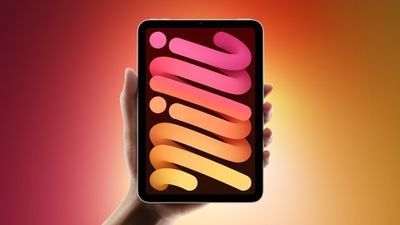
ipad mini 7 feature
The major exception is The Verge.

"The 'jelly scrolling' effect from the last model is still very much present," opined The Verge's David Pierce.

In a follow-up comment shared on Threads, Pierce said "I'm sitting here scrolling on both the 2021 and 2024 Mini, and if you forced me to pick which one is better I'd say the 2024 wiggles LESS. But it still wiggles."

Many other reviews said that "jelly scrolling" seems to be fixed, as a result of Apple making display-related hardware changes to minimize the effect.

Jason Snell, writing for Six Colors:

It's my understanding that the new model's display circuitry is different from the old model, and I couldn't detect any "jelly scrolling" in my use. It doesn't mean it's for sure gone, and I'm looking forward to eagle-eyed "jelly scrolling" experts reporting back with their results, but I sure couldn't see it, even when I recorded myself scrolling at a high frame rate and played it back frame by frame.

Craig Grannell, writing for Stuff:

Apple reckons it's optimised the display, but won't provide any details on how. To my eyes, the jelly scrolling doesn't look as bad as I recall it being last time, but bear in mind two things. First, I don't have the old iPad mini to compare. Secondly, I wasn't too fussed about this last time anyway.

Nathan Ingraham, writing for Engadget:

One bit of good news about the screen is that it seems Apple has fixed the "jelly-scrolling" problem that plagued the prior iPad mini. Jelly-scrolling occurs when one side of a screen doesn't refresh at exactly the same rate as the other, and this effect was noticeable in portrait mode with the old iPad mini. It's not something that I ever noticed while using the new iPad mini. I am curious to see if the issue has been totally resolved or if my eyes just didn't catch it, but I'll continue using the iPad mini in the coming weeks to see if I spot any display issues.

Brenda Stolyar, writing for WIRED:

But I can't talk about the iPad Mini display without going over the infamous “jelly scrolling” fiasco on the 2021 model. iPad Mini owners bemoaned that one side of the screen refreshed slower than the other when scrolling up and down on the display. I didn't experience this with my Mini, but Apple did make it a point to optimize the LCD in the latest model to alleviate this issue. Apple was tight-lipped on exactly what it changed, but for what it's worth, I once again have yet to see any problems on my test unit.

Tony Polanco, writing for Tom's Guide:

Lastly, I didn't notice the infamous "jelly scrolling" screen-tearing effect that plagued the iPad mini 6 during my testing. I can't say whether or not Apple fixed this issue or I simply didn't see it. But if that should change, I'll update this review.

Federico Viticci, writing at MacStories:

And while the display technology is unchanged – it's an IPS display that refreshes at 60 Hz – the so-called jelly scrolling issue has been fixed thanks to an optimized display controller.

"Jelly scrolling" refers to screen tearing, which can cause text or images on one side of the screen to appear to be tilted downwards because of a mismatch in refresh rates. It can cause one side of the display to look as if it is responding faster than the other side, resulting in a visual disturbance that is hard to ignore once noticed.
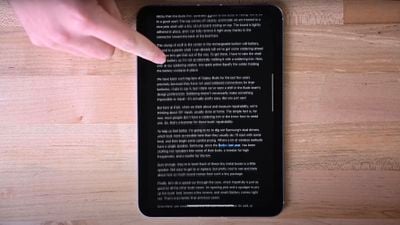
ipad mini jelly scrolling ifixit"Jelly scrolling" on iPad mini 6

The effect is noticeable on the iPad mini 6 when the device was used in portrait orientation, leading to complaints from customers over the past three years.

Shortly after the iPad mini 6 launched, an Apple spokesperson told Ars Technica on background that "jelly scrolling" was "normal" behavior for iPads with LCD displays. Given that LCDs refresh line by line, there is a tiny delay between when the lines at the top and lines at the bottom are refreshed. The effect is particularly noticeable on the iPad mini 6 because it can be seen in portrait orientation rather than landscape orientation.

The new iPad mini launches this Wednesday, October 23.
Related Roundup: iPad mini
Buyer's Guide: iPad Mini (Buy Now)
Related Forum: iPad

Popular Stories

iPad mini OLED feature 1

Apple Announces New iPad Mini With 8.5-Inch OLED Display, A20 Pro Chip, and More

Monday October 26, 2026 6:05 am PDT by
Apple today announced a new iPad mini with a larger 8.5-inch OLED display, a nano-texture display option, a thinner and lighter design, an A20 Pro chip, a new Acoustic Display audio system that eliminates speaker holes, IP67-rated water and dust resistance, a landscape front camera, Apple's N1 chip with Wi-Fi 7 and Bluetooth 6 support, and more. Altogether, Apple says this amounts to the iPad...

Black Apple Event Logo

Apple Now Inviting Media to October 28 'Launch Experience'

Thursday October 15, 2026 4:13 am PDT by
Apple has begun inviting selected members of the media to a product launch experience in Los Angeles on Wednesday, October 28, according to Bloomberg's Mark Gurman. In a post on X, Gurman described the gathering as an "all-day product launch experience" for touchscreen MacBooks, a new iPad mini, and Macs equipped with M6 chips. Gurman previously reported that Apple would introduce the...
iPad mini OLED feature 1

Apple Executive Comments on New iPad Mini Lacking 120Hz Display

Thursday October 29, 2026 1:47 pm PDT by
While the new iPad mini has an OLED display, the device does not support ProMotion, meaning the display's refresh rate is limited to 60Hz instead of 120Hz. ProMotion support would have allowed for the iPad mini's refresh rate to automatically adjust from 10Hz to 120Hz depending on the content being displayed, but evidently Apple has kept the feature exclusive to the iPad Pro among iPad...

Top Rated Comments

Fuchal Avatar
27 months ago
I for one love Jelly Scrolling. I hope Apple adds it to more products.
Score: 17 Votes (Like | Disagree)
27 months ago

Can’t Apple just be open about this? What’s the big deal? Just admit “hey, it may have been an issue with the 6, so we made sure to fix it on the 7.” Is that so hard to just be open?
They said it wasn't an issue at all when the iPad Mini 6 came out. I'm not sure why they had to essentially lie about an issue that existed.
Score: 16 Votes (Like | Disagree)
x-evil-x Avatar
27 months ago
Just give it a 120hz screen already. Not sure why they haven’t made a pro version of this iPad yet
Score: 15 Votes (Like | Disagree)
turbineseaplane Avatar
27 months ago

Steve used to often say, "our competitors ship the panels we reject"
It has dawned on me that we are now so far removed from the Steve era that vast majority of the Apple user base doesn’t even know what kind of quality standard we are talking about here

It’s sad
Score: 14 Votes (Like | Disagree)
turbineseaplane Avatar
27 months ago
It's not fixed .. it's "better"
They "optimized the display controller"

(or something to that effect .. whatever that even might mean, who knows)

Depending upon who you ask, it's still there in some form
What a massive disappointment

What happened to Apple?
Score: 14 Votes (Like | Disagree)
klky Avatar
27 months ago
I'll check it out at the Apple Store and see for myself. Only way to know for sure.
Score: 12 Votes (Like | Disagree)
Latest Stories
Apple Taking New Approach to Developing iOS 28 and macOS 28
33 minutes ago
Early Apple Black Friday Deals on Apple Watch, MacBook Air, and More
19 hours ago
'Backglow' Lets You Customize New MacBook Pro's Glowing Apple Logo
20 hours ago
Top Stories: Apple Product Launches, iOS 27.3 Beta, and More
1 day ago
More Fun iPhone Duo Apps: 30 New Picks to Try
2 days ago
Hands-On With Apple's New OLED Touchscreen MacBook Pro
2 days ago
Apple Store With All-New Design Opening Soon in Southern California
2 days ago
Control the Glowing Apple Logo on Your New MacBook Pro
2 days ago
Apple Shares New 'Apple Card: Apply and Use in Minutes' Ad
2 days ago
Apple Says More Than 100,000 Apps Optimized for iPhone Duo, Here's What's Still Missing
2 days ago
Early Black Friday Deals Kickoff With Steep Discounts on Apple Watch Ultras and More
2 days ago
The MacRumors Show: iOS 27.3 Looks Like a Huge Update
2 days ago
Best Buy's Black Friday Event Begins With Sitewide Savings on Apple, TVs, More
2 days ago
Apple Releasing Yet Another Two New Products Next Week
2 days ago
MacBook Air Drops to Lowest Price in Months With Amazon's $250 Discount
2 days ago
Apple Rumored to Drop the iPhone's Action Button Next Year
2 days ago
Apple's Extended Return Policy Now in Effect for 2026 Holiday Season
2 days ago
Apple Music Classical Updated With New Icon and Refreshed Design
2 days ago
OLED iPad Mini, M6 iMac, and New MacBook Pros Available From Today
2 days ago
Apple Surveys iPhone Duo Buyers About Crease and Camera
3 days ago
Apple's First Touchscreen Mac is Now Arriving to Customers
3 days ago
Claude Gets Personal Finance Feature With Bank Account Linking
3 days ago
Apple Arcade Adds Crossy Road Rush and NBA 2K27
3 days ago
Apple's New HomeView Smart Home Hub: Here's How Much RAM It Has
3 days ago
iPad Mini vs. iPad Air Buyer's Guide: Now Just $50 Apart
3 days ago
First iOS 27.3 and macOS Golden Gate 27.3 Public Betas Now Available
3 days ago
Apple Announces a New Mac Sales Record
3 days ago
Paid $200 for Logic Pro? Apple Says You Won't Get This New Feature
3 days ago
Instagram's Edits Video Editor is Now Available on Mac
3 days ago
Prevent Siri and Search From Accessing Specific iPhone Apps
3 days ago