iOS 18.2 Includes Revamped Mail App With Built-In Categorization - MacRumorsOpen MenuShow RoundupsShow Forums menuVisit ForumsOpen Sidebar
Skip to Content

iOS 18.2 Includes Revamped Mail App With Built-In Categorization

With the iOS 18.2, iPadOS 18.2, and macOS Sequoia 15.2 betas that came out today, Apple introduced an updated version of the Mail app with built-in categorization.
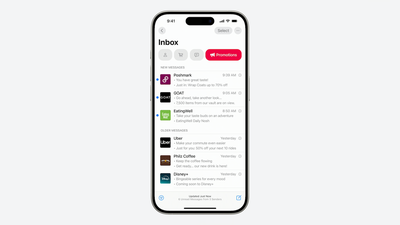
iOS 18 Mail Categorization
Mail Categories organize your incoming emails into different sections. Important emails are shown in a "Primary" category, with orders, newsletters, social notifications, and deals organized into three other sections.

The "Transactions" section includes receipts, orders, and deliveries, and it makes it easy to find orders that you've placed and shipping information for those orders.

The "Updates" section includes newsletters, alerts for things like doctor's appointments and correspondence, and other subscription emails. Apple's "Promotions" category includes special offers and deal emails.

Categorization appears to be a work in progress at this time, which is not surprising as this is a beta. Emails may be mis-categorized or might show up in multiple categories, but that's likely something that Apple will address over time.

Devices that have Apple Intelligence support will show priority emails in the Primary inbox, so you can see what's most important first. If an email in the Transactions, Updates, or Promotions section includes time-sensitive information, it will also be in the Primary section of the inbox.

Categories is the default view after updating to the new software, but in the upper right corner of the Mail app, you can swap back to a list view that shows all emails in chronological order, without separation into categories.

The Mail app has an "About Categories" section where you can see how your messages have been categorized over the course of the last week, but there is no option to tell the Mail app if you believe an email has been put into the wrong category.


Related Forums: iOS 18, iPadOS 18

Popular Stories

iPhone 18 Pro and Pro Max Feature

'Apple Upgrade' Program Reportedly Launching Next Week

Tuesday July 21, 2026 8:30 am PDT by
Apple and Klarna are partnering on a new "Apple Upgrade" leasing program set to launch in the U.S. on Tuesday, July 28, according to Bloomberg's Mark Gurman. The program will allow you to finance most iPhone, iPad, Mac, and Apple Watch models, with a 24-month term for iPhones and Apple Watches and a 36-month term for iPads and Macs. Customers will be able to pay off the device early during...
iPhone 18 Pro Deep Red Feature

iPhone 18 Pro Launching in Two Months With These 12 New Features

Tuesday July 21, 2026 6:22 am PDT by
It is now mid-July, and that means the iPhone 18 Pro and iPhone 18 Pro Max are now just two months away. The devices are expected to look similar to the iPhone 17 Pro and iPhone 17 Pro Max, but there will still be many year-over-year changes, with rumored features including a smaller Dynamic Island, 5G via satellite, and more. Apple is expected to unveil the iPhone 18 Pro, iPhone 18 Pro Max, ...
iPhone 18 Pro Deep Red Feature

iPhone 18 Pro Launching in Two Months With These 12 New Features

Friday July 17, 2026 10:39 am PDT by
It is now mid-July, and that means the iPhone 18 Pro and iPhone 18 Pro Max are now just two months away. The devices are expected to look similar to the iPhone 17 Pro and iPhone 17 Pro Max, but there will still be many year-over-year changes, with rumored features including a smaller Dynamic Island, 5G via satellite, and more. Apple is expected to unveil the iPhone 18 Pro, iPhone 18 Pro Max, ...

Top Rated Comments

jz0309 Avatar
23 months ago
I hope that this "categorization" is an opt-in feature, don't want an app doing this for me ... if it is not optional, either no 18.2 or no apple mail client anymore
Score: 12 Votes (Like | Disagree)
10anta Avatar
23 months ago

How’s that possible in Todays world!
- Unsubscribe from any marketing and mailing lists, send to junk any that don’t respect that
- Read and delete/archive anything not needing an action
- Flag the limited few requiring a response/retrieval
Score: 8 Votes (Like | Disagree)
john123 Avatar
23 months ago

Leveraging the power of Apple Intelligence to organize and restructure our stored information is so powerful and meaningful. All of us will soon be tooled with superhero productivity skills.
I legit can't tell if this was sarcasm or serious. I'm about 85/15.
Score: 8 Votes (Like | Disagree)
10anta Avatar
23 months ago
As a person with zero e-mails in my inbox, I’m not sure I need this

Obviously some people are rather different
Score: 8 Votes (Like | Disagree)
spaxxedout Avatar
23 months ago
File photo of society if email didn’t support formatting or embedded images and only used HTML for links.


Attachment Image
Score: 7 Votes (Like | Disagree)
turbineseaplane Avatar
23 months ago
My life got so much better when I switched to Fastmail and no longer have to worry about client side app interoperability and feature changes and tweaks on the device side.

I really love having all that just be server side full-time and no matter where I access things it’s always the same

Original Gmail really got that right out of the gate
Score: 7 Votes (Like | Disagree)