10 New Things Your iPhone Can Do in iOS 18.2 - MacRumorsOpen MenuShow RoundupsShow Forums menuVisit ForumsOpen Sidebar
Skip to Content

10 New Things Your iPhone Can Do in iOS 18.2

Apple is set to release iOS 18.2 in December, bringing the second round of Apple Intelligence features to iPhone 15 Pro and iPhone 16 models. This update brings several major advancements to Apple's AI integration, including completely new image generation tools and a range of Visual Intelligence-based enhancements. There are a handful of new non-AI related feature controls incoming as well.

New Things Your iPhone Can Do in iOS 18
While not all advertised Apple Intelligence features will be available immediately, iOS 18.2 introduces several capabilities that aim to make your iPhone smarter and more intuitive. Below, we've listed 10 new things your iPhone will be able to do when the update rolls out in December.

Adjust Media Volume on Lock Screen
ios 18 2 volume control lock screen
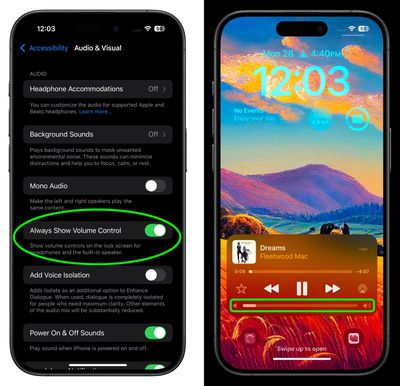
Prior to 2022, the volume slider was a familiar presence on the Lock Screen whenever media was playing. When Apple released iOS 16, however, it removed the control without explaining the reason, much to the dismay of many users.

Thankfully, Apple is bringing the control back as an option in iOS 18.2. If you're already on the iOS 18.2 beta, you'll find a toggle in Settings ➝ Accessibility ➝ Audio & Visual, labeled "Always Show Volume Control". Enable the switch, and you'll be able to adjust volume from the Lock Screen without having to unlock your ‌iPhone‌ or use the physical volume buttons.

Play Daily Sudoku Puzzles
Sudoku Apple News iOS 18
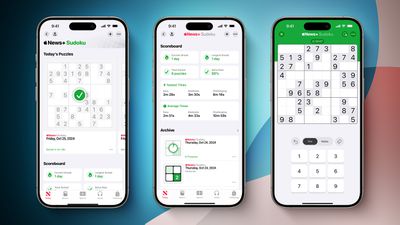
With iOS 18.2, Apple News+ subscribers in the U.S. will gain access to daily sudoku puzzles, offering easy, moderate, and challenging difficulty levels. A scoreboard will keep track of your sudoku statistics, including the total number of puzzles solved and your fastest completion times for each difficulty level.

This addition will be the fourth puzzle game available with an Apple News+ subscription, joining Crossword, Crossword Mini, and Quartiles.

Easily Manage Default Apps
ios 18 2 default apps
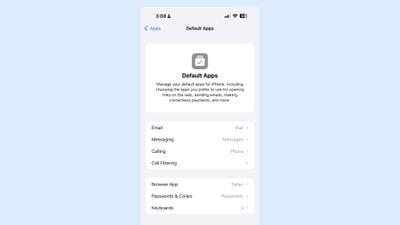
iOS 18.2 includes a new "Default Apps" section that can be found in the Settings app, which can be used to manage your default apps for the iPhone. This is a feature that Apple promised would be coming to the European Union, but it looks as if it may become available worldwide, based on the beta.

In the latest beta, US users can access the Default App interface to choose their preferred Email, Call Filtering, Browser, and Passwords, and Keyboards. EU users should have more options for choosing non-Apple apps as their default, as they are able to delete core apps like Messages, App Store, Safari, Camera, and Photos.

Categorize Emails in Mail

ios 18 mail app
In iOS 18.2, Apple is introducing an updated version of the Mail app for built-in categorization. Mail Categories effectively organize your incoming emails into distinct sections for easier navigation.

Important emails are grouped in a "Primary" category, while other types are categorized into three additional sections. The "Transactions" section streamlines access to receipts, orders, and shipping information, allowing you to quickly locate your purchases. Meanwhile, the "Updates" section gathers newsletters, appointment reminders, and various subscription emails, keeping you informed. Lastly, the "Promotions" category highlights special offers and promotional messages, to make sure you don’t miss out on any deals.

Generate Images Using Prompts
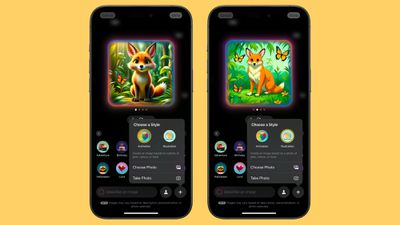
ios 18 2 image playground styles
Image Playground is a totally new app designed to help you create images based on your ideas. Similar to ChatGPT, you can generate images by providing a prompt, and Apple offers suggested categories like themes, locations, and costumes to inspire your creativity. The app specializes in stylized content, meaning the generated images won't be realistic, but can choose from Animation and Illustration styles.

Additionally, you can include likenesses of friends and family by pulling images directly from your Photos app. While Image Playground functions as a standalone app, it can also be integrated into apps like Notes and Messages and added to third-party applications.

Generate Images With Sketches
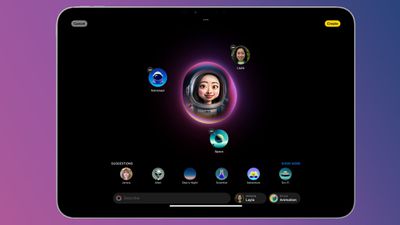
ios 18 image playground
In the Notes app, Image Wand can be used to generate an image that fits into the content of your note. You can use it by circling an empty space – Image Wand will create a new image that's inspired by your text. Alternatively, you can draw something with your finger and circle it with the tool to get a new related image. And on iPad, you can draw a sketch with the Apple Pencil to have Image Wand generate an appropriate image.

Create Custom Emoji Characters
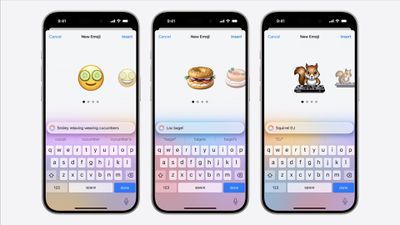
iOS 18 Genmoji WWDC
Genmoji are akin to traditional emojis but offer enhanced functionality. With Genmoji, you can create virtually any emoji you desire, freeing you from the limitations of the standard emoji set.

While they function like emojis on Apple devices, they are not encoded characters from the Unicode Consortium. Instead, Apple developed a unique API for Genmoji, ensuring they display correctly in any application that supports rich text. You can generate a Genmoji by providing a description of your desired design, and you even have the option to create Genmoji that resemble individuals from your Photos library.

Query ChatGPT via Siri
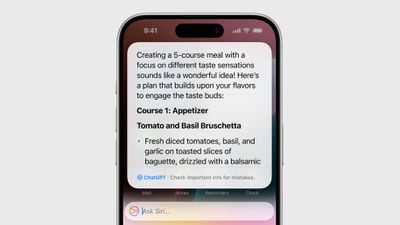
iOS 18 ChatGPT
Apple is collaborating with OpenAI to incorporate ChatGPT into the iPhone, iPad, and Mac. This partnership allows Siri to handle complex requests by referring them to ChatGPT, such as generating images or creating text from scratch. With the Writing Tools feature, ChatGPT can produce and illustrate original content, expanding its capabilities beyond what Siri can currently offer.

For instance, you can open a lengthy PDF and ask Siri to summarize information on a specific topic; Siri can then pass this request to ChatGPT to generate a comprehensive summary. Apple envisions Siri as a facilitator for AI models and tools, optimizing available resources to provide you with answers without the need to switch between multiple apps.

Visual Intelligence

Apple Visual Intelligence
If you have an iPhone 16, you can make use of Visual Intelligence, a feature that offers insights about your surroundings. For instance, when you open the camera and aim it at a restaurant, you'll receive details such as opening hours and reviews.

Additional capabilities of Visual Intelligence include reading text aloud, identifying phone numbers and addresses for adding to Contacts, copying text, and summarizing information. Users can also search Google to find where to purchase a specific item they see, and by pointing the camera at an object, they can access further information through ChatGPT. Apple intends to enhance this feature by introducing more functionalities in the future.

More Options in Writing Tools
notes
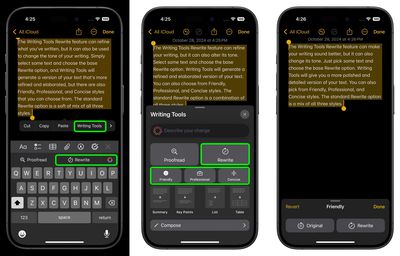
Apple is upgrading the Writing Tools feature to include options for more open-ended modifications. In iOS 18.1, Writing Tools can only adjust the tone to friendly, professional, or a simplified version. However, with the release of iOS 18.2, users will be able to specify the desired tone or content changes, such as incorporating more action words or transforming an email into a poem.


Popular Stories

duo aquarium

More Fun iPhone Duo Apps: 30 New Picks to Try

Friday November 6, 2026 3:27 pm PST by
When the iPhone Duo launched, we shared a list of some of the fun apps developers created for the new form factor. Two weeks out, developers are continuing to come up with fresh ideas, so we thought we'd share some of our favorites. Games Marbles Unhinged ($2.99) - Marbles Unhinged is a marble maze designed for the Duo. When you fold it, the floor turns into a ramp. If you stand the top...

apple pro tell logo

Apple Launching Five New Products Today

Thursday November 5, 2026 12:59 am PST by
Apple is launching five new products on Friday, November 6, following pre-orders that opened last week, including its first touchscreen MacBook Pro models. The following new products will be available from today: iPad mini with OLED display and A20 Pro chip iMac with M6 chip 14-inch MacBook Pro with M6 chip 14-inch MacBook Pro with OLED touchscreen 16-inch MacBook Pro with OLED...
iOS 28 AI

Apple Taking New Approach to Developing iOS 28 and macOS 28

Sunday November 8, 2026 7:42 am PST by
Apple has made a change to its development process for iOS 28, macOS 28, and corresponding software updates, according to Bloomberg's Mark Gurman. In his Power On newsletter today, he said Apple separates development of each year's new operating systems into three major stages. Typically, he said each stage consists of four weeks of coding followed by a four-week "convergence" period where...

Top Rated Comments

NightFox Avatar
26 months ago

All I want to know about AI is how to turn it off.
If anyone on here knows how to to it please let me know 👍
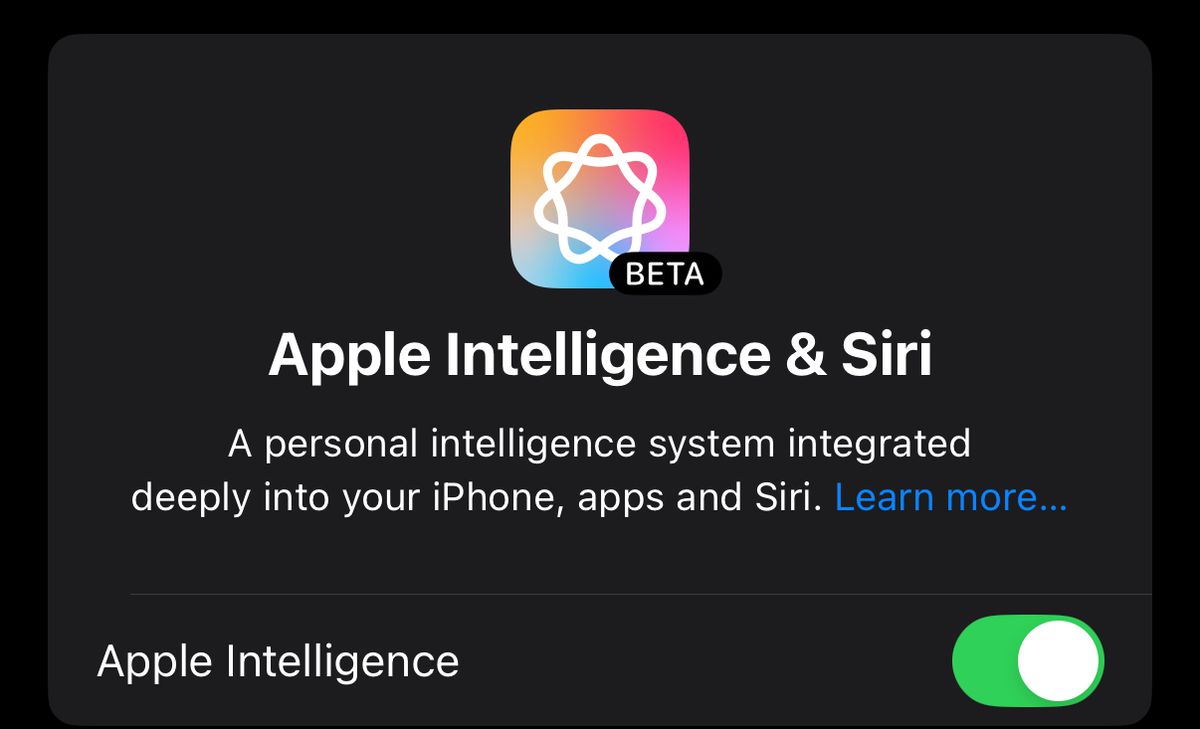
Well, there's a big switch in Settings labelled "Apple Intelligence". You leave that turned off.


(with apologies to all the people who wanted it to be difficult so they could get angry about it)

Attachment Image
Score: 19 Votes (Like | Disagree)
26 months ago
Meh, nothing compelling
Score: 7 Votes (Like | Disagree)
26 months ago
Can Apple Intelligence do the Sudoku puzzles for me? I don’t have the time so that would be awesome.
Score: 4 Votes (Like | Disagree)
WarmWinterHat Avatar
26 months ago

All I want to know about AI is how to turn it off.
If anyone on here knows how to to it please let me know 👍
It's off by default.

Settings/Apple Intelligence & Siri/Apple Intelligence
Score: 4 Votes (Like | Disagree)
jz0309 Avatar
26 months ago
Well, my iPhone won’t be able to do half of those, and I’m totally fine with that.
I will update just to get the security fixes that will be in there… 13PM
Score: 4 Votes (Like | Disagree)
26 months ago
I don’t understand why the 15 Pro/Pro Max do not have Visual Intelligence.
Score: 3 Votes (Like | Disagree)
Latest Stories
Apple Store Subscription Sign-Up Controversy Exposed
52 minutes ago
Siri AI Rumored to Become 'More Like an Agent' as Early as Next Year
11 hours ago
Apple Taking New Approach to Developing iOS 28 and macOS 28
13 hours ago
Early Apple Black Friday Deals on Apple Watch, MacBook Air, and More
1 day ago
'Backglow' Lets You Customize New MacBook Pro's Glowing Apple Logo
1 day ago
Top Stories: Apple Product Launches, iOS 27.3 Beta, and More
2 days ago
More Fun iPhone Duo Apps: 30 New Picks to Try
2 days ago
Hands-On With Apple's New OLED Touchscreen MacBook Pro
2 days ago
Apple Store With All-New Design Opening Soon in Southern California
2 days ago
Control the Glowing Apple Logo on Your New MacBook Pro
2 days ago
Apple Shares New 'Apple Card: Apply and Use in Minutes' Ad
2 days ago
Apple Says More Than 100,000 Apps Optimized for iPhone Duo, Here's What's Still Missing
2 days ago
Early Black Friday Deals Kickoff With Steep Discounts on Apple Watch Ultras and More
3 days ago
The MacRumors Show: iOS 27.3 Looks Like a Huge Update
3 days ago
Best Buy's Black Friday Event Begins With Sitewide Savings on Apple, TVs, More
3 days ago
Apple Releasing Yet Another Two New Products Next Week
3 days ago
MacBook Air Drops to Lowest Price in Months With Amazon's $250 Discount
3 days ago
Apple Rumored to Drop the iPhone's Action Button Next Year
3 days ago
Apple's Extended Return Policy Now in Effect for 2026 Holiday Season
3 days ago
Apple Music Classical Updated With New Icon and Refreshed Design
3 days ago
OLED iPad Mini, M6 iMac, and New MacBook Pros Available From Today
3 days ago
Apple Surveys iPhone Duo Buyers About Crease and Camera
3 days ago
Apple's First Touchscreen Mac is Now Arriving to Customers
3 days ago
Claude Gets Personal Finance Feature With Bank Account Linking
3 days ago
Apple Arcade Adds Crossy Road Rush and NBA 2K27
3 days ago
Apple's New HomeView Smart Home Hub: Here's How Much RAM It Has
3 days ago
iPad Mini vs. iPad Air Buyer's Guide: Now Just $50 Apart
3 days ago
First iOS 27.3 and macOS Golden Gate 27.3 Public Betas Now Available
3 days ago
Apple Announces a New Mac Sales Record
3 days ago
Paid $200 for Logic Pro? Apple Says You Won't Get This New Feature
3 days ago