Apple Seeds First Public Betas of iOS 18.2, iPadOS 18.2 and macOS Sequoia 15.2 With New Apple Intelligence Features - MacRumorsOpen MenuShow RoundupsShow Forums menuVisit ForumsOpen Sidebar
Skip to Content

Apple Seeds First Public Betas of iOS 18.2, iPadOS 18.2 and macOS Sequoia 15.2 With New Apple Intelligence Features

Apple today seeded the first public betas of upcoming iOS 18.2, iPadOS 18.2, and macOS Sequoia 15.2 updates, allowing the public to try out the new features ahead of when the software launches. The public betas come a couple days after Apple provided developers with the second betas.


Public beta testers can download the updates from the Settings app on each device after opting into the beta through Apple's public beta testing website.

iOS 18.2, iPadOS 18.2, and macOS Sequoia 15.2 introduce the next ‌Apple Intelligence‌ features, including the first image generation capabilities.

The update adds ‌Image Playground‌, a new app for creating images based on text descriptions. You can enter anything you want, though Apple will suggest costumes, locations, items, and more to add to an image. There are options to create characters that resemble your friends and family, and you can choose a photo for ‌Image Playground‌ to use as inspiration to create a related image. Elements added to ‌Image Playground‌ creations are previewed, and there is a preview history so you can undo a change and go back to a prior version.

While ‌Image Playground‌ is a standalone app, it is also integrated into Messages, Notes, Freeform, and more. ‌Image Playground‌ does not make photorealistic images and is instead limited to animation or illustration styles.

The update also adds ‌Genmoji‌, which are customizable emoji characters that you can create based on descriptions and phrases. Like ‌Image Playground‌ creations, you can base them on your friends and family, with the data pulled from the People album in Photos. You can also make characters using basic elements, and you'll get multiple ‌Genmoji‌ suggestions to choose from. You can create ‌Genmoji‌ using the emoji keyboard.

‌Genmoji‌ are limited to iOS 18.2 and iPadOS 18.2 right now, and will be coming to macOS Sequoia later.

Siri in iOS 18.2, iPadOS 18.2, and macOS Sequoia 15.2 has ChatGPT integration. If ‌Siri‌ is unable to provide an answer to a question, ‌Siri‌ will hand the request over to ChatGPT, though ‌Siri‌ will need user permission first. ChatGPT will answer the question and relay the information back through ‌Siri‌.

ChatGPT can be used to create content from scratch, including text and images. No account is required to use ChatGPT integration, and Apple and OpenAI do not store requests.

If you have an iPhone 16, there's a Visual Intelligence feature in iOS 18.2 that provides information about what's around you. Open up the camera and point it at a restaurant to get reviews, or point it at an item to search Google for it.

Some other ‌Visual Intelligence‌ capabilities include reading text out loud, detecting phone numbers and addresses to add them to Contacts, copying text, and summarizing text.

Apple added Writing Tools in iOS 18.1, but in iOS 18.2, you can more freely describe the tone or content change that you want to make, such as adding more action words, or turning an email into a poem.

‌Apple Intelligence‌ now supports localized English in Australia, Canada, New Zealand, South Africa, Ireland, and the UK in addition to U.S. English.

Wait List

If you've already been testing ‌Apple Intelligence‌ and are opted in, you will have access to Writing Tools, ChatGPT integration, and ‌Visual Intelligence‌ automatically.

There is a secondary waiting list for early access to use ‌Genmoji‌, ‌Image Playground‌, and Image Wand. You can sign up to get access in ‌Image Playground‌ or in the areas where you access ‌Genmoji‌ or ‌Image Wand‌.

When you request access, you are added to a wait list for all three capabilities and you'll get a notification when the features are available for you to use. Apple will roll out access over time.

Availability and Compatibility

The public betas are available on all devices, but the ‌Apple Intelligence‌ features require a device capable of ‌Apple Intelligence‌.

Apple is still working on refining the new ‌Apple Intelligence‌ tools, and the company warns that ‌Genmoji‌, ‌Image Wand‌, and ‌Image Playground‌ can sometimes give you results you weren't expecting. Apple is collecting feedback on these experiences and will refine them over time.

Release Date

Apple is expected to release the iOS 18.2, iPadOS 18.2, macOS Sequoia 15.2, watchOS 11.2, tvOS 18.2, and visionOS 2.2 updates in early December.


Related Forums: iOS 18, iPadOS 18, macOS Sequoia

Popular Stories

apple pro tell logo

Apple Launching Five New Products Today

Thursday November 5, 2026 12:59 am PST by
Apple is launching five new products on Friday, November 6, following pre-orders that opened last week, including its first touchscreen MacBook Pro models. The following new products will be available from today: iPad mini with OLED display and A20 Pro chip iMac with M6 chip 14-inch MacBook Pro with M6 chip 14-inch MacBook Pro with OLED touchscreen 16-inch MacBook Pro with OLED...
duo aquarium

More Fun iPhone Duo Apps: 30 New Picks to Try

Friday November 6, 2026 3:27 pm PST by
When the iPhone Duo launched, we shared a list of some of the fun apps developers created for the new form factor. Two weeks out, developers are continuing to come up with fresh ideas, so we thought we'd share some of our favorites. Games Marbles Unhinged ($2.99) - Marbles Unhinged is a marble maze designed for the Duo. When you fold it, the floor turns into a ramp. If you stand the top...


silver iphone 18 pro

Apple Rumored to Drop the iPhone's Action Button Next Year

Friday November 6, 2026 6:07 am PST by
Apple plans to merge the iPhone's Action button with the Camera Control starting next year, according to the leaker known as "Instant Digital." In a new post on Weibo, the leaker claimed that a single press of the combined button would open the camera, while a long press would trigger the function assigned to the Action button. They explicitly clarified that the dedicated Action button would ...

Top Rated Comments

Realityck Avatar
26 months ago
Should be these builds
iOS 18.2 beta 2 (22C5125e) - November 4, 2024
iPadOS 18.2 beta 2 (22C5125e) - November 4, 2024
macOS 15.2 beta 2 (24C5073e) - November 4, 2024
tvOS 18.2 beta (22K5132e) - November 4, 2024
visionOS 2.2 beta (22N5778f) - November 4, 2024
watchOS 11.2 beta (22S5077d) - November 4, 2024

No OTA installation issues with all the devices I use (iOS/iPadOS/tvOS/MacOS)
Score: 11 Votes (Like | Disagree)
26 months ago

Should be these builds
iOS 18.2 beta 2 (22C5125e) - November 4, 2024
iPadOS 18.2 beta 2 (22C5125e) - November 4, 2024
macOS 15.2 beta 2 (24C5073e) - November 4, 2024
tvOS 18.2 beta (22K5132e) - November 4, 2024
visionOS 2.2 beta (22N5778f) - November 4, 2024
watchOS 11.2 beta (22S5077d) - November 4, 2024

No OTA installation issues with all the devices I use (iOS/iPadOS/tvOS/MacOS)
can confirm for macOS 15.2 beta 2

developer/public beta full installers are available now same build but links to the InstallAssistant.pkg are different

run these in terminal

for file in $(curl -# https://swscan.apple.com/content/catalogs/others/index-15seed-1.sucatalog | grep com_apple_MobileAsset_MacSoftwareUpdate.plist | grep -Evw '(com_apple_MobileAsset_MacSoftwareUpdate.plist.integrityDataV1|InstallInfo.plist)' | sed -e s/"<string>"//g -e s/"<\/string>"//g -e s/\ //g); do
curl -# $file | egrep -EA 1 '(>Build<|OSVersion)' | sed -e s/"<string>"//g -e s/"<\/string>"//g -e s/\ //g | sed -e s/"<key>"//g -e s/"<\/key>"//g -e s/\ //g
echo $file | sed -e "s/com_apple_MobileAsset_MacSoftwareUpdate.plist/InstallAssistant.pkg/g"
done

for file in $(curl -# https://swscan.apple.com/content/catalogs/others/index-15beta-1.sucatalog | grep com_apple_MobileAsset_MacSoftwareUpdate.plist | grep -Evw '(com_apple_MobileAsset_MacSoftwareUpdate.plist.integrityDataV1|InstallInfo.plist)' | sed -e s/"<string>"//g -e s/"<\/string>"//g -e s/\ //g); do
curl -# $file | egrep -EA 1 '(>Build<|OSVersion)' | sed -e s/"<string>"//g -e s/"<\/string>"//g -e s/\ //g | sed -e s/"<key>"//g -e s/"<\/key>"//g -e s/\ //g
echo $file | sed -e "s/com_apple_MobileAsset_MacSoftwareUpdate.plist/InstallAssistant.pkg/g"
done

and you get these results respectively

Build
24C5073e
--
OSVersion
15.2
https://swcdn.apple.com/content/downloads/13/38/072-11038-A_8VILF7KGLR/ekuwqfer80bkta2a6l6hn9flavknip4edt/InstallAssistant.pkg

Build
24C5073e
--
OSVersion
15.2
https://swcdn.apple.com/content/downloads/10/34/072-11038-A_TGR6W7K3M5/4spyivl2qgnl5f93tuxe6hidk9y21677rf/InstallAssistant.pkg

so there may actually be some differences despite being same build

in the past links to InstallAssistant.pkg were the same

so why different now? maybe application of ai different?

maybe separate waitlists?
Score: 5 Votes (Like | Disagree)
OferJ Avatar
26 months ago

why do we need these terrible image generators built in...
No one is forcing you to use them
Score: 3 Votes (Like | Disagree)
jz0309 Avatar
26 months ago

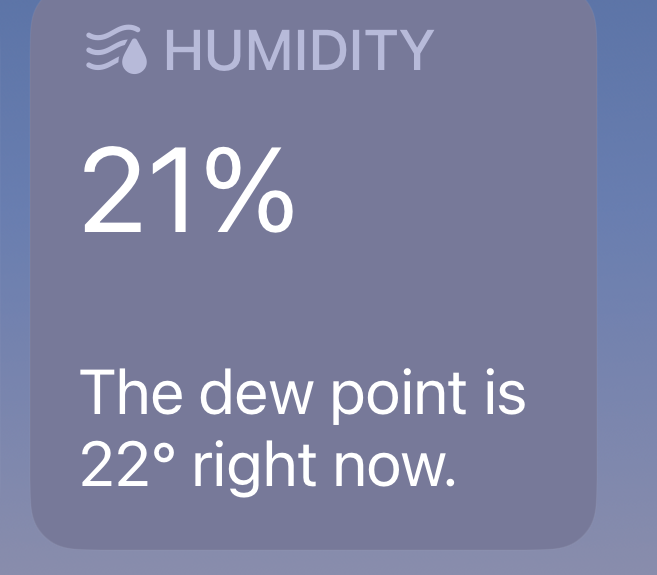
Thats just be redirected to chatGPT because likely the due point data is not in the metrological service that SIRI interfaces with. For example it's not part of their weather app.
It’s right there:


Attachment Image
Score: 2 Votes (Like | Disagree)
26 months ago

Am I right in thinking that other versions of English and not just US English work with Apple Intelligence in this Beta?
Yes, as long as your Siri region isn't set to US English instead of your iPhone's region. That was a work around earlier, but it now stops it from working. (This doesn't mean I've tested all English locales, just Canadian.)
Score: 2 Votes (Like | Disagree)
centauratlas Avatar
26 months ago

Will this fix my 16 pro max batt3ry woes?
I was having good battery life on the 16 PM 18.1 betas, but the 18.2 dev beta 1 had much worse. The dev beta 2 which this is seems to be much better than the beta 1 - if this applies to you. Figured I'd at least give my experience. :-)
Score: 2 Votes (Like | Disagree)
Latest Stories
Apple Taking New Approach to Developing iOS 28 and macOS 28
31 minutes ago
Early Apple Black Friday Deals on Apple Watch, MacBook Air, and More
19 hours ago
'Backglow' Lets You Customize New MacBook Pro's Glowing Apple Logo
20 hours ago
Top Stories: Apple Product Launches, iOS 27.3 Beta, and More
1 day ago
More Fun iPhone Duo Apps: 30 New Picks to Try
2 days ago
Hands-On With Apple's New OLED Touchscreen MacBook Pro
2 days ago
Apple Store With All-New Design Opening Soon in Southern California
2 days ago
Control the Glowing Apple Logo on Your New MacBook Pro
2 days ago
Apple Shares New 'Apple Card: Apply and Use in Minutes' Ad
2 days ago
Apple Says More Than 100,000 Apps Optimized for iPhone Duo, Here's What's Still Missing
2 days ago
Early Black Friday Deals Kickoff With Steep Discounts on Apple Watch Ultras and More
2 days ago
The MacRumors Show: iOS 27.3 Looks Like a Huge Update
2 days ago
Best Buy's Black Friday Event Begins With Sitewide Savings on Apple, TVs, More
2 days ago
Apple Releasing Yet Another Two New Products Next Week
2 days ago
MacBook Air Drops to Lowest Price in Months With Amazon's $250 Discount
2 days ago
Apple Rumored to Drop the iPhone's Action Button Next Year
2 days ago
Apple's Extended Return Policy Now in Effect for 2026 Holiday Season
2 days ago
Apple Music Classical Updated With New Icon and Refreshed Design
2 days ago
OLED iPad Mini, M6 iMac, and New MacBook Pros Available From Today
2 days ago
Apple Surveys iPhone Duo Buyers About Crease and Camera
3 days ago
Apple's First Touchscreen Mac is Now Arriving to Customers
3 days ago
Claude Gets Personal Finance Feature With Bank Account Linking
3 days ago
Apple Arcade Adds Crossy Road Rush and NBA 2K27
3 days ago
Apple's New HomeView Smart Home Hub: Here's How Much RAM It Has
3 days ago
iPad Mini vs. iPad Air Buyer's Guide: Now Just $50 Apart
3 days ago
First iOS 27.3 and macOS Golden Gate 27.3 Public Betas Now Available
3 days ago
Apple Announces a New Mac Sales Record
3 days ago
Paid $200 for Logic Pro? Apple Says You Won't Get This New Feature
3 days ago
Instagram's Edits Video Editor is Now Available on Mac
3 days ago
Prevent Siri and Search From Accessing Specific iPhone Apps
3 days ago