Apple seeded the third betas of iOS 18.2 and iPadOS 18.2 to developers for testing today. While the third betas of each update are minor relative to the first two betas, there are still a handful of changes across the Photos app, TV app, and more.
A corresponding iOS 18.2 public beta with these changes will likely be released later this week, and Apple previously confirmed that the software update will be released to the public in December. iOS 18.2 is compatible with the iPhone XS series and newer, but Apple Intelligence features require an iPhone 15 Pro model or any iPhone 16.
Below, we recap everything new that we have found in the third betas so far. Many of the changes were discovered by MacRumors contributor Aaron Perris.
Check out our earlier list of everything new in the first two iOS 18.2 betas for more, including Apple Intelligence features like Genmoji and Image Playground.
Tweaked Video Player in Photos App
In iOS 18.2 Beta 3, videos in the Photos app no longer zoom in or out when you tap on them. pic.twitter.com/TbCKOwlVFg — Beta Profiles (@BetaProfiles) November 11, 2024
iOS 18 introduced a completely redesigned Photos app on the iPhone, but not all of the changes were well received. Apple has continued to tweak the Photos app ever since it announced iOS 18, and that trend has continued with the latest beta.
iOS 18.2 beta 3 introduces a tweaked video player that takes up more of the screen. This change eliminates the thick borders around videos that appear on earlier iOS 18 versions, meaning you no longer have to tap on a video for full-screen playback.
Customizable Navigation Bar in TV App
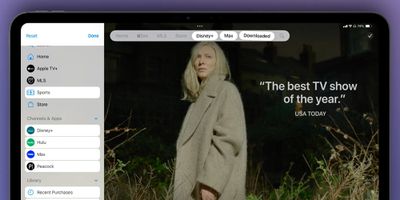
Starting with iPadOS 18.2 beta 3, the navigation bar in the TV app can be customized, according to the screenshot above from 9to5Mac.
New Camera Control Setting
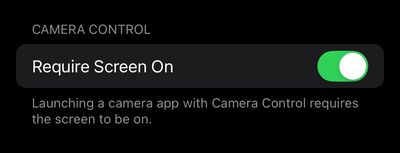
On all iPhone 16 models, iOS 18.2 beta 3 adds a new setting for the Camera Control button. In the Settings app under Display & Brightness, there is now a toggle for "Require Screen On." When this setting is turned on, you can only launch the Camera app or a supported third-party camera app with the Camera Control button when the iPhone's screen is turned on. Of course, when the setting is turned off, that restriction no longer applies.
Redesigned Next-Generation CarPlay Icons

As we previously reported, Apple continues to prepare for the launch of next-generation CarPlay. iOS 18.2 beta 3 includes redesigned icons for the new "Climate" and "Media" apps that will be available on next-generation CarPlay.
Apple's website continues to say that the first vehicles with next-generation CarPlay support will "arrive in 2024," but there are still no vehicles that support the system, and Apple has yet to provide a more specific timeframe.
Safari Wallpapers
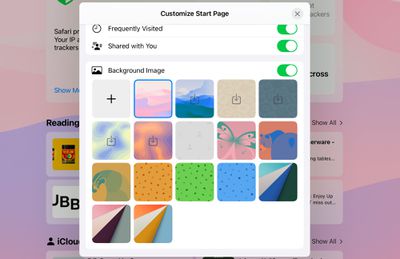
In iPadOS 18.3 beta 2, Safari has new background wallpapers to choose from.
Other Changes
- Starting with iOS 18.2 beta 3, the AirDrop icon in the share sheet now appears dark in Dark Mode, rather than staying white.
- In the developer notes for iOS 18.2 beta 3, Apple said issues with the Precision Finding and "Play Sound" features of AirTags, AirPods, and third-party Find My-enabled accessories on earlier betas have been resolved.
- Apple may be more strictly enforcing device requirements for Apple Intelligence features.