watchOS 11.2 Lets You Pause iPhone Video With Camera Remote App
In watchOS 11.2, Apple has added a useful new feature that's designed to allow you to pause video that you're recording on the iPhone using the Camera Remote app on the Apple Watch.
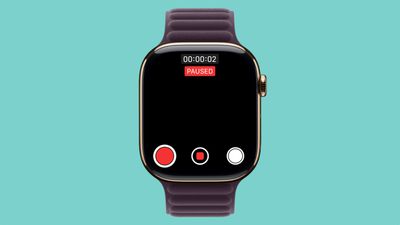
The Camera Remote app has been available since the Apple Watch initially launched, and while there was an option to start and stop video recording, there wasn't an option to pause video and restart it. When a video recording is in progress, there is now a pause button on the left side of the Camera Remote interface. Tapping it pauses a video, and then tapping the red record button restarts the video.
Apple initially added a feature for pausing video recordings with the iPhone Camera app in iOS 18, and the watchOS 11.2 update expands that same functionality to the Apple Watch's Camera Remote app.
Other new additions in watchOS 11.2 include expanded support for tidal conditions and coastal locations in the Tides app in China. watchOS 11.2 will see a release alongside iOS 18.2 next Monday.
Popular Stories
Thursday September 10, 2026 11:57 am PDT by
Juli CloverSome Apple Watch users who upgrade to the Series 12 or the Ultra 4 might temporarily lose access to hypertension notifications.
On the watchOS feature availability page, Apple says notifications might not be available on the Series 12 or Ultra 4 at launch because regulatory clearances are in process.
Hypertension Notifications may not be available on Apple Watch Series 12 or Ultra 4 in your ...
Apple today released watchOS 27, the newest version of the operating system that runs on the Apple Watch. watchOS 27 is compatible with the Apple Watch Series 9 and later, the Apple Watch Ultra 2 and later, and the Apple Watch SE 3.
watchOS 27 can be downloaded for free on a compatible device through the Settings app on the watch.
The update introduces support for Siri AI, a more capable...
Wednesday September 9, 2026 12:06 pm PDT by
Juli CloverApple today seeded the release candidate versions of watchOS 27, visionOS 27, and tvOS 27 to developers and public beta testers. The release candidates are the final versions of the updates that will be seeded to the public as long as no final bugs are found during this last round of testing.
The updates can be installed through the Software Update section in the Settings app on each...