Phishing Attacks Use This Simple Trick to Defeat iPhone Message Security - MacRumorsOpen MenuShow RoundupsShow Forums menuVisit ForumsOpen Sidebar
Skip to Content

Phishing Attacks Use This Simple Trick to Defeat iPhone Message Security

A new social engineering tactic is being used by cybercriminals to trick iPhone users into disabling iMessage's built-in phishing protection, in a bid to expose them to malicious links and scams, according to BleepingComputer.
General Apps Messages Redux
The scam exploits a security feature in iMessage that automatically disables links from unknown senders. Apple told the outlet that when users reply to these messages or add the sender to their contacts, the links become clickable – a behavior that scammers are now actively exploiting, according to the report. The deceptive messages often masquerade as notifications from trusted organizations like USPS or toll road authorities.

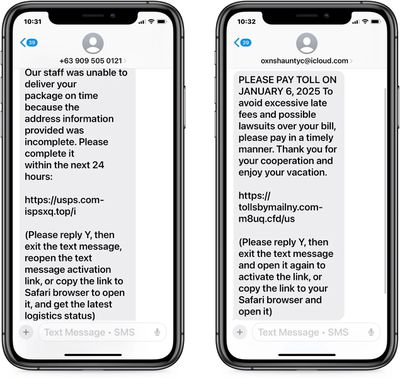
Scammers are apparently looking to exploit the familiar "reply STOP" or "reply NO" that often appears at the end of messages from authentic businesses or services, as there's been a surge in SMS phishing (smishing) attacks that specifically ask recipients to reply "Y" to "activate" supposedly legitimate links.

By getting users to respond, attackers not only enable the previously disabled links but also identify active phone numbers that are more likely to engage with future scams.

Tech-savvy users are likely to easily identify these as phishing attempts, but the main concern is that older or less experienced users will be particularly vulnerable to the tactic. Needless to say, the best way to ensure that you never fall for the scam is to never reply to suspicious messages from unknown senders.
phishing scam

SMS phishing attacks with disabled links (Image credit: BleepingComputer)

Another line of defense is to enable message filtering on your iPhone or iPad. Message filtering sorts messages from people who are not in your contacts into a separate list, where you can more easily view them in the Messages app. To filter messages from unknown senders, open Settings and go to Apps ➝ Messages, then toggle on the switch next to Filter Unknown Senders.

Bear in mind that the feature can filter legitimate messages – from couriers or your bank, for example – so don't automatically assume that a filtered message is dodgy. And, as mentioned above, you can't open links in a message from an unknown sender until you add them to your contacts or reply to the message, but that's by design.


Popular Stories

iOS 27 Next to iPhone

Here's When iOS 27 Rolls Out Today in Every Time Zone [Update: It's Out]

Sunday September 13, 2026 3:00 am PDT by
Update 10:04 a.m.: iOS 27 is rolling out now, though it may take a bit for all users to see it, so keep checking! Apple is about to release iOS 27, which will finally deliver more advanced Siri AI capabilities as well as a variety of other refinements, improvements, and new features to iPhones. It's Apple's biggest software update of the year, and Apple announced at Wednesday's iPhone event...
iOS 27 Icon iPhone

iOS 27 Available Now With These 8 New Features

Monday September 14, 2026 9:00 am PDT by
Update — 10 a.m. Pacific Time: Apple has released iOS 27. During its iPhone 18 Pro and iPhone Duo event last week, Apple announced that iOS 27 will be released widely on Monday, September 14. iOS 27 should be available around 10 a.m. Pacific Time / 1 p.m. Eastern Time today via the Settings app, under General → Software Update. Below, we have highlighted eight new features and...
Apple iCloud Plus expansion hero

iCloud+ Now Includes Apple TV, Apple Arcade, and Curated Apple Music Stations in Over 100 Countries

Tuesday September 15, 2026 1:43 am PDT by
Apple today announced a new subscription initiative that turns paid iCloud+ subscriptions into a broader services bundle in more than 100 countries. In select countries, Apple says every paid iCloud+ plan, including the cheapest 50GB tier, now includes Apple TV and Apple Arcade "at no additional cost," while family sharing extends the storage, TV and Arcade access to up to five people....

Top Rated Comments

vertsix Avatar
22 months ago
Why doesn't Apple use Apple Intelligence to detect and remove these things?

Genuine question, I know Apple Intelligence sucks at this time but I'm sure it can be easily trained to detect these samples?
Score: 27 Votes (Like | Disagree)
McWetty Avatar
22 months ago
“iPhone users hate this one trick…” is the only way this article could be more clickbait. /s

Snark aside… I eliminated this spamming by removing all my personal data from data brokers. It took me an entire Saturday, but I managed to remove my email/phone/address from over 40 online sources and I haven’t gotten a single SMS spam since. Not even during the US election season.
Score: 9 Votes (Like | Disagree)
22 months ago

I eliminated this spamming by removing all my personal data from data brokers. It took me an entire Saturday, but I managed to remove my email/phone/address from over 40 online sources
Would be very interested to hear specifics on how you (or anyone else) did this. Did you pay for some service that automates it, or manually go through and fill out forms? Thanks!
Score: 6 Votes (Like | Disagree)
22 months ago
The faster we leave SMS behind the better.
I have had the same phone number for 20+ years and it must be part of an active list scammers use because at this point I receive phishing SMS's at least 2-3 times a week and regularly use TrueCaller to filter out this garbage.
Score: 6 Votes (Like | Disagree)
spazzcat Avatar
22 months ago
Don't reply to messages from pepole you don't know or don't make any sense because they have no context.
Score: 5 Votes (Like | Disagree)
WarmWinterHat Avatar
22 months ago

Care to share some details? Would be super cool if you started a thread on this topic.
Here you go; there are PDFs in the right column:

https://inteltechniques.com/workbook.html

This has been the standard for a while, and most sites that have guides have copied from this. The author no longer updates the guide or works in the field, but it's still useful.

I did the same a few years ago and even though I have a very unique name, nothing comes up when you google/bing/ddg my name, or my phone number.
Score: 4 Votes (Like | Disagree)