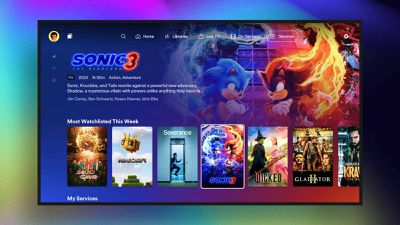
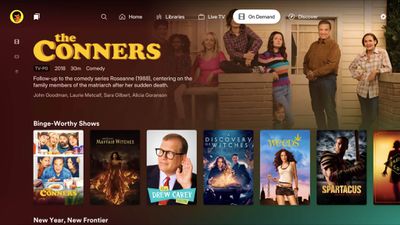
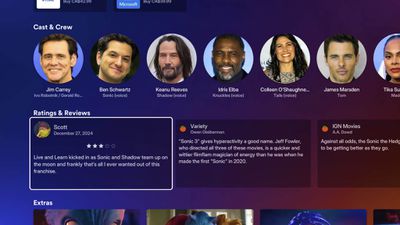
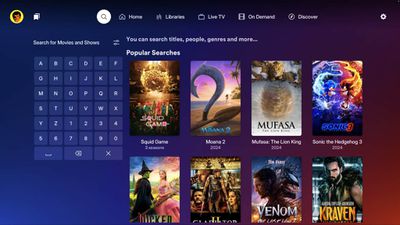
In November, Plex unveiled a redesigned iPhone app with improved navigation, larger artwork, a dedicated section for media libraries, and more. The redesigned app is still in beta, and as of today it can also be tested on the Apple TV.
Plex shared some screenshots of the redesigned Apple TV app, as seen below.
Plex previously said the redesigned app would be available in early 2025, following beta testing, but it has yet to provide a more specific timeframe.
Plex is a popular video player that lets you stream your own media library on a variety of devices, and it also offers ad-supported TV shows and movies.
Tuesday September 15, 2026 1:43 am PDT by Tim Hardwick
Apple today announced a new subscription initiative that turns paid iCloud+ subscriptions into a broader services bundle in more than 100 countries.
In select countries, Apple says every paid iCloud+ plan, including the cheapest 50GB tier, now includes Apple TV and Apple Arcade "at no additional cost," while family sharing extends the storage, TV and Arcade access to up to five people....
Tuesday September 8, 2026 10:19 am PDT by Joe Rossignol
The next Apple TV 4K will be equipped with an A19 or A19 Pro chip, according to evidence in Apple's code uncovered by MacRumors contributor Aaron Perris. In particular, the device's model identifier points towards the A19 generation of chips.
Accordingly, the next Apple TV would have 8GB or 12GB of RAM, up from 4GB in the current 2022 model with the A15 Bionic chip. Other rumored upgrades for...
Apple today released the sixth public betas of iOS 27, iPadOS 27, tvOS 27, and macOS Golden Gate, allowing anyone with a compatible device to download and test the new software. The sixth betas come a week after Apple seeded the fifth betas and a few hours after the eighth developer betas.
You can get started by signing up on Apple's beta website and then opting in to the public beta by...
As a long time Plex user, I truly wish they would stop messing around with the app. Over time it's become so bloated and full of 'their' junk. I don't want all the on demand stuff. I want it for my local content only.
If my TV had a native JellyFin client I'd jump immediately over to it.
Recommendation for owned collections: use the orange icon "Computers" app. No ads. No vod. Simple (Apple designed and works with Apple DRM'd content too) UI that harkens back to the original AppleTV UI created by the Lord Jobs...
Home sharing ('https://support.apple.com/en-us/108958') still "just works" and Computers brings all of the owned media together in one simple app.
In my household, Computers is the second most used app of all AppleTV apps... right behind the incredible Channels app ('https://getchannels.com') for live & DVR television. All of the streamer options- including the AppleTV app are all well down "most popular" lists here.
Recommendation for owned collections: use the orange icon "Computers" app. No ads. No vod. Simple (Apple designed and works with Apple DRM'd content too) UI that harkens back to the original AppleTV UI created by the Lord Jobs...
Home sharing ('https://support.apple.com/en-us/108958') still "just works" and Computers brings all of the owned media together in one simple app.
In my household, Computers is the second most used app of all AppleTV apps... right behind the incredible Channels app ('https://getchannels.com') for live & DVR television. All of the streamer options- including the AppleTV app are all well down "most popular" lists here.
Requires a Mac be up and running all the time, doesn't work outside the household, and only works on the Apple TV. The only Mac in my home is my MacBook, and it leaves with me.
Plex and my Synology is much easier. Plex is on every platform.
The bottom screenshot looks the most different - it has stuff across the top now rather than down the side.
Ahhhh yes, I see that now, thank you. They do tend to push their Plex stuff, but its easy enough to hide it all. I really don't blame them for trying to make a little $, for what a great product I personally think it is...I'm okay with it.