Apple No Longer Hiding Apple Intelligence Storage Space Info in macOS 15.4 - MacRumorsOpen MenuShow RoundupsShow Forums menuVisit ForumsOpen Sidebar
Skip to Content

Apple No Longer Hiding Apple Intelligence Storage Space Info in macOS 15.4

With the second beta of macOS 15.4 that was released earlier in March, Apple changed System Settings to hide how much local storage space Apple Intelligence takes up on a Mac.
Apple Intelligence Storage Space Feature 2
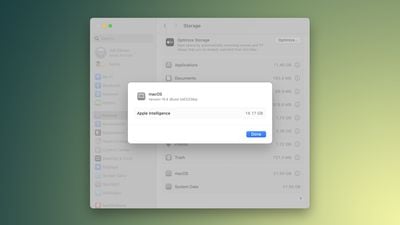
Making the change led to accusations that Apple was trying to hide the size of ‌Apple Intelligence‌, and so with the fourth macOS 15.4 beta that came out today, Apple made ‌Apple Intelligence‌'s storage requirements easy to find once again.

To see ‌Apple Intelligence‌ storage space, you can go to System Settings > General > Storage and click the info button next to the macOS listing. That brings up a popup that shows the version of macOS installed and the storage space taken up by ‌Apple Intelligence‌ and it's the same way that System Settings works in the current release version of macOS Sequoia, 15.3.2.

It is possible that the missing ‌Apple Intelligence‌ storage feature in the earlier macOS 15.4 beta was a bug. Users who had System Integrity Protection (SIP) disabled were able to see the information without issue, and Apple appeared to have made the ‌Apple Intelligence‌ storage assets unavailable to anyone with SIP enabled.

For reference, SIP protects the Mac by preventing unauthorized code from being run, and it can only be turned off in Recovery Mode. Disabling SIP is typically only used by developers testing apps, and most users always have it on. Given that Apple returned the ‌Apple Intelligence‌ storage space listing to all users, it was perhaps something unintentional, though it remains unclear.

Apple says that ‌Apple Intelligence‌ can consume up to 7GB of storage space on a Mac, though it appears to be taking up more space on some Macs in macOS Sequoia 15.4. ‌Apple Intelligence‌ requires dedicated storage space because it downloads machine learning models and assets to Apple devices so that some functions can be run locally.

Disabling ‌Apple Intelligence‌ is the only way to keep the feature from using up space on a Mac.

Related Forum: macOS Sequoia

Popular Stories

iPhone 18 Pro Deep Red Feature

iPhone 18 Pro Launching in Two Months With These 12 New Features

Friday July 17, 2026 10:39 am PDT by
It is now mid-July, and that means the iPhone 18 Pro and iPhone 18 Pro Max are now just two months away. The devices are expected to look similar to the iPhone 17 Pro and iPhone 17 Pro Max, but there will still be many year-over-year changes, with rumored features including a smaller Dynamic Island, 5G via satellite, and more. Apple is expected to unveil the iPhone 18 Pro, iPhone 18 Pro Max, ...
iPhone 18 Pro and Pro Max Feature

'Apple Upgrade' Program Reportedly Launching Next Week

Tuesday July 21, 2026 8:30 am PDT by
Apple and Klarna are partnering on a new "Apple Upgrade" program set to launch in the U.S. on Tuesday, July 28, according to Bloomberg's Mark Gurman. The program will allow you to finance most iPhone, iPad, Mac, and Apple Watch models, with a 24-month term for iPhones and Apple Watches and a 36-month term for iPads and Macs. Customers will be able to pay off the device early during the term, ...
iPhone 18 Pro Deep Red Feature

iPhone 18 Pro Launching in Two Months With These 12 New Features

Tuesday July 21, 2026 6:22 am PDT by
It is now mid-July, and that means the iPhone 18 Pro and iPhone 18 Pro Max are now just two months away. The devices are expected to look similar to the iPhone 17 Pro and iPhone 17 Pro Max, but there will still be many year-over-year changes, with rumored features including a smaller Dynamic Island, 5G via satellite, and more. Apple is expected to unveil the iPhone 18 Pro, iPhone 18 Pro Max, ...

Top Rated Comments

turbineseaplane Avatar
18 months ago
Nice

All it needs is a "delete Apple Intelligence" button right there also, and we are all wrapped up here
Score: 41 Votes (Like | Disagree)
CalMin Avatar
18 months ago
Hmm... so they addressed needing more than 8GB RAM for Apple Intelligence. When will they start us on more than 256GB SSD?
Score: 17 Votes (Like | Disagree)
18 months ago
Apple turning into 1990s microsoft right here
Score: 13 Votes (Like | Disagree)
CSM2000 Avatar
18 months ago
How are the 7GB of space utilized by A.I. recovered once Apple Intelligence is turned off? I'd much rather have the space than A.I. capabilities.
Score: 11 Votes (Like | Disagree)
sw1tcher Avatar
18 months ago

Disabling Apple Intelligence is the only way to keep the feature from using up space on a Mac.

Until Apple decides to automatically enable Apple Intelligence for everyone, turning it into an opt-out feature. And then when you install any sort of OS update, it will re-enable Apple Intelligence again.

https://www.macrumors.com/2025/03/11/ios-18-3-2-apple-intelligence-auto-on/
Score: 10 Votes (Like | Disagree)
18 months ago

I think Macroumers commenters will need to decide which they want more
a) A smarter Siri, or
b) No "AI stuff" on their Mac. or
c) not sending personal data to a server in the cloud.

There is no way to run a smarter Siri locally on a Mac without consuming considerable resources on the Mac.
I'll take B and C, thank you.

The AI should be an optional install.
Score: 7 Votes (Like | Disagree)