How to Use iOS 18.4's New Ambient Music Feature in Control Center - MacRumorsOpen MenuShow RoundupsShow Forums menuVisit ForumsOpen Sidebar
Skip to Content

How to Use iOS 18.4's New Ambient Music Feature in Control Center

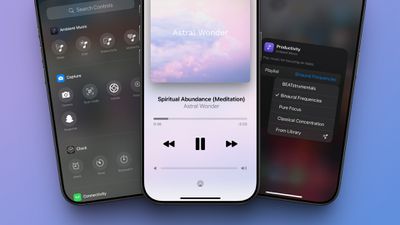
The upcoming iOS 18.4 update for the iPhone adds an Ambient Music feature to Control Center. Below, we take a closer look at how it works.
iOS 18 4 Ambient Music Control Center
iOS 18.4 is currently in beta, so the Ambient Music feature is not widely available yet. The update will likely be released to the general public next week.

To use the feature on iOS 18.4, open Control Center and tap on the plus sign in the top-left corner. Then, tap on "Add a Control" at the bottom of the screen, scroll down to the Ambient Music section, and add one or more of the controls.

Here is how Apple describes the four Ambient Music themes:

  • Sleep: Music for a restful sleep.
  • Chill: Music for relaxation.
  • Productivity: Music for focusing on tasks.
  • Wellbeing: Music for meditation and self-care.

You can add any of the four Ambient Music controls to your Control Center, and then tap on one to start a playlist of songs that matches the theme. The feature is free and easy to use, with no Apple Music subscription or app download required.

While the Ambient Music feature is turned on, music controls will appear on the screen, and there is also Dynamic Island integration on newer iPhones.

There are four playlists available for each theme, or you can set your own. To change the playlist, open Control Center, and then tap on the plus sign in the top-left corner of the screen. Next, tap on an Ambient Music control that you added to Control Center, and tap on the playlist name. A drop-down menu will show additional playlist options.

  • Sleep: Sleep Sounds, Bedtime Beats, Sound Bath, and Piano Sleep.
  • Chill: Piano Chill, Ambient Chill, Lo-Fi Jazz, and Pure Chill.
  • Productivity: BEATstrumentals, Binaural Frequencies, Pure Focus, and Classical Concentration.
  • Wellbeing: Pure Meditation, Spa, Beats & Breath, and Pure Calm.

To update your iPhone to iOS 18.4, once the update is released, open the Settings app and select General → Software Update.


Related Forums: iOS 18, iPadOS 18

Popular Stories

iCloud iPhone 17 Pro

iPhone Users Who Pay for iCloud Storage Get Two New Perks on iOS 27

Thursday July 2, 2026 6:10 am PDT by
If you pay for certain iCloud+ storage plans beyond the 5GB that Apple offers for free, you will receive two more perks on iOS 27 at no additional cost. A summary of the two new iCloud+ perks on iOS 27:Increased daily usage limits for some new Apple Intelligence features, including image generation in the revamped Image Playground app. HomeKit Secure Video cameras receive generated video...
American Express Gold Apple Pay Feature

American Express Announces New Apple Pay Feature

Tuesday June 30, 2026 10:27 am PDT by
American Express today announced that you can now redeem Membership Rewards points when checking out with Apple Pay on the web and in apps on the iPhone and iPad. When checking out with Apple Pay on iOS 18 or iPadOS 18 or later, tap on your eligible American Express card (Platinum, Gold, Green, and others) and select the Membership Rewards points option. You can use points to cover all or...
series 10 apple watch titanium digital crown

Report: Apple Watch Redesign Coming Next Year With New Band System

Tuesday June 30, 2026 8:45 am PDT by
A "major overhaul" of the Apple Watch's design is due to arrive next year with a new system for connecting bands, according to a known Weibo leaker. In a set of recent posts, the leaker known as "Instant Digital" linked the new claim to older rumors about an "Apple Watch X" model, which was said to introduce a fresh design and break compatibility with the existing watch band system. Citing...

Top Rated Comments

17 months ago
I had no idea you can change the playlists. Awesome, that's why I enjoy MacRumors. 👍 But this is pretty hidden, isn't it? :D

However, are these playlists updated because I was listening to Chill and it was pretty repetitive.


Does this require an Apple Music subscription to work?
No, it does not.
Score: 9 Votes (Like | Disagree)
blodyholy Avatar
17 months ago
I’m confused as to why this feature was relegated to the control center only? Seems like a stand alone or Music app integration as well makes sense.
Score: 7 Votes (Like | Disagree)
17 months ago

As someone else pointed out, I see no option to set a timer. Please inform us how?
You need to use the Timer app in the clock app and instead of a sound you can select „stop playing“ „when the timer ends“.

It’s rather convoluted and not at all intuitive.
Score: 4 Votes (Like | Disagree)
tennisproha Avatar
17 months ago
This is nice but Apple Music needs a Sleep Timer like the Podcasts app. Can't really use any of the sleep or meditation playlists on Apple Music because otherwise they play all night.

Also can't use the Timer app as a workaround because then you have to change the timer sound every time you need to set an actual timer.
Score: 4 Votes (Like | Disagree)
neotint Avatar
17 months ago

I’m confused as to why this feature was relegated to the control center only? Seems like a stand alone or Music app integration as well makes sense.
Because the control center allows 2 touch access if it's placed higher on the page. It's for common regular daily work or personal wellness needs. Verses accessing your Music app, where these stations exist along with dozens of other options that only trigger more ADHD content choice overload that you can't change the menu order of.

e.g. I've saved the Pure Focus playlist in Apple Music, and I use it many times a week, but it's never/rarely shown on my inital Apple Music load home screen, unless it's in recently played and I haven't listened to more than 3 other items. I have to search for it or click and scroll across many playlists just to find it.

Apple is making a user friendly iOS UI surfacing of several of its existing ambient Apple Music playlists, free for all iOS users regardless of Apple Music subscription. This is a great example of Apple doing human-centered design aligned with digital wellness.
Score: 4 Votes (Like | Disagree)
17 months ago

This is nice but Apple Music needs a Sleep Timer like the Podcasts app. Can't really use any of the sleep or meditation playlists on Apple Music because otherwise they play all night.

Also can't use the Timer app as a workaround because then you have to change the timer sound every time you need to set an actual timer.
Yes! This has always been so stupid. Let's get a sleep timer within the music app please! (And also for this new feature.)
Score: 3 Votes (Like | Disagree)