Apple Releases visionOS 2.4 With Apple Intelligence, Spatial Gallery and New iPhone Integration - MacRumorsOpen MenuShow RoundupsShow Forums menuVisit ForumsOpen Sidebar
Skip to Content

Apple Releases visionOS 2.4 With Apple Intelligence, Spatial Gallery and New iPhone Integration

Apple today released visionOS 2.4, the fourth update to the visionOS 2 operating system that came out in September. visionOS 2.4 comes two months after the launch of visionOS 2.3.
visionOS 2
visionOS 2.4 can be downloaded on all Vision Pro headsets by navigating to the Settings app, selecting the General section, and choosing the Software Update option.

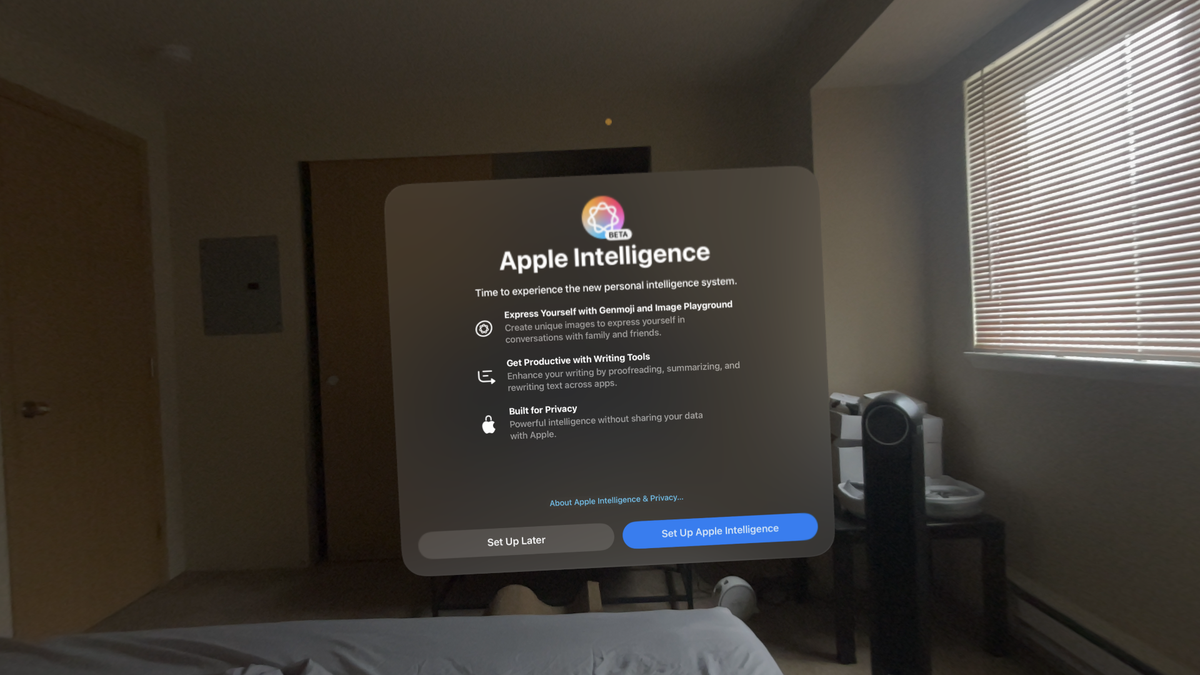
The visionOS 2.4 update brings Apple Intelligence to the Vision Pro for the first time, putting it on par with the iPhone, iPad, and Mac. The Vision Pro has an M2 Apple silicon chip inside, and is capable of running the full suite of ‌Apple Intelligence‌ features.

‌Apple Intelligence‌ features available on the Vision Pro include Writing Tools for generating, proofreading, and summarizing text, Genmoji for creating custom emoji characters, a dedicated Image Playground app for generating images, Memory Movie for creating custom slideshows, smart reply for generating quick responses to texts and emails, Priority Notifications and Notification Summaries, ChatGPT Siri integration and new ‌Siri‌ features, and more.

visionos 2 4 apple intelligence writing tools
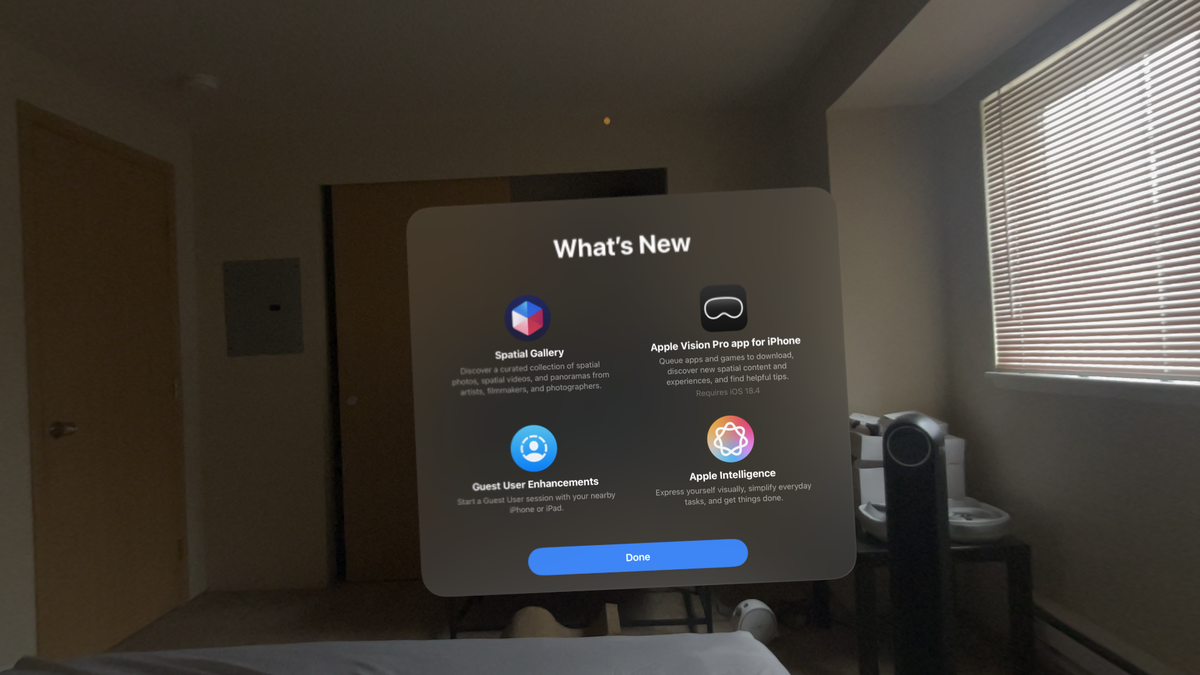
Along with ‌Apple Intelligence‌, Apple added a Spatial Gallery app for the Vision Pro. The Spatial Gallery app offers a curated assortment of spatial videos, spatial photos, and panorama images from artists, filmmakers, and photographers. Apple plans to offer a range of content featuring sports, culture, arts, lifestyle, nature, travel, entertainment, and more.

Content at launch includes images and experiences from Cirque du Soleil, Red Bull, Porsche, Samba Diop, and Jonpaul Douglass, along with behind the scenes content from Apple TV+ shows like Severance. Apple's release notes for the update are below.


Apple Intelligence
- Use Writing Tools to rewrite, proofread, and summarize text right in the app you’re working in, and compose text from scratch using ChatGPT
- Quickly respond to messages with Smart Reply in Mail and Messages with suggested responses
- Create unique images in multiple styles using concepts, descriptions, and people from your photo library with Image Playground
- Create custom emoji right from the keyboard and use your Genmoji across the system in your sticker drawer
- Use Image Wand to turn sketches into images in Notes
- Find photos and videos simply by describing what you’re looking for in Photos
- Create a Memory Movie by describing the story you want to see in Photos
- Use priority messages in Mail which understand the content of your messages and prioritize those that require your attention, displaying them at the top of your inbox
- Catch up on your notifications with Priority Notification to make it easy to see a glanceable summary of the most important information

Guest User
- Start a Guest User session with your nearby iPhone or iPad and guide the guest using View Mirroring

Spatial Gallery app
- Discover a curated collection of spatial photos, spatial videos and panoramas, updated regularly

Apple Vision Pro app
- Discover new content, spatial experiences, and quickly access information about your device using Apple Vision Pro app for iPhone when you upgrade to iOS 18.4

This release also includes other features and improvements.
- Use dictation to edit text like replacing or deleting a word
- Activate Travel Mode using the Digital Crown when you see a “tracking fail” notification.

Some features may not be available for all regions. For more information, please visit this website:
https://www.apple.com/visionos/visionos-2

In iOS 18.4, there is a new Vision Pro app that works in conjunction with visionOS 2.4. With the Vision Pro app, Vision Pro owners can download apps to the Vision Pro, find content to watch and add it to a watch list, and get device info like serial number. There is a dedicated discover page that offers curated recommendations for new and noteworthy experiences, including popular apps and games.

An iPhone can also be used to set up and manage Guest Mode on the Vision Pro, and guests can now save their eye and hand setups for up to 30 days after their last use, making multi-person use more feasible. With an iPhone, Vision Pro owners can block or allow certain apps and guide a user through the Vision Pro interface using AirPlay.

Related Roundup: Apple Vision Pro
Buyer's Guide: Vision Pro (Neutral)
Related Forum: Apple Vision Pro

Popular Stories

Apple Remnants Vision Pro

Apple Unveils Immersive Horror Film Coming Exclusively to Vision Pro

Tuesday October 13, 2026 5:26 am PDT by
Apple on Monday announced Remnants, an immersive horror film that will be released exclusively on the Vision Pro on Friday, October 16. The film will be in the Apple Immersive Video format, meaning it will be a 3D video recorded in 8K resolution with a 180-degree field of view and Spatial Audio. Apple shared a short video of people reacting to the film while wearing the Vision Pro....
apple vision pro orange

Apple Releases visionOS 27.2

Monday October 26, 2026 10:46 am PDT by
Apple today released visionOS 27.2, the first big update for the visionOS 27 operating system that runs on the Apple Vision Pro. visionOS 27.2 can be downloaded by opening the Settings app, selecting the General section, and choosing Software Update. Installing the update requires the headset to be removed, and a progress bar appears on the EyeSight display. The visionOS 27.2 update...

General visionOS watchOS and tvOS Betas Feature Redux

Apple Seeds watchOS 27.2, tvOS 27.2 and visionOS 27.2 Release Candidates

Monday October 19, 2026 10:25 am PDT by
Alongside new betas of iOS 27.2, iPadOS 27.2, and macOS Golden Gate 27.2, Apple has seeded the release candidate versions of watchOS 27.2, tvOS 27.2 and visionOS 27.2. The RCs come a week after Apple released the fourth betas. Registered developers can download the betas through the Settings app on each device. There's no word on what's being added in visionOS 27.2 and tvOS 27.2, but...

Top Rated Comments

Ghost31 Avatar
21 months ago
Just downloaded it and then have been using it for the past hour. Pretty cool stuff. Really like the spatial gallery although I don’t see myself using it that much. Probably gonna be one of those things I think is cool for about a week and then I forget about the app even existing

I like the severance behind-the-scenes photos. I think this would be a great opportunity to show more behind the scene stuff of our favorite TV shows and not just 3-D photos.

[Click to view video attachment]

Attachment Image

Attachment Image
Score: 4 Votes (Like | Disagree)
21 months ago
This looks like an amazing update and I cannot wait to try the Spatial Gallery. Intelligence is great for the things it's great at (summarizing, prioritizing, etc) but dont need the image playground.
Score: 4 Votes (Like | Disagree)
Kylo83 Avatar
21 months ago
People don’t really use Apple intelligence on the iPhone so doubt the few with a Vision Pro would use it
Score: 3 Votes (Like | Disagree)
BarrettF77 Avatar
21 months ago
It's what they are doing to waste dev time. I think that the performance is better on AVP, but still don't use it much. VOS 3.0 will decide if I sell my AVPs off as they just take up space.
Score: 2 Votes (Like | Disagree)
21 months ago

I didn't mean to appear condescending if that's how it came across, it's just that many people genuinely don't understand the different between immersive and spatial. Also, the new app is called Spatial Gallery so no real suggestion of immersive content from the app name either.

That aside, I think we can safely assume that Apple will be sponsoring or at the very least strongly encouraging the creation of fully immersive content because for a device like the AVP, content is what it needs most. But as I'm sure you are well aware, this is a chicken & egg problem because the audience is currently small (AVP owners) and the content is costly to produce. I'm happy to play my part in this dilemma for now because I've only had my AVP since around Christmas 2024 and content has been steadily trickling out during that time. I think I would have been much more frustrated if I had bought one on day 1 though.

The immersive content we've seen on AVP so far has I think all come via the Apple TV+ app so I think that's where it will continue to appear. At least until the likes of Netflix and other big streaming players introduce native AVP apps or support immersive content some other way. I expect some content will also be downloadable but probably not top tier movies and other shows due to piracy fears.

Anyway, I'm looking forward to visionOS 2.4 mostly because I should be able to share the experience of using my AVP with family and friends more easily with the new guest user features. The Spatial Gallery is part of that of course, but I've already been saving spatial content via my iPhone 15 Pro for the last year or more and panoramas I took years ago also look amazing.
You came across just fine and I definitely appreciate your response.
I enjoyed going through the new spacial gallery yesterday and it always has me hoping for more. I also have been taking spacial photos and videos on my iPhone 16, but I was really surprised that last year’s update allowed us to make any old photos into a spacial photos as well. I even had photos of a couple of older family members who passed a few years back and the spacial renderings were so realistic that it was almost eerie. Hopefully we’ll see an immersive gallery as costs come down… and being able to easily share the device is the only way for the masses to fully appreciate the technology.

Score: 1 Votes (Like | Disagree)
21 months ago
I just wish the iPhone did projection into the head unit. It’s annoying to have apps and notifications on an iPhone for 2 step authentication and then have to take my Vision Pro off to read my phone because Apple allowed developers to not let apps onto Vision Pro from iOS.

Score: 1 Votes (Like | Disagree)
Latest Stories
Early Apple Black Friday Deals on Apple Watch, MacBook Air, and More
7 hours ago
'Backglow' Lets You Customize New MacBook Pro's Glowing Apple Logo
7 hours ago
Top Stories: Apple Product Launches, iOS 27.3 Beta, and More
14 hours ago
More Fun iPhone Duo Apps: 30 New Picks to Try
1 day ago
Hands-On With Apple's New OLED Touchscreen MacBook Pro
1 day ago
Apple Store With All-New Design Opening Soon in Southern California
1 day ago
Control the Glowing Apple Logo on Your New MacBook Pro
1 day ago
Apple Shares New 'Apple Card: Apply and Use in Minutes' Ad
1 day ago
Apple Says More Than 100,000 Apps Optimized for iPhone Duo, Here's What's Still Missing
1 day ago
Early Black Friday Deals Kickoff With Steep Discounts on Apple Watch Ultras and More
1 day ago
The MacRumors Show: iOS 27.3 Looks Like a Huge Update
1 day ago
Best Buy's Black Friday Event Begins With Sitewide Savings on Apple, TVs, More
2 days ago
Apple Releasing Yet Another Two New Products Next Week
2 days ago
MacBook Air Drops to Lowest Price in Months With Amazon's $250 Discount
2 days ago
Apple Rumored to Drop the iPhone's Action Button Next Year
2 days ago
Apple's Extended Return Policy Now in Effect for 2026 Holiday Season
2 days ago
Apple Music Classical Updated With New Icon and Refreshed Design
2 days ago
OLED iPad Mini, M6 iMac, and New MacBook Pros Available From Today
2 days ago
Apple Surveys iPhone Duo Buyers About Crease and Camera
2 days ago
Apple's First Touchscreen Mac is Now Arriving to Customers
2 days ago
Claude Gets Personal Finance Feature With Bank Account Linking
2 days ago
Apple Arcade Adds Crossy Road Rush and NBA 2K27
2 days ago
Apple's New HomeView Smart Home Hub: Here's How Much RAM It Has
2 days ago
iPad Mini vs. iPad Air Buyer's Guide: Now Just $50 Apart
2 days ago
First iOS 27.3 and macOS Golden Gate 27.3 Public Betas Now Available
2 days ago
Apple Announces a New Mac Sales Record
2 days ago
Paid $200 for Logic Pro? Apple Says You Won't Get This New Feature
2 days ago
Instagram's Edits Video Editor is Now Available on Mac
2 days ago
Prevent Siri and Search From Accessing Specific iPhone Apps
2 days ago
Best Early Black Friday Deals on iPhone 18 Pro and iPhone Duo
3 days ago