Five iPhone Security Features You Should Be Using - MacRumorsOpen MenuShow RoundupsShow Forums menuVisit ForumsOpen Sidebar
Skip to Content

Five iPhone Security Features You Should Be Using

Apple has quite a few security features that it's added to iPhones, iPads, and Macs over the years. Now more than ever, it's important to make sure you're taking advantage of the built-in security tools that are available to keep yourself and your data safe, so we've rounded up a list of the most important options.

iPhone Security Feature 25
If you don't already have these enabled, you might want to consider turning some of them on.

Two-Factor Authentication

With two-factor authentication, you need to verify your identify when you sign into iCloud on a new device or on the web. It works by sending a six-digit code to a device where you're already signed in, and it won't authorize a sign-in on the new device unless you input that code from your existing device.
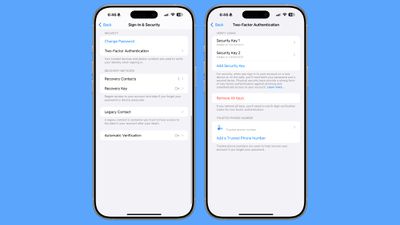
two factor authentication
If you have an iPhone and want to sign into your ‌iCloud‌ account on your Mac, for example, when you enter your Apple Account name and password, you'll get a pop-up on your iPhone with a code that you input for identity verification. Alternatively, you can set a trusted phone number where you can also get a code in case you forget your password.

Apple tries really hard to get people to use two-factor authentication, so chances are you have it enabled, but if you don't, it's a first line of defense to protect your data. There are even some iOS features that don't work without it.

You can manage two-factor authentication by going to Settings > Sign-In and Security.

Security Keys

For an extra layer of protection with two-factor authentication, you can add physical security keys, such as the YubiKey. With a security key set up, you verify your identity with a physical dongle via USB-C or NFC.

Security keys make sure no one can break into your account even if they have access to one of your trusted devices, but you definitely don't want to lose a security key. You can set this up in the two-factor authentication section of the Settings app.

Stolen Device Protection

Stolen Device Protection is a feature that Apple added after criminals got clever and started watching people enter their passcodes before stealing an iPhone.
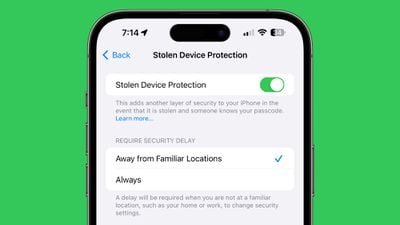
ios 17 4 stolen device protection
When you turn on Stolen Device Protection, a passcode won't work for accessing sensitive information like passwords and credit card data. Instead, Face ID or Touch ID biometric authentication is required, so if a thief has your iPhone and your passcode, they won't be able to get into your accounts.

There's also a security delay that keeps your Apple Account password from being changed without two instances of biometric authentication and an hour-long delay.

Thieves are blocked from accessing passwords, making purchases, turning off Lost Mode on an iPhone, applying for an Apple Card, using an iPhone to set up a new device, and accessing credit cards and Apple Cash. There are delays for signing out of an Apple Account, changing a password, resetting settings, and turning off Stolen Device Protection.

By default, Stolen Device Protection is only on when you're away from familiar locations like your home or your work, but if you want it on at all times, you just need to change the toggle to Always.

You can get to the Stolen Device Protection settings by opening up the Settings app, going to the ‌Face ID‌ and Passcode section, and tapping on Stolen Device Protection.

Private Relay

Private Relay is more of a privacy feature than a security feature, but it's something that you should have on. It hides your IP address and browsing activity in Safari and protects unencrypted internet traffic so no one can see what you're doing even if you're on an unsecured network.
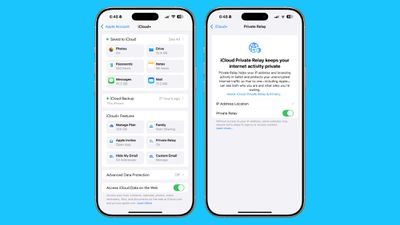
icloud private relay
Private Relay is an ‌iCloud‌+ feature that you get access to as long as you pay Apple at least $0.99 a month for 50GB of ‌iCloud‌ Storage, and it's well worth it. You should also take advantage of Hide My Email whenever possible, as it will give you temporary email addresses that you can revoke at any time.

Private Relay can be enabled by opening up Settings, tapping on your profile picture, and tapping on the ‌iCloud‌ section.

Advanced Data Protection

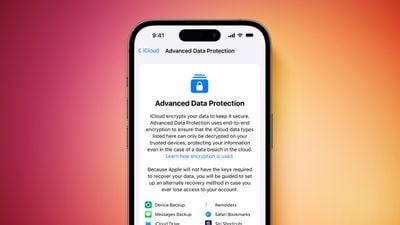
By default, some of the data that's saved in ‌iCloud‌ backups and uploaded to ‌iCloud‌ is not end-to-end encrypted, which means that Apple can provide ‌iCloud‌ backup data to law enforcement.

Apple advanced security Advanced Data Protection screen Feature Orange
Advanced Data Protection encrypts your ‌iCloud‌ data so that it cannot be decrypted except for on your personal devices signed into your Apple Account. It is Apple's highest security option for cloud data.

The feature protects device backups, Messages backups, iCloud Drive files, Notes, Photos, Reminders, Safari bookmarks, Siri Shortcuts, Voice Memos, and Wallet Passes, all of which can otherwise be accessed in ‌iCloud‌ backups by subpoena.

Advanced Data Protection is a good idea to turn on, but keep in mind that it means even Apple can't recover your data if a password is lost. To use Advanced Data Protection, Apple requires you to have a recovery key saved or a recovery contact set up as a way to regain access to your account should you lose your password.

You can get to Advanced Data Protection by opening up the Settings app, tapping on your profile picture, selecting ‌iCloud‌, and then scrolling down to the Advanced Data Protection section. You can also turn it on in the Privacy and Security section of the Settings app.

Lockdown Mode

Lockdown Mode is an extreme security option that most people won't want to turn on, but it's good to know where it is in case you need it.
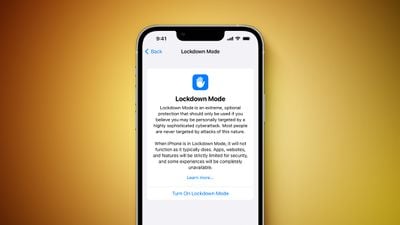
Lockdown Mode Feature
Apple designed this feature for journalists, activists, government employees, and others who might be in danger of being subject to sophisticated cyber attacks and mercenary spyware.

Lockdown Mode disables a lot of iPhone features, blocking Message attachments, web technologies like JIT (just-in-time JavaScript compilation), FaceTime calls from unknown contacts, shared albums in the ‌Photos‌ app, invites for Apple services from unknown people, physical device connections, and configuration profiles.

It essentially removes common attack vectors by limiting iPhone functionality, so it's not something you're going to want to use day-to-day unless you need it. Lockdown Mode can be turned on by opening up Settings, going to Privacy and Security, and tapping on the Lockdown Mode option.

Contact Key Verification

Similar to Lockdown Mode, Contact Key Verification is designed for a limited number of people who need to confirm the identify of who they are speaking to. It provides an option to compare contact verification codes with someone in person or over the phone, so no one can impersonate that person at a later date.


Popular Stories

duo aquarium

More Fun iPhone Duo Apps: 30 New Picks to Try

Friday November 6, 2026 3:27 pm PST by
When the iPhone Duo launched, we shared a list of some of the fun apps developers created for the new form factor. Two weeks out, developers are continuing to come up with fresh ideas, so we thought we'd share some of our favorites. Games Marbles Unhinged ($2.99) - Marbles Unhinged is a marble maze designed for the Duo. When you fold it, the floor turns into a ramp. If you stand the top...
apple pro tell logo

Apple Launching Five New Products Today

Thursday November 5, 2026 12:59 am PST by
Apple is launching five new products on Friday, November 6, following pre-orders that opened last week, including its first touchscreen MacBook Pro models. The following new products will be available from today: iPad mini with OLED display and A20 Pro chip iMac with M6 chip 14-inch MacBook Pro with M6 chip 14-inch MacBook Pro with OLED touchscreen 16-inch MacBook Pro with OLED...
iOS 28 AI

Apple Taking New Approach to Developing iOS 28 and macOS 28

Sunday November 8, 2026 7:42 am PST by
Apple has made a change to its development process for iOS 28, macOS 28, and corresponding software updates, according to Bloomberg's Mark Gurman. In his Power On newsletter today, he said Apple separates development of each year's new operating systems into three major stages. Typically, he said each stage consists of four weeks of coding followed by a four-week "convergence" period where...

Top Rated Comments

scorpio vega Avatar
21 months ago
Two factor authentication is amazing however it is a double edged sword.

I had to change my number awhile back due to it being posted on some shady adult websites and had pervs messaging me.

Anyway the number was changed and updated it under email and phone numbers in settings. I didn’t think much of it.


When I got my iPhone 16 pro max, I had deleted my old iPhone and had given it to someone else and I tried to set up the iPhone 16 with my Apple account and I couldn’t bc while I changed the number I had forgotten to update it in the 2 factor authentication as well thus it was still trying to contact my old phone number and I didn’t have any other devices that I could access my iCloud.

So I literally couldn’t access my iCloud for nearly a month. It was a nightmare lol.

So be warned to always make sure it’s up to date.

Score: 14 Votes (Like | Disagree)
21 months ago
Having lost my business partner of 25 years recently (who operated company vendor accounts on a locked, encrypted iPhone, or internet services with 2FA enabled to verify via his locked iPhone), another security feature you should list here is Legacy Contact, which allows a designated Contact (preferably a trusted relative or your executor) to unlock your Apple accounts and your devices after your death.
Score: 9 Votes (Like | Disagree)
fredrik9 Avatar
21 months ago

Am I the only one here who disables all lock screen security just to shave off a few microseconds when the phone wakes up?
Yes
Score: 7 Votes (Like | Disagree)
21 months ago
I use 9999 as my passcode so that someone would have to go through 10,000 different codes before they get to mine. Oooops, forget I told you that. By the way, I only recently realized that they started allowing six digit codes starting with iOS 9. Bet you can guess my NEW passcode -- that will take even longer for a bad person to brute force.


Score: 7 Votes (Like | Disagree)
Parowdy Avatar
21 months ago
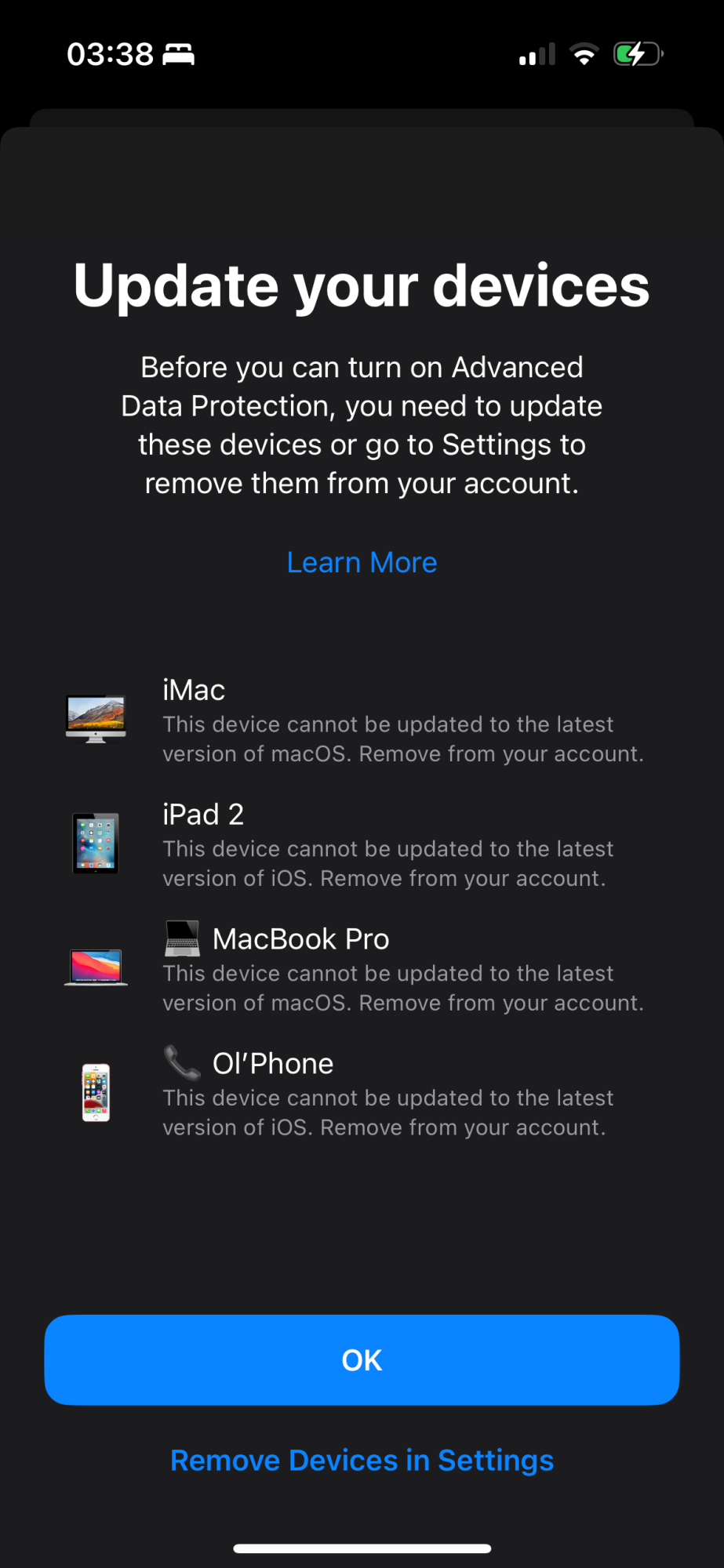
One big thing to point out about Advanced Data Protection:
You can NOT have any old devices singed into your account!

It makes sense and it also explains why I had a recovery contact set up but the feature itself turned off, I can’t follow through. At least the old SE can not be removed as it’s my backup phone. Interesting that my „obsolete“ 2017 MBP isn’t listed.
This is unfortunately pretty useless for many (especially Apple fans).

Attachment Image
Score: 7 Votes (Like | Disagree)
21 months ago
Unlike other vendors, turning on Apple two factor is a one way street after two weeks you can’t turn it off.
Score: 7 Votes (Like | Disagree)
Latest Stories
Apple Store Subscription Sign-Up Controversy Exposed
32 minutes ago
Siri AI Rumored to Become 'More Like an Agent' as Early as Next Year
11 hours ago
Apple Taking New Approach to Developing iOS 28 and macOS 28
12 hours ago
Early Apple Black Friday Deals on Apple Watch, MacBook Air, and More
1 day ago
'Backglow' Lets You Customize New MacBook Pro's Glowing Apple Logo
1 day ago
Top Stories: Apple Product Launches, iOS 27.3 Beta, and More
2 days ago
More Fun iPhone Duo Apps: 30 New Picks to Try
2 days ago
Hands-On With Apple's New OLED Touchscreen MacBook Pro
2 days ago
Apple Store With All-New Design Opening Soon in Southern California
2 days ago
Control the Glowing Apple Logo on Your New MacBook Pro
2 days ago
Apple Shares New 'Apple Card: Apply and Use in Minutes' Ad
2 days ago
Apple Says More Than 100,000 Apps Optimized for iPhone Duo, Here's What's Still Missing
2 days ago
Early Black Friday Deals Kickoff With Steep Discounts on Apple Watch Ultras and More
2 days ago
The MacRumors Show: iOS 27.3 Looks Like a Huge Update
2 days ago
Best Buy's Black Friday Event Begins With Sitewide Savings on Apple, TVs, More
3 days ago
Apple Releasing Yet Another Two New Products Next Week
3 days ago
MacBook Air Drops to Lowest Price in Months With Amazon's $250 Discount
3 days ago
Apple Rumored to Drop the iPhone's Action Button Next Year
3 days ago
Apple's Extended Return Policy Now in Effect for 2026 Holiday Season
3 days ago
Apple Music Classical Updated With New Icon and Refreshed Design
3 days ago
OLED iPad Mini, M6 iMac, and New MacBook Pros Available From Today
3 days ago
Apple Surveys iPhone Duo Buyers About Crease and Camera
3 days ago
Apple's First Touchscreen Mac is Now Arriving to Customers
3 days ago
Claude Gets Personal Finance Feature With Bank Account Linking
3 days ago
Apple Arcade Adds Crossy Road Rush and NBA 2K27
3 days ago
Apple's New HomeView Smart Home Hub: Here's How Much RAM It Has
3 days ago
iPad Mini vs. iPad Air Buyer's Guide: Now Just $50 Apart
3 days ago
First iOS 27.3 and macOS Golden Gate 27.3 Public Betas Now Available
3 days ago
Apple Announces a New Mac Sales Record
3 days ago
Paid $200 for Logic Pro? Apple Says You Won't Get This New Feature
3 days ago