iOS 19 Rumored to Add Stage Manager Support to USB-C iPhones - MacRumorsOpen MenuShow RoundupsShow Forums menuVisit ForumsOpen Sidebar
Skip to Content

iOS 19 Rumored to Add Stage Manager Support to USB-C iPhones

A leaker known as Majin Bu today claimed that iOS 19 will enable support for at least a limited version of Stage Manager on iPhone models with a USB-C port.
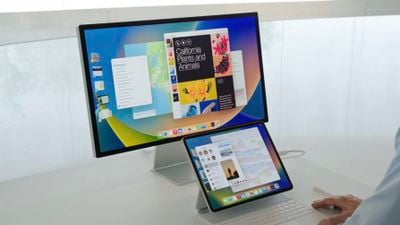
ipados 16 stage manager
In a blog post citing sources, the leaker said that when an iPhone with a USB-C port is connected to an external display, users will be able to take advantage of a Stage Manager-like interface with multiple apps open at once on the screen. However, he said that there might be more limitations compared to Stage Manager on iPads.

iPhone models with a USB-C port include all iPhone 15 models and newer.

iPhones with both Lightning and USB-C ports can already be connected to external displays, but only for basic screen mirroring.

The first developer beta of iOS 19 should be available immediately after the WWDC 2025 keynote on June 9, and the software update is expected to be released to the general public in September. It is unclear if Stage Manager support on USB-C iPhones would be available in the first beta, or enabled later in the iOS 19 software cycle.

Samsung offers a similar feature called DeX on its Galaxy smartphones.

Majin Bu has a mixed track record with Apple rumors, with some hits and some misses. They were one of the sources who accurately claimed that the device succeeding the iPhone SE would be named the iPhone 16e, but they also inaccurately claimed that the device would have a Dynamic Island instead of a notch. They also accurately leaked the redesigned Milanese Loop for the Apple Watch Ultra 2, the Desert Titanium color name for iPhone 16 Pro models, several iPhone cases, and much more.
Related Roundups: iOS 26, iPadOS 26
Related Forum: iOS 26

Popular Stories

iOS 26 6 2

Apple Releases iOS 26.6.2

Tuesday September 8, 2026 10:47 am PDT by
Apple today released iOS 26.6.2 with a fix for "an issue that prevents downloading a software update over a cellular connection." The minor software update is rolling out now for the iPhone 11 series and newer. To update your iPhone, open the Settings app and tap on General → Software Update. It might take a few minutes for the update to be visible to everyone. iOS 26.6.2 arrives...
ios 26 7

Apple Releases iOS 26.7 With Security Fixes

Monday September 14, 2026 10:32 am PDT by
Alongside iOS 27, Apple today released iOS 26.7, an update to the existing iOS 26 software. Users who check for new software will see iOS 26.7 as the default update, with iOS 27 listed as an option at the bottom of the Software Update interface. According to Apple's release notes, iOS 26.7 includes security fixes, but it does not have any other features. Apple will eventually show iOS 27 ...
apple lock security bug vulnerability fix privacy

iOS 27 and iOS 26.7 Fix More Than 100 Security Bugs

Monday September 14, 2026 11:36 am PDT by
Today's iOS 27 update addresses over 100 security vulnerabilities, which is a good reason to install the new software. If you don't want to update to iOS 27 yet, Apple also released iOS 26.7 with over 80 security fixes. 75 of the fixes are shared across both updates, so iOS 26.7 addresses many of the same issues. There are multiple kernel fixes, including one that could allow a malicious...

Top Rated Comments

Reverend Benny Avatar
18 months ago

What would be the use case(s) for having multiple iPhone apps open on an external display?
Imagine docking your iPhone into a USB-C dock, getting mouse and keyboard on the big screen and being able to use your apps desktop style.
Score: 16 Votes (Like | Disagree)
Nautilus007 Avatar
18 months ago
Man, they are really doing everything they can not to cannabilize sales.
Apple could literally make it so you could connect your phone to a screen and mirror Mac OS
Score: 14 Votes (Like | Disagree)
PotentPeas Avatar
18 months ago

What would be the use case(s) for having multiple iPhone apps open on an external display?
The big idea here is less about "Stage Manager" and more about just being able to use an external display connected to the iPhone for something other than mirroring the iPhone screen.

I can see uses for this, especially if apps take advantage to provide some extra functionality in "external display" mode. (I imagine they would if they're already doing this for iPad.)

For instance, my wife doesn't use a PC or laptop very often, she just lives on her phone. She does a lot of work with photos on there and a lot of it is "keeping the family up with what's been going on with our kids". I think being able to plug into a screen and have more working space could be very helpful.

For myself, I can think of situations where I need to run to the office for a meeting and I have to detach my laptop from all of the dock setup stuff I have in my home office. If I could just grab my phone instead and be able to connect it to a usable desktop-ish work environment at the office, that would be nice.

I can envision a situation where my kids don't need anything *other* than a phone and a dock setup to do their school work.

The ideas are there. Whether it would be any good all depends on if the implementation/execution that Apple and possibly third-party devs come up with.
Score: 11 Votes (Like | Disagree)
applesith Avatar
18 months ago
I can't imagine we are far from having an iPhone serve the role of a Mac Mini when plugged into a monitor with a Bluetooth mouse and keyboard. Even if this is technically possible, there will be intentional software limitations because otherwise, this would cannibalize sales of other devices. Which is also why I believe iPad OS is so limited to mitigate its overlap with MacOS.
Score: 9 Votes (Like | Disagree)
BelgianChoklit Avatar
18 months ago
Because it's been such a stellar success on the iPad.
Score: 8 Votes (Like | Disagree)
18 months ago
Very cool! I could see docking an iPhone to an external display to do a bit of writing or whatever. I like the idea of rolling up to a place with just my phone, working for a bit on a real keyboard and mouse, and then leaving with just my phone in my pocket.
Score: 6 Votes (Like | Disagree)