

Google Maps Can Now Scan Your iPhone Screenshots for Places - MacRumorsOpen MenuShow RoundupsShow Forums menuVisit ForumsOpen Sidebar
Skip to Content

Google Maps Can Now Scan Your iPhone Screenshots for Places

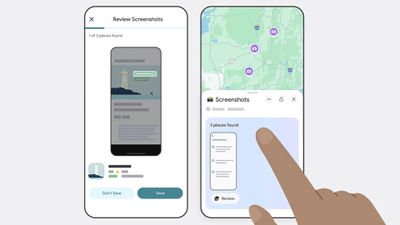
Google Maps has gained the optional ability to scan screenshots in your iPhone's photos and save any found locations to a dedicated list.
google maps
Powered by the company's Gemini AI, the new feature lets Google Maps search for any screenshots in your photos, such as social media posts, news articles, and travel blogs, and capture them in the app under a new Screenshots List under the You tab.

The feature scans for shots that include location information like names and addresses, and the app finds associated listings in Google Maps. Users can review those captures via a carousel, and Gemini will automatically identify the associated places and offer to save them with additional details.

The feature's Auto-scan option requires that Google Maps is given the "Allow Access to All Photos" permisssions, so it's not like your photos automatically get scanned. Alternatively, users can browse their photos and manually import screenshots to review. Here's how Google describes the steps involved to save screenshots in Google Maps:

  1. Navigate to the You tab.
  2. At the top of the You tab, you'll see a Screenshots list with a badge that says "Try it out!" Tap the badge. This will open a video showing you how the feature works — you'll even be able to test it out alongside the video.
  3. You'll see a request to allow Google Maps access to your photos. Choose when it has access. (There's also a manual option if you don't want to give Maps full access, more on that later.)
  4. Next time you take a screenshot that includes location information, head to Google Maps after.
  5. If Maps recognizes a place, a message will pop up telling you that it has places ready for you to review.
  6. Tap "review," and decide if you want to save the image to your screenshots list or not. (You can add these images to other lists later, too, if you want.)
  7. You also have the option to upload screenshots manually: When you're in the app select the Screenshots list under the You tab. From there, you can upload screenshots manually. The rest of the process is the same!
  8. You'll see the saved places directly on your map or can get to the list through You tab to access while you're on the go.

The new capability has rolled out to Google Maps for iOS (in U.S. English), and is likely to extend to other languages and regions soon.


Popular Stories

Apple Card iPhone 16 Pro Feature

Apple Card Promo to Offer Free AirPods Pro 3

Friday May 15, 2026 8:59 am PDT by
Starting as early as next week, customers who sign up for an Apple Card at Apple's retail stores in the U.S. will receive $249 cash back when they purchase AirPods Pro 3, according to Bloomberg's Mark Gurman. The promotion has yet to be officially announced by Apple, so exact terms and conditions are not available at this time. AirPods Pro 3 are priced at $249 in the U.S., so customers who...
Apple WWDC25 iOS 26 CarPlay Light mode 250609

Six Popular iPhone Apps Now Available on CarPlay

Thursday May 14, 2026 9:10 am PDT by
Apple's CarPlay system for accessing iPhone apps on a vehicle's dashboard screen has received six popular apps in recent weeks: ChatGPT, Perplexity, Grok, Google Meet, WhatsApp, and the indie artist streaming platform Audiomack. Make sure you have the latest version of each app and they will automatically appear on CarPlay. ChatGPT Starting with iOS 26.4, CarPlay supports voice-based...
ipad mini 7 blue

OLED iPad Mini: Release Date, Pricing, and What to Expect

Thursday May 14, 2026 5:08 am PDT by
According to the latest rumors, Apple is close to launching its next-generation iPad mini. So what should we expect from the successor to the iPad mini 7 that Apple released over a year ago? Read on to find out. Processor and Performance Apple is working on a next-generation version of the iPad mini (codename J510/J511) that features the A19 Pro chip, according to information found in code...

Top Rated Comments

13 months ago
100% no thanks. Google not getting access to my full library.
Score: 28 Votes (Like | Disagree)
13 months ago
Absolutely NO NO NO.
Score: 18 Votes (Like | Disagree)
iMac The Knife Avatar
13 months ago
Yeah, I'm sure folks with iPhones are completely stoked on Google scanning their phones...😂
Score: 10 Votes (Like | Disagree)
Kirkster Avatar
13 months ago
Not if google were the last immigrant grocer on earth… Honey…
Score: 10 Votes (Like | Disagree)
13 months ago

The feature's Auto-scan option requires that Google Maps is given the "Allow Access to All Photos" permisssions
Nope!

This is probably the actual reason the whole feature was developed -- as bait to get someone lazy to just let Google run rampant through their entire photo album.
Score: 8 Votes (Like | Disagree)
13 months ago
AI will be scanning you’re entire device soon enough and who knows where that data will end up.

Got anything embarrassing, well it will be spewed out by an LLM soon enough 😂
Score: 7 Votes (Like | Disagree)













