iPadOS 26 Multitasking Update Gets Rid of Split View and Slide Over - MacRumorsOpen MenuShow RoundupsShow Forums menuVisit ForumsOpen Sidebar
Skip to Content

iPadOS 26 Multitasking Update Gets Rid of Split View and Slide Over

With iPadOS 26, Apple is introducing major changes to the way that multitasking works, and part of that update will see the removal of Split View and Slide Over, two multitasking interface options that have long existed on the iPad.
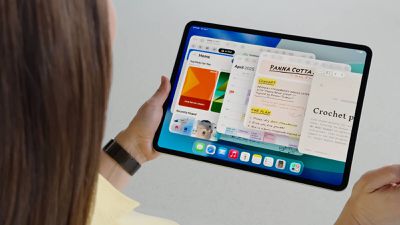
ipados 26 multitasking
‌iPadOS 26‌ allows for multiple app windows, each of which can be resized freely on the display. The feature works on all ‌iPad‌ models able to run ‌iPadOS 26‌, though there are limitations on how many apps can be open at once. On older iPads, for example, you're limited to four apps. Newer iPads can have more open app windows.

You can change the size of ‌iPad‌ app windows, move them on top of each other, and rearrange them as desired, much like on the Mac. There are also tiling options so that you can see two to four apps side-by-side, a feature that's similar to Split View.

Windows retain their positions even when you shut off your ‌iPad‌ or close an app, and you can see all of your open apps with a swipe up gesture that activates an Exposé-style view.

‌iPad‌ app windows feature the Mac traffic-light controls, and these can be used for resizing and closing apps. ‌iPad‌ apps also have Mac-style menu bars for tweaking settings, and there's a feature for running system-intensive tasks in the background.

The new multitasking feature that replaces Slide Over and Split View is much more robust, so it is unlikely that most ‌iPad‌ users are going to miss these options.
Related Roundups: iOS 26, iPadOS 26
Related Forum: iOS 26

Popular Stories

iOS 26 6 2

Apple Releases iOS 26.6.2

Tuesday September 8, 2026 10:47 am PDT by
Apple today released iOS 26.6.2 with a fix for "an issue that prevents downloading a software update over a cellular connection." The minor software update is rolling out now for the iPhone 11 series and newer. To update your iPhone, open the Settings app and tap on General → Software Update. It might take a few minutes for the update to be visible to everyone. iOS 26.6.2 arrives...
ios 26 7

Apple Releases iOS 26.7 With Security Fixes

Monday September 14, 2026 10:32 am PDT by
Alongside iOS 27, Apple today released iOS 26.7, an update to the existing iOS 26 software. Users who check for new software will see iOS 26.7 as the default update, with iOS 27 listed as an option at the bottom of the Software Update interface. According to Apple's release notes, iOS 26.7 includes security fixes, but it does not have any other features. Apple will eventually show iOS 27 ...
apple lock security bug vulnerability fix privacy

iOS 27 and iOS 26.7 Fix More Than 100 Security Bugs

Monday September 14, 2026 11:36 am PDT by
Today's iOS 27 update addresses over 100 security vulnerabilities, which is a good reason to install the new software. If you don't want to update to iOS 27 yet, Apple also released iOS 26.7 with over 80 security fixes. 75 of the fixes are shared across both updates, so iOS 26.7 addresses many of the same issues. There are multiple kernel fixes, including one that could allow a malicious...

Top Rated Comments

Apple Knowledge Navigator Avatar
17 months ago
I’m split on this one, but I’ll let it slide.
Score: 67 Votes (Like | Disagree)
klasma Avatar
17 months ago
I feel that removing Slide Over is a mistake. The new interface doesn’t seem to have a similar equivalent that would cover the same use cases.
Score: 29 Votes (Like | Disagree)
dugbug Avatar
17 months ago
I think things like slide over and their multiple difficult to discover and memorize gestures for all of that ran its course. This new system is so much more practical and discoverable.

I think the only downside is the ipad mini benefited from the slide over given space constraints.
Score: 20 Votes (Like | Disagree)
fatTribble Avatar
17 months ago
I actually use Split View a lot. I hope that functionality is just as simple to do in 26.
Score: 19 Votes (Like | Disagree)
17 months ago

Don’t think I’ve ever used Split View and slid over is useless imo glad they are getting replaced in ios26.
Split View is actually useful when using the iPad as a tablet. Hope Apple reverses courses on this one.
Score: 16 Votes (Like | Disagree)
jonnyb098 Avatar
17 months ago
Slideover has been invaluable for quick access to apps like messages or calculator. I don’t want it in its own window. I want it right there in slideover for quick access to an app and then get rid of it.

Slide over was the ONE multitasking feature they got right from the start and now they are ditching it.

Bad move Apple, bad move.
Score: 15 Votes (Like | Disagree)