iOS 26 Makes Third-Party Alarm and Timer Apps Better - MacRumorsOpen MenuShow RoundupsShow Forums menuVisit ForumsOpen Sidebar
Skip to Content

iOS 26 Makes Third-Party Alarm and Timer Apps Better

With iOS 26, Apple is adding a new AlarmKit framework for developers that offer apps with alarm clocks and timers. AlarmKit provides system-level access to alarm functionality, which was previously reserved only for Apple's Clock app.
apple alarm app
Developers will now be able to create apps that have the same feature set and permissions as Apple's built-in alarm functionality, including alerts that always activate even if Silent mode or a Focus mode is enabled, full-screen snooze and stop display options, and access to the Lock Screen, Dynamic Island, and Apple Watch.

In iOS 18 and before, developers used time sensitive alerts for alarms, and critical alerts when given the entitlement from Apple, but there was no option for an alert that can't be missed like the alerts that comes from the Clock app. There was also no Lock Screen overlay, and there were limits on the number of alarms that could be set.

Alarms from third-party apps could fail to trigger if the iPhone restarted or if the app updated, which was problematic, and alerts could be silenced with Focuses.

The new framework will support unlimited alarms and repeating options, so there won't be the same limitations there were before, and alarm alerts won't be simple notifications. In the coming months, we should see much more full-featured alarm apps and apps with timers that are able to better compete with Apple's built-in options.
apple ios 26 alarm app
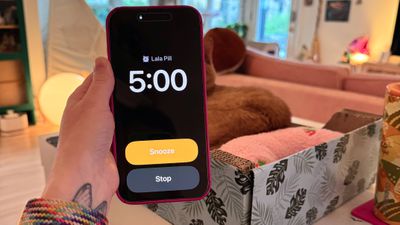
Apple's own alarm feature in the Clock app has a new look in ‌iOS 26‌, with a larger time display and larger stop and snooze buttons. Apple also now allows users to customize snooze length, choosing a length of time between 1 minute and 15 minutes. Previously, tapping snooze always snoozed an alarm for nine minutes.
Related Roundups: iOS 26, iPadOS 26
Related Forum: iOS 26

Popular Stories

iOS 26 6 2

Apple Releases iOS 26.6.2

Tuesday September 8, 2026 10:47 am PDT by
Apple today released iOS 26.6.2 with a fix for "an issue that prevents downloading a software update over a cellular connection." The minor software update is rolling out now for the iPhone 11 series and newer. To update your iPhone, open the Settings app and tap on General → Software Update. It might take a few minutes for the update to be visible to everyone. iOS 26.6.2 arrives...
ios 26 7

Apple Releases iOS 26.7 With Security Fixes

Monday September 14, 2026 10:32 am PDT by
Alongside iOS 27, Apple today released iOS 26.7, an update to the existing iOS 26 software. Users who check for new software will see iOS 26.7 as the default update, with iOS 27 listed as an option at the bottom of the Software Update interface. According to Apple's release notes, iOS 26.7 includes security fixes, but it does not have any other features. Apple will eventually show iOS 27 ...
apple lock security bug vulnerability fix privacy

iOS 27 and iOS 26.7 Fix More Than 100 Security Bugs

Monday September 14, 2026 11:36 am PDT by
Today's iOS 27 update addresses over 100 security vulnerabilities, which is a good reason to install the new software. If you don't want to update to iOS 27 yet, Apple also released iOS 26.7 with over 80 security fixes. 75 of the fixes are shared across both updates, so iOS 26.7 addresses many of the same issues. There are multiple kernel fixes, including one that could allow a malicious...

Top Rated Comments

17 months ago

I wonder why would anyone use a third party alarm app. What functionality is missing from the stock app?
I use an app called AutoSleep which has an Apple Watch alarm feature that detects what stage of sleep you’re in so it can always wake you up on light sleep, which helps you wake up less groggy and tired. Only issue (until now) was that it did it through notification alerts, which could result in missed alarms or the alarms being randomly silenced, so I always have a backup “normal” alarm in case the AutoSleep one doesn’t come through. With this AlarmKit functionality that won’t be a concern anymore.
Score: 9 Votes (Like | Disagree)
ss2cire Avatar
17 months ago
now that's nifty, I just hope games don't start using it to make sure your notifications come through even in silent mode haha
Score: 6 Votes (Like | Disagree)
klasma Avatar
17 months ago

I wonder why would anyone use a third party alarm app. What functionality is missing from the stock app?
Earlier today someone on this forum wished for an alarm that always goes off at sunset (or some fixed offset from sunset).

Someone who wants to shift their sleep rhythm might want to set an alarm that automatically shifts five minutes forward (or backward) each day.

There are plenty of things one could implement.
Score: 5 Votes (Like | Disagree)
Agent007 Avatar
17 months ago
Mid-2000's, I had a Motorola flip phone where the alarm would activate even if the phone was turned off. In those days there were SO many different handsets on the market, some with bizarre features, it was kinda cool.
Score: 4 Votes (Like | Disagree)
lellis2k Avatar
17 months ago

I wonder why would anyone use a third party alarm app. What functionality is missing from the stock app?
There’s plenty of use cases, eg cooking timers that fire off a set of alarms/timers based on one specific recipe/method
Score: 4 Votes (Like | Disagree)
17 months ago

I wonder why would anyone use a third party alarm app. What functionality is missing from the stock app?
The two use cases I want:

* set an alarm for a specific date
* set an alarm at a specific frequency eg: every second Tuesday
Score: 3 Votes (Like | Disagree)