macOS Tahoe's New Theming System Explained - MacRumorsOpen MenuShow RoundupsShow Forums menuVisit ForumsOpen Sidebar
Skip to Content

macOS Tahoe's New Theming System Explained

In macOS Tahoe, Apple introduces the concept of Themes, with new appearance settings that go beyond the traditional Light and Dark modes, allowing you to customize the look of your Mac desktop more than ever. Here's what's changed.
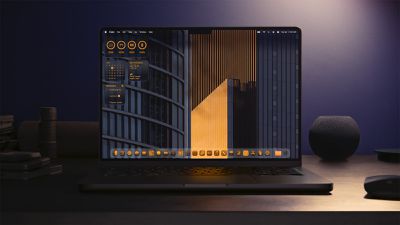
macOS Tahoe Tinted App Icons
In System Settings ➝ Appearance, there are still the standard Auto, Light, and Dark modes, but Apple has added several options that allow you to really mix things up and create your own stylized desktop environment.
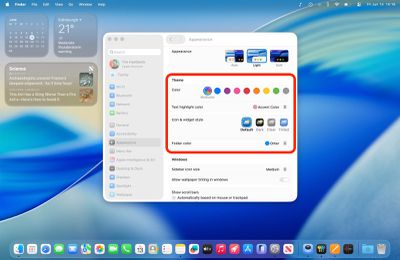
tahoe appearance 1

The new Theme section in Appearance settings

"Accent color" has become "Color," and there's a new "Text highlight color" option, so you can now make highlighted text appear in a different shade to buttons, pop‑up menus, radio buttons, checkboxes, and focused outlines.
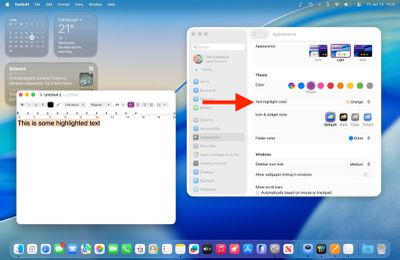
text highlight 1

The new Text highlight color option

The default setting maintains the classic macOS look with app icons displaying their original colors. But you can now customize folder colors independently through a dedicated new "Folder Color" setting. When set to Automatic, folders retain their traditional blue appearance, but switching to other colors like purple will change all folder colors system-wide.
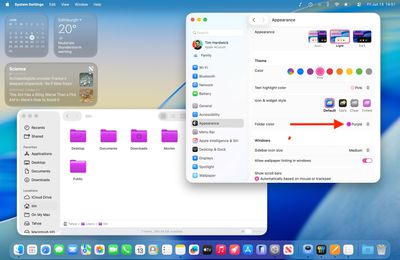
folder color 1

The new Folder color option

Meanwhile, a new "Icon & widget style" section offers three distinct modes alongside the Default. Like iOS 18, the new Dark option applies black backgrounds to icons throughout the system interface, including System Settings sidebar icons (this works in both Light and Dark modes). You can set this to Always or Automatic, which switches to dark icons at night while maintaining the default appearance during daylight hours.
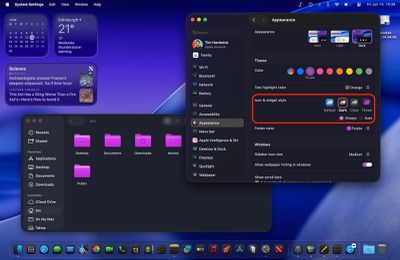
dark icons widgets macos 1

Dark icon & widget style (shown in Dark mode)

The new Clear setting emphasizes the Liquid Glass redesign and adds a new transparency by picking up background colors, creating a more translucent interface effect. Clear also includes Light and Dark variants, or it can be set to Auto for automatic day-night switching.
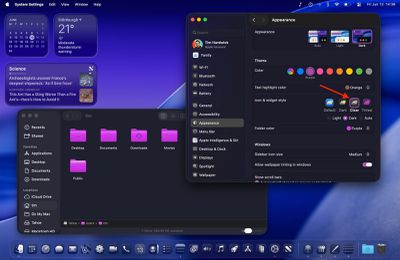
clear dark 1

The new Clear icon & widget style (shown in Dark mode)

Most notably, the Tinted option allows comprehensive color customization of both icons and folders. With "Tinted" selected, the Folder color setting becomes "Icon, widget & folder color," allowing you to select from preset colors or choose custom tints using the Other option (which includes a color picker and a theme color). Tinted mode can also be configured as Light or Dark for a more subdued appearance or set to Auto for time-based switching.
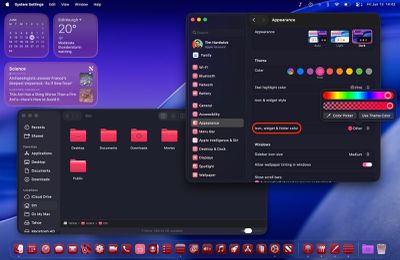
appearance tint macos 1

The new Tinted icon & widget style (shown in Dark mode)

Overall, the new Theme enhancements ensure "personalization parity" between macOS and iOS. Apple is offering unprecedented control over your desktop's visual appearance, but you still get system-wide consistency across interface elements. For added visual customization, you can even add a symbol or emoji to folders for a unique flair. What do you think of the new Theme options in macOS 26? Let us know in the comments.

Related Roundup: macOS Tahoe
Related Forum: macOS Tahoe

Popular Stories

macos tahoe

Apple Releases macOS Tahoe 26.7 and macOS Sequoia 15.8

Monday September 14, 2026 10:40 am PDT by
Alongside macOS Golden Gate, Apple today released new versions of macOS Tahoe and macOS Sequoia. macOS Tahoe 26.7 and macOS Sequoia 15.8 are available for users with older Macs or those who don't yet want to update to Golden Gate. The updates can be downloaded through the Software Update section of the System Settings app. On Macs eligible to install macOS Golden Gate, users will see both...
Apple AI Command Center Concept Mock 1 Textless

macOS Tahoe 26.7 is Full of References to Unreleased Apple Products

Monday August 17, 2026 4:50 pm PDT by
The macOS Tahoe 26.7 release candidate that Apple seeded today has references to several unreleased products, from home devices to iPhones, iPads, AirPods, and Macs. Subscribe to MacRumors on YouTube Some of these codenames have shown up in prior software updates but have new feature flags, while others haven't been seen in the code before. Home Accessories Home Hub...
apple lock security bug vulnerability fix privacy

iOS 26.6.1 and macOS Tahoe 26.6.2 Fix Nearly 30 Security Vulnerabilities

Monday August 17, 2026 12:11 pm PDT by
The iOS 26.6.1, iPadOS 26.6.1, and macOS Tahoe 26.6.2 updates Apple released today fix almost 30 security vulnerabilities, according to Apple's security support document. This is Apple's third security release in three weeks as AI surfaces bugs faster than the company's typical release schedule can absorb. Apple says the software includes security fixes that were previously added to the iOS...

Top Rated Comments

turbineseaplane Avatar
17 months ago
Can I get an entire "OS X Lion" theme?

That's what I actually want here.

MacRumors content image
Score: 39 Votes (Like | Disagree)
17 months ago
Nice to have some customisation, but damn, there are going to be some ugly desktops out there.
Score: 27 Votes (Like | Disagree)
lysingur Avatar
17 months ago
I'm not asking much—Is there an option to get this Finder icon back?


Attachment Image
Score: 18 Votes (Like | Disagree)
Oberhorst Avatar
17 months ago
What is this? Absolutely awful, who the heck "designed" this?
I hope that's just unfinished beta business. Otherwise 🤮

Attachment Image
Score: 16 Votes (Like | Disagree)
SRQrws Avatar
17 months ago
Not trying to be snarky, but I wish Apple would spend less time on stuff like this and more on fixing buggy OSs. Heck, I still can't get iCloud Drive to reliably sync across all my devices. I prefer wallpaper that doesn't distract me. I use solar gradients on my Macs and on my PC I use a solid color background.
Score: 16 Votes (Like | Disagree)
turbineseaplane Avatar
17 months ago


What is this? Absolutely awful, who the heck "designed" this?
I hope that's just unfinished beta business. Otherwise 🤮
The "everything is enclosed in a capsule" is ridiculous and wastes valuable UI space with unneeded visual clutter.

They have absolutely inept "designers" working on this.
Score: 14 Votes (Like | Disagree)