AT&T Launches Account Lock to Combat SIM Swapping Scams - MacRumorsOpen MenuShow RoundupsShow Forums menuVisit ForumsOpen Sidebar
Skip to Content

AT&T Launches Account Lock to Combat SIM Swapping Scams

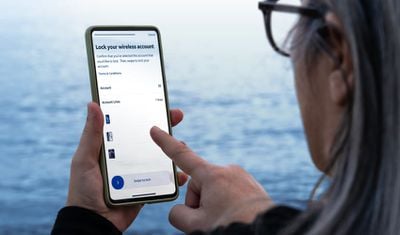
AT&T today said that customers can activate Wireless Account Lock, a new feature that will prevent unauthorized changes to a wireless account. With Account Lock turned on, account changes like billing updates and wireless number transfers are disabled.
att wireless account lock
Account Lock will protect AT&T users from SIM swapping, a technique that scammers employ to gain control of a smartphone user's phone number, and by extension, two-factor verification codes sent to that number. With SIM swapping, an attacker calls the carrier's support staff, pretends to be the smartphone user, and asks for a number transfer.

Postpaid AT&T customers can activate Wireless Account Lock from the myAT&T app. Locked features will not be accessible until the Wireless Account Lock is disabled in the app, requiring physical control for access. Here's what Account Lock prevents:

  • Upgrading a device
  • Changing a SIM card or eSIM
  • Initiating a phone number transfer
  • Adding a new line
  • Changing billing information
  • Changing authorized users
  • Changing phone numbers

There are also account locking features for enterprise customers and prepaid AT&T users.

AT&T says that it will never call or text subscribers to ask them to turn off the Wireless Account Lock feature.

Popular Stories

iphone 18 pro blue%402x

iPhone 18 Pro: Dark Cherry, Light Blue, and Dark Gray Chassis Leaked [Update]

Thursday June 4, 2026 5:18 am PDT by
Update: Since publication, new information has come to light suggesting the images have been AI-manipulated and are not in fact iPhone 18 Pro chassis parts. The original article follows. The color options Apple is reportedly planning for the upcoming iPhone 18 Pro and ‌iPhone 18 Pro‌ Max have appeared online today in the form of images of chassis parts of unknown authenticity....
Aston Martin CarPlay Ultra Screen

Apple Says CarPlay Ultra is Coming to These Vehicle Brands

Thursday May 21, 2026 11:53 am PDT by
Last year, Apple launched CarPlay Ultra, the long-awaited next-generation version of its CarPlay software system for vehicles. Nearly a year later, CarPlay Ultra is still limited to Aston Martin's latest luxury vehicles, but that should change fairly soon. In May 2025, Apple said many other vehicle brands planned to offer CarPlay Ultra, including Hyundai, Kia, and Genesis. CarPlay Ultra...
iOS 27 All the New App Features

iOS 27: All the Rumored App Features

Wednesday June 3, 2026 3:48 pm PDT by
Siri is getting a major overhaul in iOS 27, but Apple also has some big updates planned for apps like Camera, Photos, and Wallet. There are multiple new AI features in the works, plus some non-AI upgrades. Camera Apple is moving Visual Intelligence from the Camera Control button to the Camera app in iOS 27, according to Bloomberg. There will be a Siri mode that will be available alongside...

Top Rated Comments

Black_Mage Avatar
12 months ago
1) Great idea

2) Why the hell did it take so long for a carrier to figure this out?
Score: 19 Votes (Like | Disagree)
Plutonius Avatar
12 months ago
Good idea. The scammers are getting out of control.
Score: 15 Votes (Like | Disagree)
fatTribble Avatar
12 months ago

Has anyone been able to find this in the app? I don’t see the option anywhere
Turn Wireless Account Lock on or off
You can only turn Wireless Account Lock on or off using the myAT&T app. The app needs to be installed on a device that is active on your Wireless account. Download the myAT&T app now ('https://www.att.com/features/myatt-app/')

[LIST=1]
* Open the myAT&T app. Sign in, if asked.
* Select Services (second tab at the bottom).
* Choose Mobile Security, then scroll to and select Wireless Account Lock.
* Scroll to and select Continue.
* Choose the account that you want to lock or unlock.
* Swipe to lock or unlock the account.

Good to know: Any time a user turns Wireless Account Lock on or off, we’ll send an email to the primary account holder and a text message to each active wireless number on the account.


https://www.att.com/support/article/wireless/000102016/
Score: 9 Votes (Like | Disagree)
surfzen21 Avatar
12 months ago
I just ported one of my numbers out of AT&T 2 days ago.

I can confirm that even after I requested and received my port out pin and entered all the relevant info into the port in for my new service, AT&T denied the port until I confirmed that I requested it.

I received a message on the phone with the number I was trying to port out and I needed to confirm it.

I appreciate this added level of security.

Its my understanding from people in the industry that sim stealing is becoming more and more frequent. This is especially problematic when more and more people do their banking and investment management from their phones and use their number as a security check.
Score: 9 Votes (Like | Disagree)
R4z3r Avatar
12 months ago

1) Great idea

2) Why the hell did it take so long for a carrier to figure this out?
Other carriers have figured this kind of thing out. Verizon for example offers services like Number Lock and SIM protection to do this kind of thing — https://www.verizon.com/about/privacy/account-security/how-does-verizon-protect-my-account

It’s not that carriers haven’t figured this out, it’s that most customers aren’t regularly going into their wireless accounts looking for security features nor are carriers doing a good job of advertising this stuff
Score: 7 Votes (Like | Disagree)
archvile Avatar
12 months ago

It says it was announced today. Seems likely they will notify customers about the new feature.
I’ve had this feature on my account for at least 6 months, if not longer. Maybe I was lucky but I thought they rolled this out a while ago.
Score: 5 Votes (Like | Disagree)

















