

Apple Releases Sixth Public Betas of iOS 26 and More - MacRumorsOpen MenuShow RoundupsShow Forums menuVisit ForumsOpen Sidebar
Skip to Content

Apple Releases Sixth Public Betas of iOS 26 and More

Apple today released the sixth public betas of iOS 26, iPadOS 26, macOS 26, and tvOS 26, allowing the public to test the updates ahead of their September launch. The sixth public betas come a week after the fifth public betas, and the updates correspond with the ninth developer betas that were released earlier today.
iOS 26 Glass Feature
Public beta testers that have registered on Apple's website can download the latest ‌iOS 26‌, ‌iPadOS 26‌, and macOS 26 public betas by opening the Settings or System Settings app, going to the General section, tapping on Software Update, and choosing the ‌iOS 26‌, ‌iPadOS 26‌, or macOS 26 Public Beta options.

‌iOS 26‌ and ‌iPadOS 26‌ feature Apple's Liquid Glass design, with a visual aesthetic that focuses on transparency. Icons, menu buttons, navigation bars, and more reflect and refract light with subtle animations. There are pop-out menus in some areas, tab bars shrink down, and everything has a more rounded look.
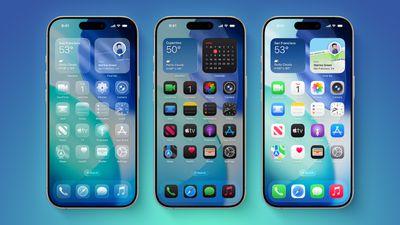
iOS 26 on Three iPhones
There are new Apple Intelligence features like Visual Intelligence for screenshots, updated order tracking in the Wallet app, new features in Reminders, and Live Translation for the Messages, Phone, and FaceTime apps. Image Playground has ChatGPT style options, and Genmoji supports mixing two or more emoji characters to make something new.
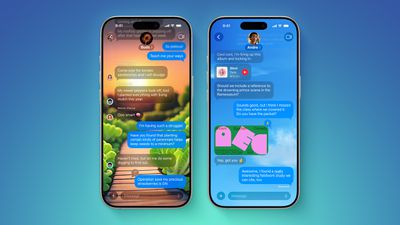
ten messages features
2D photos have a more 3D look with a Spatial Scene feature, and Safari has updated navigation. In the Phone app, there are new Call Screening and Hold Assist features that will save you time, while the Messages app supports customizable backgrounds and polls. Apple Music has a DJ-like AutoMix feature, CarPlay has an overhauled interface, there's a new Apple Games app, and Preview has come to the iPhone for the first time.
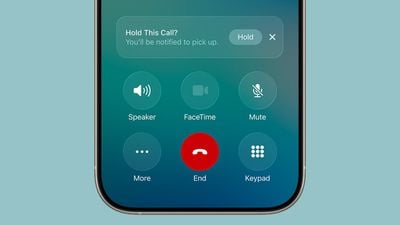
ios 26 call holding
macOS Tahoe has the same Liquid Glass design as ‌iOS 26‌, and it extends to app icons, folders, the Dock, in-app navigation, menus, the Control Center, and the Menu Bar. The Control Center and the Menu Bar are customizable, and you're also able to customize folders, app icons, and widgets.
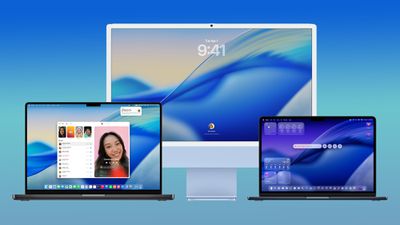
macos tahoe design
Safari has an updated tab design and a redesigned sidebar, and Apple has brought the Phone app to the Mac for making phone calls through Wi-Fi Calling. The Phone app supports the new Call Screening and Hold Assist features.

Spotlight has been overhauled with improved search and the ability to execute hundreds of actions without opening up an app. There's a new Games app with a Game Overlay feature, and developers have access to Metal 4.

More on what's new can be found in our iOS 26, iPadOS 26, and macOS Tahoe roundups.

Popular Stories

iphone 18 pro blue%402x

iPhone 18 Pro: Dark Cherry, Light Blue, and Dark Gray Chassis Leaked [Update]

Thursday June 4, 2026 5:18 am PDT by
Update: Since publication, new information has come to light suggesting the images have been AI-manipulated and are not in fact iPhone 18 Pro chassis parts. The original article follows. The color options Apple is reportedly planning for the upcoming iPhone 18 Pro and ‌iPhone 18 Pro‌ Max have appeared online today in the form of images of chassis parts of unknown authenticity....
Aston Martin CarPlay Ultra Screen

Apple Says CarPlay Ultra is Coming to These Vehicle Brands

Thursday May 21, 2026 11:53 am PDT by
Last year, Apple launched CarPlay Ultra, the long-awaited next-generation version of its CarPlay software system for vehicles. Nearly a year later, CarPlay Ultra is still limited to Aston Martin's latest luxury vehicles, but that should change fairly soon. In May 2025, Apple said many other vehicle brands planned to offer CarPlay Ultra, including Hyundai, Kia, and Genesis. CarPlay Ultra...
iOS 27 All the New App Features

iOS 27: All the Rumored App Features

Wednesday June 3, 2026 3:48 pm PDT by
Siri is getting a major overhaul in iOS 27, but Apple also has some big updates planned for apps like Camera, Photos, and Wallet. There are multiple new AI features in the works, plus some non-AI upgrades. Camera Apple is moving Visual Intelligence from the Camera Control button to the Camera app in iOS 27, according to Bloomberg. There will be a Siri mode that will be available alongside...

Top Rated Comments

CalMin Avatar
10 months ago
Question: Is it safe to load these latest betas on my only, mission critical, devices that I need for work and for life and don't have backed up? They must be stable by now right?

😇 Don't be silly! It's still a beta.
😈 Do it, do it, do it, do it...
Score: 13 Votes (Like | Disagree)
10 months ago
Hey MacRumours team , such articles would be much better if they show what’s new va the previous version
Score: 9 Votes (Like | Disagree)
ChamomileTea Avatar
10 months ago
At the current state, iOS 26 is stable from the point of view that you’re not going to lose a call or lose your work because of it, but it’s full of small bugs that spoil the experience. For example, I’m always losing the keyboard sound.
Score: 7 Votes (Like | Disagree)
10 months ago

Presently have iOS 26 PB 5 (23A530a).

Waiting for it to show up in updates so I can load
iOS 26 PB 6
onto my
iPhone 25 e.
Look at my boy here. Living in the future with an iPhone 25.

Drop me a few winning lottery numbers so I can afford an iPhone 17!
Score: 7 Votes (Like | Disagree)
jz0309 Avatar
10 months ago

Question: Is it safe to load these latest betas on my only, mission critical, devices that I need for work and for life and don't have backed up? They must be stable by now right?

😇 Don't be silly! It's still a beta.
😈 Do it, do it, do it, do it...

Is it safe? Yes, they don't bite or hurt you in any way.
Is it smart? Maybe not
Score: 6 Votes (Like | Disagree)
10 months ago
In before “battery life way better” posts
Score: 5 Votes (Like | Disagree)














