AirPods Pro 2 and AirPods 4 Get iOS 26 Features With New Firmware Update - MacRumorsOpen MenuShow RoundupsShow Forums menuVisit ForumsOpen Sidebar
Skip to Content

AirPods Pro 2 and AirPods 4 Get iOS 26 Features With New Firmware Update

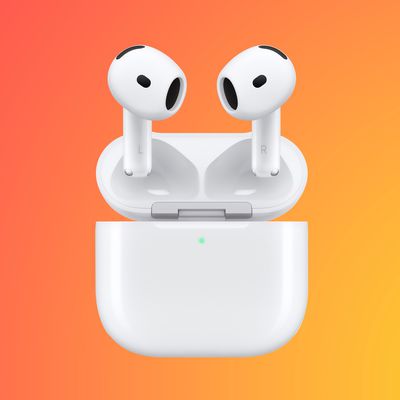
Apple today released updated firmware for the AirPods Pro 2 and the AirPods 4, introducing support for the new AirPods features that are included in iOS 26, iPadOS 26, and macOS Tahoe.
AirPods Pro Firmware Feature
The firmware has a build number of 8A356, and it replaces the current 7E93 firmware.

With Apple's new software updates, the AirPods Pro 2 and the ‌AirPods 4‌ support better audio quality for phone calls and video calls, and studio-quality audio recording for interviews, podcasts, videos, and more.

There is an option to use the AirPods as a camera remote with the Camera app to take photos or start a video recording, and you can now get the AirPods to pause audio if you fall asleep while listening. A Keep Audio in Headphones feature ensures that your music won't switch to your car when you get in, and you can now get charging reminders when your AirPods battery is low. On the ‌AirPods 4‌ with ANC and the AirPods Pro 2, Live Translation is supported.

All of these features will also be available with the new AirPods Pro 3 that are releasing on Friday, September 19.

To install the new firmware, make sure your AirPods are in range of your iPhone, iPad, or Mac. From there, put your AirPods in the Charging Case and connect the Charging Case to power. Keep the case closed and wait at least 30 minutes for the firmware update to install.


Related Roundups: AirPods 4, AirPods Pro 3
Related Forum: AirPods

Popular Stories

AirPods Pro Beta Firmware 2

Apple Releases Updated AirPods Beta Firmware With iOS 27 Features

Tuesday June 23, 2026 2:34 pm PDT by
Apple today released updated beta firmware for the AirPods Pro 2, AirPods Pro 3, AirPods 4, and AirPods Max 2. The firmware is limited to developers at the current time, and it has a build number of 9A5304b. In iOS 27, iPadOS 27, and macOS Golden Gate, Apple is adding a new AirPods interface and support for custom EQ. AirPods are also compatible with the new Siri AI. With iOS 26, iPadOS...
iOS 27 Beta Hints at New Apple Product Such as AirPods Ultra Feature

iOS 27 Beta Hints at New Apple Product Such as 'AirPods Ultra'

Friday July 3, 2026 8:44 am PDT by
The second iOS 27 developer beta seemingly hints at a new Apple product, according to code uncovered by app designer and developer Sam Henri Gold. The code mentions a product codenamed B790 that can relay "two images from cameras on either side of [a] user's head." Gold speculated that the code could be referring to Apple's rumored smart glasses, but a more likely possibility is AirPods with ...
AirPods Pro Beta Firmware 2

Apple Releases New AirPods Beta Firmware With iOS 27 Features

Tuesday July 7, 2026 11:19 am PDT by
Apple today released a third version of the beta firmware it is testing for the AirPods Pro 2, AirPods Pro 3, AirPods 4, and AirPods Max 2. The firmware is limited to developers at the current time, and it has a build number of 9A5314b. In iOS 27, iPadOS 27, and macOS Golden Gate, Apple is adding a new AirPods interface, a slider for Adaptive mode, and support for custom EQ, so the firmware...

Top Rated Comments

decypher44 Avatar
11 months ago
I really wish they’d finally allow a direct request for updated firmware instead of “plug it in and wait”.
Score: 33 Votes (Like | Disagree)
BJMRamage Avatar
11 months ago
I understand there can be Automatic (AutoMagic) updates but there really should be an Option to "Update Now"
Score: 12 Votes (Like | Disagree)
11 months ago
How very un-Apple to roll out headline features to older models. Nice one!
Score: 10 Votes (Like | Disagree)
11 months ago
You have to download the language(s) to translate from as well as the language(s) to translate to. I am trying it on a french video on YouTube translating to english (US) and it is working.
Score: 4 Votes (Like | Disagree)
11 months ago

Will the firmware updates not make my audio sound like trash when connecting to my Windows computer for work Teams meetings? Never an issue with connecting to my iPhone/iPad/MacBook/Apple Watch. Just always lousy when connected to a Windows machine (prob intentional).
The issue here, in Windows 10 & 11, is that after connecting the AP2 (and probably AP3 also) to your laptop is that Teams and other programs default to using the ‘Headset’ Bluetooth profile for microphone and speakers. You can see this in Teams device setting. This codec is ancient and really mangled the sound.

What succeeded as a workaround for me was to go into Teams and set my laptop’s microphone as the main mic. And then set the AP2 ‘headphone’ profile as the speakers. Now both my voice and others sound good.

Basically, avoid the ‘headset’ Bluetooth profile.
Score: 3 Votes (Like | Disagree)
11 months ago
I plugged my AirPods 4 ANC into my iPad via USB-C (case with pods in) and it just straight updated in a matter of minutes. Not sure if I’ve ever thought about doing that, but tried it. Updated.
Score: 3 Votes (Like | Disagree)