10+ macOS Tahoe Features You Should Check Out - MacRumorsOpen MenuShow RoundupsShow Forums menuVisit ForumsOpen Sidebar
Skip to Content

10+ macOS Tahoe Features You Should Check Out

Apple released macOS Tahoe on September 15, which means it's now available for all Macs that support it. If you didn't download the new software yet, here are some features that might entice you to upgrade.

  • Liquid Glass - ‌macOS Tahoe‌ has a whole new design, and it matches the Liquid Glass that Apple brought to iOS 26. Buttons, navigation bars, widgets, the Dock, menus, side bars, and more all have a more translucent look that reflects the background underneath and refracts light. There are new icon options, including tinted and entirely clear.
  • Customizable Control Center - You can rearrange the Control Center in ‌macOS Tahoe‌, putting what you access most often front and center. You're also able to use multiple Control Center pages, and add third-party app controls like on iOS.
  • Customizable Menu Bar - You can also rearrange the Menu Bar, plus add Control Center controls to it. Live Activities from the iPhone will also show up in the Menu Bar now through iPhone Mirroring.
  • Spotlight Redesign - Spotlight is very different in ‌macOS Tahoe‌, and it might take some getting used to. There's no more Launchpad, because the new Spotlight functionality has replaced it. There are four main Spotlight options to access apps, files, complete actions, and access the Clipboard History.
  • Clipboard - Spotlight now saves what you copy and paste, so you have a log of what you've been doing that you can go back and reference. You can see your entire history for the day, but it is limited to 24 hours.
  • Spotlight Actions - You can use Spotlight Actions to do all kinds of things without opening an app. You can send texts, emails, create shortcuts for features in apps, set timers, create Calendar events, make reminders, and much more, plus there's integration with the Shortcuts app to take things even further. There are quick access phrases you can assign to launch tasks quickly, like CH for bringing up ChatGPT.
  • Folder Customization - You can assign colors to folders, and also add an emoji or character to help you better organize your files. Folders get a color tag, which is a useful way to group things together.
  • Widgets - You can move widgets from the Notification Center to the desktop for quicker access. This works with widgets from Apple apps and from third-party apps.
  • Shortcuts - The macOS Shortcuts app supports creating automations, much like the Shortcuts app in ‌iOS 26‌. You can make Shortcuts that run at a specific time of day, with a trigger action, when an accessory connects, when an action in an app takes place, when the battery drains to a certain level, when activating a Focus mode, and more. It's super powerful when paired with Spotlight's new functionality.
  • Phone App - Apple brought the Phone app to the Mac, so you can make calls, accept calls, and use features like Hold Assist and Call Screening. You still need a connected iPhone with Wi-Fi Assist turned on.
  • Journal App - The Journal app is new to the Mac, and it makes a lot of sense on a platform that has a full keyboard. It works just like the iOS version of the app, but there are also some added features like the option to create multiple journals.
  • Games App - The Games app is also new to the Mac. It's a cross-platform app that aggregates Mac App Store games and Apple Arcade games with your own games library, plus it provides options for playing with friends. There's a new Game Overlay that lets you adjust game settings and connect with friends without exiting the game, and if you're on battery, there's a Low Power Mode so you can play longer.

Read More

For more on the new features in ‌macOS Tahoe‌, make sure to check out our roundup.

Related Roundup: macOS Tahoe
Related Forum: macOS Tahoe

Popular Stories

duo aquarium

More Fun iPhone Duo Apps: 30 New Picks to Try

Friday November 6, 2026 3:27 pm PST by
When the iPhone Duo launched, we shared a list of some of the fun apps developers created for the new form factor. Two weeks out, developers are continuing to come up with fresh ideas, so we thought we'd share some of our favorites. Games Marbles Unhinged ($2.99) - Marbles Unhinged is a marble maze designed for the Duo. When you fold it, the floor turns into a ramp. If you stand the top...
apple pro tell logo

Apple Launching Five New Products Today

Thursday November 5, 2026 12:59 am PST by
Apple is launching five new products on Friday, November 6, following pre-orders that opened last week, including its first touchscreen MacBook Pro models. The following new products will be available from today: iPad mini with OLED display and A20 Pro chip iMac with M6 chip 14-inch MacBook Pro with M6 chip 14-inch MacBook Pro with OLED touchscreen 16-inch MacBook Pro with OLED...
silver iphone 18 pro

Apple Rumored to Drop the iPhone's Action Button Next Year

Friday November 6, 2026 6:07 am PST by
Apple plans to merge the iPhone's Action button with the Camera Control starting next year, according to the leaker known as "Instant Digital." In a new post on Weibo, the leaker claimed that a single press of the combined button would open the camera, while a long press would trigger the function assigned to the Action button. They explicitly clarified that the dedicated Action button would ...

Top Rated Comments

15 months ago


* Liquid Glass - macOS Tahoe has a whole new design, and it matches the Liquid Glass that Apple brought to iOS 26. Buttons, navigation bars, widgets, the Dock, menus, side bars, and more all have a more translucent look that reflects the background underneath and refracts light. There are new icon options, including tinted and entirely clear.


After updating one of my iPhones to iOS 26, and reading the above, I can confidently say I'm skipping MacOS 26 until I'm confident all this liquid glass UI "enhancements" can be completely disabled.

This has been one of the worst aesthetic design choices I've seen Apple make. It reminds me of when Microsoft rolled out Windows Vista.
Score: 35 Votes (Like | Disagree)
AAPLGeek Avatar
15 months ago
The fact that someone at Apple is getting paid for this is beyond laughable


Attachment Image
Score: 24 Votes (Like | Disagree)
15 months ago
I find Liquid Glass to be bloated and horribly distracting on iOS, and almost as bad on Mac. Oversized tool icons, folders that adopt a color from the first tag, rounded corners that cramp toolbars. None of this is necessary and almost all of it is ugly.
Score: 22 Votes (Like | Disagree)
15 months ago
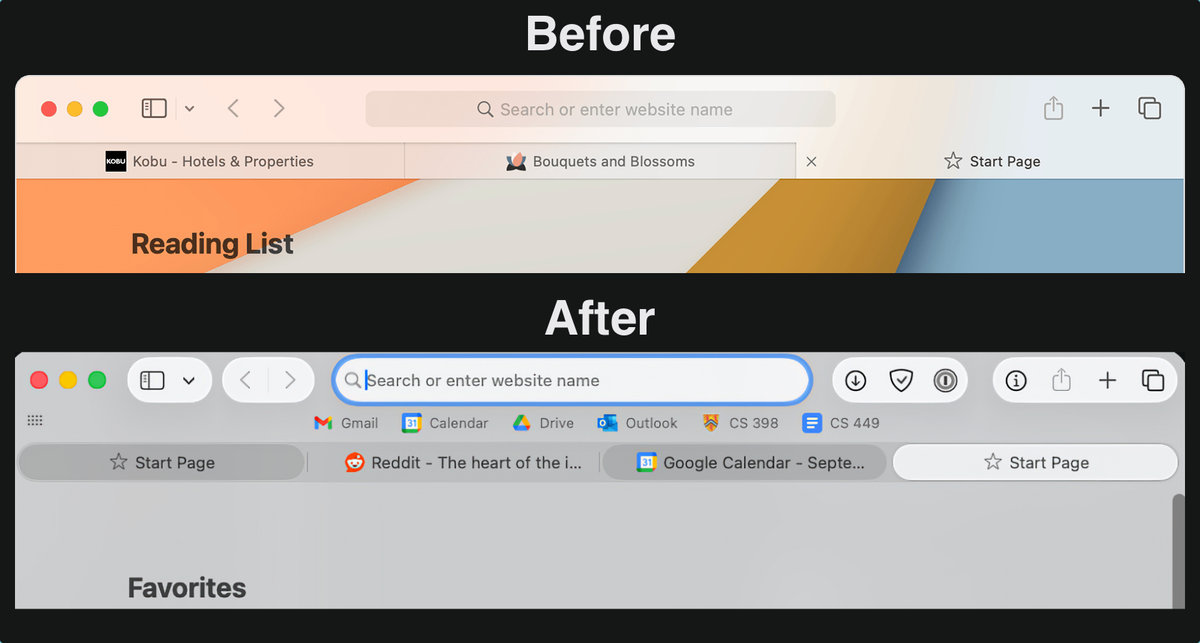
I really hate the new safari look, and also not a fan of the new app drawer. As much as I want to use the new spotlight, I might revert back to the last macos installation
Score: 22 Votes (Like | Disagree)
Will Co Avatar
15 months ago
I've just completed my updates and I'm starting to get familiarised with the new look and feel. I know that I will eventually get used to stuff, but my first impression is that Liquid Glass is dreadful. Pretty much everything that everyone else has complained about I completely agree with. Visually it is an absolute mess and a disaster. Such poor design choices from Apple, and they really do spoil the UI's in their entire range of devices.

My main gripe on iOS/iPadOS is the silly "glassy" bubble effect that attempts to simulate curved glass sliding over text, particularly on the navigator bar in most apps. Why? Just Why? It serves absolutely no useful purpose and doesn't just look bad - it's irritating. My list of other gripes is a long one.

For macOS, it's just as long. Let's start with the missing compact tabs in Safari. WTF?

I'm normally pretty laid back about this kind of stuff, but the number of bad decisions is just monumental.

Apple - please remind your designers "Just because we can do a thing - it doesn't mean we should".

Is this the worst UI I've ever seen? I think it might be. It's definitely the worst thing I've ever seen Apple do an I've been using their kit a long time.
Score: 20 Votes (Like | Disagree)
klasma Avatar
15 months ago
The best macOS feature is that you can downgrade without issues.
Score: 18 Votes (Like | Disagree)
Latest Stories
Apple Store Subscription Sign-Up Controversy Exposed
10 minutes ago
Siri AI Rumored to Become 'More Like an Agent' as Early as Next Year
10 hours ago
Apple Taking New Approach to Developing iOS 28 and macOS 28
12 hours ago
Early Apple Black Friday Deals on Apple Watch, MacBook Air, and More
1 day ago
'Backglow' Lets You Customize New MacBook Pro's Glowing Apple Logo
1 day ago
Top Stories: Apple Product Launches, iOS 27.3 Beta, and More
2 days ago
More Fun iPhone Duo Apps: 30 New Picks to Try
2 days ago
Hands-On With Apple's New OLED Touchscreen MacBook Pro
2 days ago
Apple Store With All-New Design Opening Soon in Southern California
2 days ago
Control the Glowing Apple Logo on Your New MacBook Pro
2 days ago
Apple Shares New 'Apple Card: Apply and Use in Minutes' Ad
2 days ago
Apple Says More Than 100,000 Apps Optimized for iPhone Duo, Here's What's Still Missing
2 days ago
Early Black Friday Deals Kickoff With Steep Discounts on Apple Watch Ultras and More
2 days ago
The MacRumors Show: iOS 27.3 Looks Like a Huge Update
2 days ago
Best Buy's Black Friday Event Begins With Sitewide Savings on Apple, TVs, More
3 days ago
Apple Releasing Yet Another Two New Products Next Week
3 days ago
MacBook Air Drops to Lowest Price in Months With Amazon's $250 Discount
3 days ago
Apple Rumored to Drop the iPhone's Action Button Next Year
3 days ago
Apple's Extended Return Policy Now in Effect for 2026 Holiday Season
3 days ago
Apple Music Classical Updated With New Icon and Refreshed Design
3 days ago
OLED iPad Mini, M6 iMac, and New MacBook Pros Available From Today
3 days ago
Apple Surveys iPhone Duo Buyers About Crease and Camera
3 days ago
Apple's First Touchscreen Mac is Now Arriving to Customers
3 days ago
Claude Gets Personal Finance Feature With Bank Account Linking
3 days ago
Apple Arcade Adds Crossy Road Rush and NBA 2K27
3 days ago
Apple's New HomeView Smart Home Hub: Here's How Much RAM It Has
3 days ago
iPad Mini vs. iPad Air Buyer's Guide: Now Just $50 Apart
3 days ago
First iOS 27.3 and macOS Golden Gate 27.3 Public Betas Now Available
3 days ago
Apple Announces a New Mac Sales Record
3 days ago
Paid $200 for Logic Pro? Apple Says You Won't Get This New Feature
3 days ago