

iOS 26.1 Beta 4 Lets Users Control Liquid Glass Transparency with New Toggle - MacRumorsOpen MenuShow RoundupsShow Forums menuVisit ForumsOpen Sidebar
Skip to Content

iOS 26.1 Beta 4 Lets Users Control Liquid Glass Transparency with New Toggle

With the fourth betas of iOS 26.1, iPadOS 26.1, and macOS 26.1, Apple has introduced a new setting that's designed to allow users to customize the look of Liquid Glass.
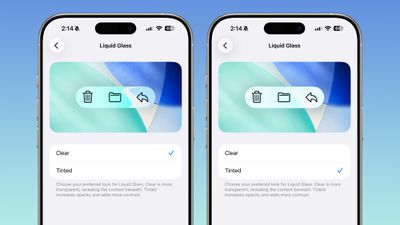
ios 26 1 liquid glass opaque
The toggle lets users select from a clear look for Liquid Glass, or a tinted look. Clear is the current Liquid Glass design, which is more transparent and shows the background underneath buttons, bars, and menus, while tinted increases the opacity of Liquid Glass and adds more contrast.

The new setting can be found on iOS and iPadOS by going to Settings > Display and Brightness, or System Settings > Appearance on the Mac.

Apple says that the new toggle was added because during the beta testing period over the summer, user feedback suggested that some people would prefer to have a more opaque option for Liquid Glass. The added setting provides additional customization in iOS 26.1, iPadOS 26.1, and macOS Tahoe 26.1.

Increasing opacity and adding contrast applies to Liquid Glass throughout the operating system, including in apps and Lock Screen notifications.

There are multiple other new features in iOS 26.1, including a new slide to stop feature for alarms and timers, new Apple Intelligence languages, a redesigned Apple TV app icon, changes to the Settings app, and more, with a full list of features available in our iOS 26.1 feature guide.
Related Roundups: iOS 26, iPadOS 26
Related Forum: iOS 26

Popular Stories

iOS 26

Apple Releases iOS 26.5.2 With Security Fixes

Monday June 29, 2026 10:21 am PDT by
Apple today released iOS 26.5.2 and iPadOS 26.5.2, minor updates to the iOS and iPadOS 26 operating systems that came out in September. iOS 26.5.2 comes a month after the launch of iOS 26.5.1, an update that added a charging fix for the iPhone Air and iPhone 17 models. iOS 26.5.2 and iPadOS 26.5.2 can be downloaded on eligible iPhones and iPads over-the-air by going to Settings > General >...
iOS 26

Apple Seeds Third iOS 26.6 and iPadOS 26.6 Betas to Developers

Monday June 29, 2026 10:10 am PDT by
Apple today seeded the third betas of upcoming iOS 26.6 and iPadOS 26.6 updates to developers for testing purposes, with the software coming two weeks after Apple seeded the second betas. Registered developers can download the betas from the Settings app on the iPhone or iPad by going to the General section and selecting Software Update. With iOS 27 set to launch in September, Apple is...
iOS 26

Apple Seeds Third Public Betas of iOS 26.6, macOS Tahoe 26.6 and More

Tuesday June 30, 2026 10:38 am PDT by
Apple today provided public beta testers with the third betas of iOS 26.6, iPadOS 26.6, macOS Tahoe 26.6, watchOS 26.6, and tvOS 26.6, with the software coming a day after Apple seeded the betas to developers. After signing up to beta test the software updates on Apple's beta site, public beta testers can download the new software using the Software Update section in the Settings app on each ...

Top Rated Comments

Innovati0n Avatar
10 months ago
Can't wait to see people somehow complain about even this.

Great addition!
Score: 39 Votes (Like | Disagree)
dannyyankou Avatar
10 months ago
Finally! I'm turning it all the way up lol
Score: 37 Votes (Like | Disagree)
10 months ago
What's with the comments about turning it up? It's a toggle, not a slider.
Score: 29 Votes (Like | Disagree)
mango316 Avatar
10 months ago
Wowww!! Apple actually listened to people request!! How shocking!!! 😱
Score: 22 Votes (Like | Disagree)
greg624 Avatar
10 months ago

Totally not necessary. Apple just needs to make a choice and stick to it.
You’re upset that Apple’s giving their users choice?


Attachment Image
Score: 19 Votes (Like | Disagree)
10 months ago

Totally not necessary. Apple just needs to make a choice and stick to it.
The fact they added it already means their analytics show a lot of people don’t like the default Liquid Glass.
Score: 16 Votes (Like | Disagree)













