Apple Again Tests Background Security Updates in iOS 26.3 and macOS Tahoe 26.3 - MacRumorsOpen MenuShow RoundupsShow Forums menuVisit ForumsOpen Sidebar
Skip to Content

Apple Again Tests Background Security Updates in iOS 26.3 and macOS Tahoe 26.3

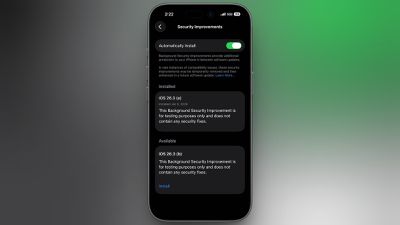
Apple is once again testing its new Background Security Improvement feature that first rolled out in iOS 26.1, iPadOS 26.1, and macOS Tahoe 26.1. Following a previous test earlier this week, developers and public beta testers who are running iOS 26.3, iPadOS 26.3, or ‌macOS Tahoe‌ 26.3 can now install a second Background Security Improvement update for testing purposes.
background security improvements 2
Apple says Background Security Improvements provide additional security protections between software updates for Safari, WebKit, and other system libraries.

Background Security Improvements can be installed by going to the Privacy and Security section of the Settings app, scrolling down to Background Security Improvements, and selecting the "Install" option. If "Automatically Install" is toggled on, Background Security Improvements will be automatically installed when they come out with no need to manually install them.

Apple says that users who opt not to install the Background Security Improvements will receive the updates in a standard software update.

Apple previously had a Rapid Security Response update feature for delivering security improvements, but it wasn't used often after it was introduced in iOS 16, and was ultimately phased out in favor of Background Security Improvements. At one point in 2023, there was a Rapid Security Response bug that prevented some websites from displaying properly.

Apple warns that Background Security Updates can result in "rare instances of compatibility issues." Should that occur, the updates may be temporarily removed and enhanced in a subsequent software update.


Related Roundups: iOS 26, iPadOS 26, macOS Tahoe
Related Forums: iOS 26, macOS Tahoe

Popular Stories

bug security vulnerability issue fix larry

Apple Fixes Possibly Exploited CoreGraphics Flaw on Older iPhones

Tuesday October 27, 2026 5:16 am PDT by
Among the flurry of iOS 27.2 releases on Monday, Apple also pushed a wave of software updates for its older operating systems, including a fix for a CoreGraphics vulnerability that Apple says may have been exploited in targeted attacks. The releases include iOS 26.7.2, iPadOS 26.7.2, iOS 18.7.11, iPadOS 18.7.11, macOS Tahoe 26.7.2, macOS Sequoia 15.8.2, and tvOS 26.6.1. iOS 18.7.11 and...
apple pro tell logo

Apple Launching Five New Products Today

Thursday November 5, 2026 12:59 am PST by
Apple is launching five new products on Friday, November 6, following pre-orders that opened last week, including its first touchscreen MacBook Pro models. The following new products will be available from today: iPad mini with OLED display and A20 Pro chip iMac with M6 chip 14-inch MacBook Pro with M6 chip 14-inch MacBook Pro with OLED touchscreen 16-inch MacBook Pro with OLED...
duo aquarium

More Fun iPhone Duo Apps: 30 New Picks to Try

Friday November 6, 2026 3:27 pm PST by
When the iPhone Duo launched, we shared a list of some of the fun apps developers created for the new form factor. Two weeks out, developers are continuing to come up with fresh ideas, so we thought we'd share some of our favorites. Games Marbles Unhinged ($2.99) - Marbles Unhinged is a marble maze designed for the Duo. When you fold it, the floor turns into a ramp. If you stand the top...

Top Rated Comments

11 months ago

I'm sorry, but based on Apple's poor software quality I do NOT ever want a security update to happen in the background or without my specific authorization.

So… turn it off?
Also, they can be removed after they are installed just so you are aware.

Score: 14 Votes (Like | Disagree)
11 months ago

But Apple is just prepping for a time when there will not be any choice. They have a constant history of removing options.

So "turn it off" works for now, but what about later?
First of all, this feature has been an iOS for four years now and you’ve always been able to turn it off, even though Apple hasn’t really used it. And they specifically state you can remove the security updates in case of compatibility issues, and you will get the security update in the future software revision.
But also… Why are you worrying about some hypothetical that might maybe possibly but also might possibly not probably won’t happen someday?
For now, they are removable, and you can turn the feature off.
If that policy changes, cross that bridge when you get to it, literally absolutely no point in fixating on it today.
It’s like the complaints in 2010 that Apple was going to make macOS “AppStore only” and your finder and terminal and all of your cool computer things are going away. It’s been 16 years and you can still download apps to your Mac from the Internet and fly through Finder and use the terminal to your heart’s content. You can even do those things at the same time..
Score: 11 Votes (Like | Disagree)
11 months ago
I'm sorry, but based on Apple's poor software quality I do NOT ever want a security update to happen in the background or without my specific authorization.

My income is based on my Apple devices working, not being bricked when I need them most.
Score: 11 Votes (Like | Disagree)
11 months ago

So… turn it off?
Also, they can be removed after they are installed just so you are aware.
But Apple is just prepping for a time when there will not be any choice. They have a constant history of removing options.

So "turn it off" works for now, but what about later?
Score: 9 Votes (Like | Disagree)
RSmith2023 Avatar
11 months ago

First of all, this feature has been an iOS for four years now and you’ve always been able to turn it off, even though Apple hasn’t really used it. And they specifically state you can remove the security updates in case of compatibility issues, and you will get the security update in the future software revision.
But also… Why are you worrying about some hypothetical that might maybe possibly but also might possibly not probably won’t happen someday?
For now, they are removable, and you can turn the feature off.
If that policy changes, cross that bridge when you get to it, literally absolutely no point in fixating on it today.
It’s like the complaints in 2010 that Apple was going to make macOS “AppStore only” and your finder and terminal and all of your cool computer things are going away. It’s been 16 years and you can still download apps to your Mac from the Internet and fly through Finder and use the terminal to your heart’s content. You can even do those things at the same time..
Some people just don’t feel right in the morning unless they wake up complaining about hypothetical things.
Score: 6 Votes (Like | Disagree)
11 months ago

Make no mistake, they really wanted to do this.

But I think they realized it would have been the end of the Mac.
And your source is?
Or is this another “just trust me bro” straw man.
Score: 6 Votes (Like | Disagree)
Latest Stories
Early Apple Black Friday Deals on Apple Watch, MacBook Air, and More
6 hours ago
'Backglow' Lets You Customize New MacBook Pro's Glowing Apple Logo
7 hours ago
Top Stories: Apple Product Launches, iOS 27.3 Beta, and More
13 hours ago
More Fun iPhone Duo Apps: 30 New Picks to Try
1 day ago
Hands-On With Apple's New OLED Touchscreen MacBook Pro
1 day ago
Apple Store With All-New Design Opening Soon in Southern California
1 day ago
Control the Glowing Apple Logo on Your New MacBook Pro
1 day ago
Apple Shares New 'Apple Card: Apply and Use in Minutes' Ad
1 day ago
Apple Says More Than 100,000 Apps Optimized for iPhone Duo, Here's What's Still Missing
1 day ago
Early Black Friday Deals Kickoff With Steep Discounts on Apple Watch Ultras and More
1 day ago
The MacRumors Show: iOS 27.3 Looks Like a Huge Update
1 day ago
Best Buy's Black Friday Event Begins With Sitewide Savings on Apple, TVs, More
2 days ago
Apple Releasing Yet Another Two New Products Next Week
2 days ago
MacBook Air Drops to Lowest Price in Months With Amazon's $250 Discount
2 days ago
Apple Rumored to Drop the iPhone's Action Button Next Year
2 days ago
Apple's Extended Return Policy Now in Effect for 2026 Holiday Season
2 days ago
Apple Music Classical Updated With New Icon and Refreshed Design
2 days ago
OLED iPad Mini, M6 iMac, and New MacBook Pros Available From Today
2 days ago
Apple Surveys iPhone Duo Buyers About Crease and Camera
2 days ago
Apple's First Touchscreen Mac is Now Arriving to Customers
2 days ago
Claude Gets Personal Finance Feature With Bank Account Linking
2 days ago
Apple Arcade Adds Crossy Road Rush and NBA 2K27
2 days ago
Apple's New HomeView Smart Home Hub: Here's How Much RAM It Has
2 days ago
iPad Mini vs. iPad Air Buyer's Guide: Now Just $50 Apart
2 days ago
First iOS 27.3 and macOS Golden Gate 27.3 Public Betas Now Available
2 days ago
Apple Announces a New Mac Sales Record
2 days ago
Paid $200 for Logic Pro? Apple Says You Won't Get This New Feature
2 days ago
Instagram's Edits Video Editor is Now Available on Mac
2 days ago
Prevent Siri and Search From Accessing Specific iPhone Apps
2 days ago
Best Early Black Friday Deals on iPhone 18 Pro and iPhone Duo
2 days ago








































