Precision Finding on Apple Watch Doesn't Work With the Original AirTag - MacRumorsOpen MenuShow RoundupsShow Forums menuVisit ForumsOpen Sidebar
Skip to Content

Precision Finding on Apple Watch Doesn't Work With the Original AirTag

A new Apple support document and our own testing has confirmed that Precision Finding on the Apple Watch Series 9 and later and Apple Watch Ultra 2 and later works with the AirTag 2, but the original AirTag is not supported.
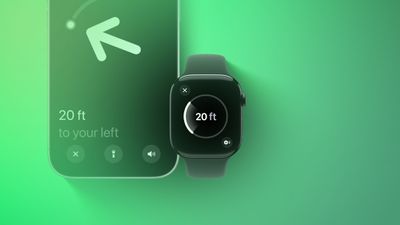
Precision Finding Apple Watch Feature
Apple has not indicated why this feature does not work with the original AirTag. However, the new AirTag is equipped with Apple's second-generation Ultra Wideband chip, while the original has Apple's first-generation Ultra Wideband chip.

Precision Finding can lead you to the exact location of an item with an AirTag attached to it, by showing you a directional arrow and your distance away from the item on a compatible iPhone, and now on a compatible Apple Watch too.

Precision Finding already existed on the above Apple Watch models for finding an iPhone 15 or newer, but there was no Precision Finding on the Apple Watch for finding an AirTag until now. As we confirmed, however, Precision Finding on the Apple Watch still does not work with the first-generation AirTag released in 2021.

To use Precision Finding to find a second-generation AirTag with a compatible Apple Watch, the watch must be running watchOS 26.2.1 or later.

How to set up the feature, according to Apple:

  1. On your Apple Watch, go to Control Center.
  2. Scroll to the bottom and tap Edit.
  3. Tap the Add button.
  4. Scroll down to Find Items.
  5. Tap Find Items, then tap Find AirTag.
  6. Tap Choose, then choose an item.
  7. Tap the Done button, then tap Done.

How to use the feature, according to Apple:

  1. On your Apple Watch, go to Control Center.
  2. Scroll down and tap the Find AirTag button.
  3. Follow the on-screen instructions and move around your space until your Apple Watch connects to your AirTag.
  4. Follow the distance and direction information on your Apple Watch. When you are close to your AirTag, the watch screen turns green.

If you have an original AirTag, you can still find it with Precision Finding on an iPhone 11 or newer.

With the AirTag 2, Precision Finding works at distances up to 1.5× farther away from an item compared to the original AirTag, but this longer range requires an iPhone 15 or newer, Apple Watch Series 9 or newer, or Apple Watch Ultra 2 or newer.

To learn more about the new AirTag, read our coverage of Apple's announcement.

Related Roundups: AirTag, Apple Watch 11

Popular Stories

youtube iphone apple watch health ad 2026

New Apple Ad Sells the iPhone and Apple Watch Health Pairing

Thursday April 23, 2026 11:18 am PDT by
Apple has published a new ad to appeal to customers in the market for an iPhone and Apple Watch pairing, highlighting the insights it can offer for your health. Titled simply "Health with iPhone + Apple Watch," the half-minute ad focuses on a woman waiting in line at a cafe who begins receiving unsolicited health and fitness advice from other people in the queue, as well as local residents,...
watchos 26 gradient light

This New Apple Watch Face Is Coming in watchOS 26.5

Friday April 24, 2026 5:51 am PDT by
iOS 26.5 and watchOS 26.5 will have a new Pride Luminance wallpaper and Apple Watch face when the updates are released in the coming weeks, according to Bloomberg's Mark Gurman. In a brief tweet, Gurman revealed that Pride Luminance will "Celebrate the vibrancy and individuality of the LGBTQ+ community and customize your watch face with colors from Pride flags." iOS 26.5 has been in...
modular ultra training load

watchOS 27 to Offer New Watch Faces, Including 'Modular Ultra' Variant

Monday May 4, 2026 5:58 am PDT by
For watchOS 27, Apple is testing new Apple Watch faces, and one of them is a simpler version of an existing Apple Watch Ultra watch face that could be coming to standard Series models. Writing in his latest Power On newsletter, Bloomberg's Mark Gurman reports that Apple is testing multiple new faces for watchOS 27, code-named "Orchid." One of them is said to be a "simplified take" on the...

Top Rated Comments

16 weeks ago

can someone explain why you'd use your watch and not your phone?
Your watch is on your actual wrist and with you at all times. That's like saying, "Why use an Apple Watch? Your phone tells the time."
Score: 14 Votes (Like | Disagree)
16 weeks ago
I wish I could say, if not a bug, I’m shocked. /s
But I’m not and you shouldn’t be either
Score: 7 Votes (Like | Disagree)
16 weeks ago

Your watch is on your actual wrist and with you at all times. That's like saying, "Why use an Apple Watch? Your phone tells the time."

Not everyone has an iPhone with an Ultra Wideband chip in it but many have an Apple Watch with it.

I’ve run into this scenario many times. Kids take the phone and I’m scrambling to find my AirTagged keys. HomePod is hit or miss so having the ability to use my Watch would be a plus with all our existing tagged items.
All good points - i guess since we never had the functionality, it seems strange to me.
Score: 4 Votes (Like | Disagree)
16 weeks ago
Got my new tag today.

Apple Watch and iPhone updated.

Precision finding works fine from iphone.

From an Apple Watch, if you find via the ‘find items” app then it doesn’t do precision find. If you use control center (add the option to find a tag) then it does.

I can’t help but think the watch update is a bit half baked.
Score: 3 Votes (Like | Disagree)
16 weeks ago

Not sure whether there is any relation between the new chip and software compatibility issues. However not surprised. It might be also that Apple wants customers to buy the newer version of AirTag.
Locking new software features behind hardware upgrades has been Apple's M-O forever.

Remember when pre-M1 iPads couldn't handle Stage Manager...until they could?

It's quite difficult to believe that the Apple Watch S9 and newer SoC that has the U2 UWB chip can work with second-generation AirTags with a simple software update, but that it can't be made to work with first-generation AirTags even though both have a UWB chip, 1st gen AirTag Precision Find My works with iPhones that only have a U1 chip, and the Watch and AirTag can receive firmware updates over the air.
Score: 3 Votes (Like | Disagree)
hagjohn Avatar
16 weeks ago
Probably because of the second-generation Ultra Wideband chip, is more precise.
Score: 3 Votes (Like | Disagree)