

Vivaldi 7.9 for Desktop Adds Auto-Hide UI for Distraction-Free Browsing - MacRumorsOpen MenuShow RoundupsShow Forums menuVisit ForumsOpen Sidebar
Skip to Content

Vivaldi 7.9 for Desktop Adds Auto-Hide UI for Distraction-Free Browsing

Vivaldi this week released version 7.9 of its desktop browser, which includes a new UI Auto-hide feature that clears the entire browser interface from view while you read, watch, or work.
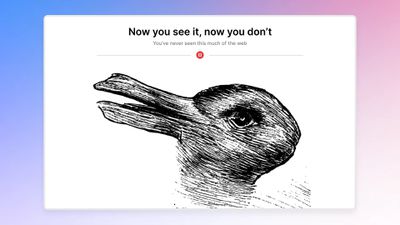
vivaldi auto hide ui
When enabled, UI Auto-hide removes the tab bar, address bar, toolbars, and status indicators from the screen entirely, and moving the cursor to any edge of the window brings everything back instantly.

The feature can be configured to hide only specific elements like the tab bar, the address bar, or the full set of chrome all at once. UI Auto-hide can be toggled via the keyboard shortcut Command-F10, or through a new icon in the status bar. All available options live under Settings ➝ Appearance ➝ UI Auto-hide.

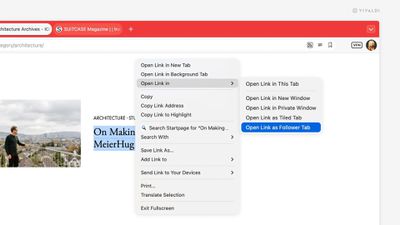
This update also introduces Follower Tab, which is designed to let users explore links without losing their place on the current page.
7
Right-clicking a link gives you the option to open it as a tiled Follower Tab, which loads the linked page side by side with the original. Subsequent links clicked in the original tab continue opening in the follower pane, while the source page stays pinned in place.

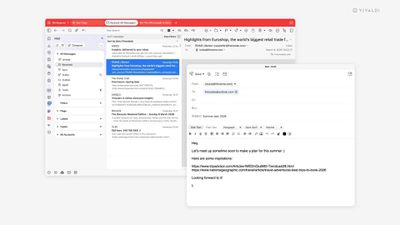
Vivaldi's built-in email client also gains several improvements in the v7.9. The mail composer can now be popped out into its own independent window, making it easier to draft messages alongside the inbox or on a second monitor.

Meanwhile, a new toggle lets you switch between rich text and plain text within the composer. Vivaldi says memory usage in the mail list has also been reduced, which should help performance on larger inboxes. Mailing list reply routing has apparently been improved as well, and users can now save selected messages directly to disk.
7
Vivaldi 7.9 is a free download for Mac, Windows, and Linux from the Vivaldi website. As with previous versions, the browser ships with built-in ad and tracker blocking, extensive tab management tools, and support for Chrome extensions.


Tag: Vivaldi

Popular Stories

iOS 27 Next to iPhone

Here's When iOS 27 Rolls Out Today in Every Time Zone [Update: It's Out]

Sunday September 13, 2026 3:00 am PDT by
Update 10:04 a.m.: iOS 27 is rolling out now, though it may take a bit for all users to see it, so keep checking! Apple is about to release iOS 27, which will finally deliver more advanced Siri AI capabilities as well as a variety of other refinements, improvements, and new features to iPhones. It's Apple's biggest software update of the year, and Apple announced at Wednesday's iPhone event...
iOS 27 Icon iPhone

iOS 27 Available Now With These 8 New Features

Monday September 14, 2026 9:00 am PDT by
Update — 10 a.m. Pacific Time: Apple has released iOS 27. During its iPhone 18 Pro and iPhone Duo event last week, Apple announced that iOS 27 will be released widely on Monday, September 14. iOS 27 should be available around 10 a.m. Pacific Time / 1 p.m. Eastern Time today via the Settings app, under General → Software Update. Below, we have highlighted eight new features and...
Apple iCloud Plus expansion hero

iCloud+ Now Includes Apple TV, Apple Arcade, and Curated Apple Music Stations in Over 100 Countries

Tuesday September 15, 2026 1:43 am PDT by
Apple today announced a new subscription initiative that turns paid iCloud+ subscriptions into a broader services bundle in more than 100 countries. In select countries, Apple says every paid iCloud+ plan, including the cheapest 50GB tier, now includes Apple TV and Apple Arcade "at no additional cost," while family sharing extends the storage, TV and Arcade access to up to five people....

Top Rated Comments

knappeduivel Avatar
26 weeks ago

Stop with new browsers, we stay with safari !
I stick with Netscape Navigator thank you
Score: 13 Votes (Like | Disagree)
26 weeks ago
I'm envisioning a modern nightmare web page full of blinking ads and popovers everywhere... but no toolbar at the top...

"Ah, now I can really focus on the content"
Score: 10 Votes (Like | Disagree)
mazz0 Avatar
26 weeks ago

probably it's just me, but I think the term "window manager" implies the existence of windows, that might be dragged around. now, FWIW I can't understand why a 8-10mm window header is so disruptive that certain browsers either omit it completely or force the tab bar to double as window header - making it close to impossible to move w/o switching to a different tab or trying to aim into those few pixels between some flat UI elements.
if I'd want to have no distractions, I might just run the app in full screen - but this is a computer and not an entertainment device with some level of multitasking capabilities.
so if we have windows, we might just keep the window control surfaces in case some wants to move them.
Yep, I don't get this obsession with hiding window Chrome. Apple themselves do it sometimes - eg either the iPhone Mirroring app.

I also hate the modern trend towards UI elements that appear on mouse-over. The number of times I've attached an emoji to a message in Teams because I was trying to select text in the message above it...
Score: 7 Votes (Like | Disagree)
embraceware Avatar
26 weeks ago
It's worth noting that Safari can already provide part of this experience. In full-screen mode, if you turn off "Always Show Toolbar in Full Screen," the UI will auto-hide, which fits nicely with the whole distraction-free idea. Of course, I understand the other browser offers many additional features beyond that.
Score: 7 Votes (Like | Disagree)
swm Avatar
26 weeks ago
probably it's just me, but I think the term "window manager" implies the existence of windows, that might be dragged around. now, FWIW I can't understand why a 8-10mm window header is so disruptive that certain browsers either omit it completely or force the tab bar to double as window header - making it close to impossible to move w/o switching to a different tab or trying to aim into those few pixels between some flat UI elements.
if I'd want to have no distractions, I might just run the app in full screen - but this is a computer and not an entertainment device with some level of multitasking capabilities.
so if we have windows, we might just keep the window control surfaces in case some wants to move them.
Score: 7 Votes (Like | Disagree)
teaneedz Avatar
26 weeks ago
when I left Firefox during its AI fiasco and tone-dead community responses, I discovered Vivaldi and haven't looked back. I appreciate their business ethics and focus on user-experience. it's a great browser if you haven't v tried it and has an iOS version with encrypted sync to keep it all together.
Score: 3 Votes (Like | Disagree)













