macOS Tahoe 26.4 Adds Slow Charger Indicator for MacBooks - MacRumorsOpen MenuShow RoundupsShow Forums menuVisit ForumsOpen Sidebar
Skip to Content

macOS Tahoe 26.4 Adds Slow Charger Indicator for MacBooks

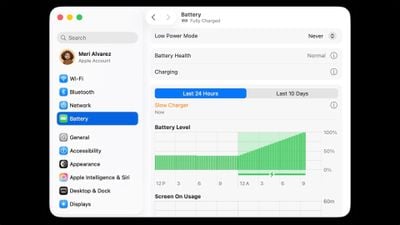
macOS Tahoe 26.4 includes a new slow charger indicator that tells MacBook users when their charging setup isn't delivering full power.
macos slow charger warning%402x
As described in an updated Apple support document, a "Slow Charger" label now appears in orange text in the battery status menu and above the Battery Level graph in Battery settings. The indicator is accompanied by an info button for more details.

Apple says that to charge more quickly, users should use a power adapter and cable that deliver at least the minimum wattage recommended for their MacBook model.

The feature is similar to one Apple added to iPhone with iOS 18, where periods of slow charging appear as an orange bar in the Battery section of the Settings app.

The slow charger indicator is one of two battery-related changes in macOS 26.4. The update also adds a Charge Limit feature that lets MacBook users set a maximum charge level anywhere from 80 to 100 percent, with the aim of preserving long-term battery health.

macOS Tahoe 26.4 is available now via System Settings ➝ General ➝ Software Update.

Related Roundup: macOS Tahoe
Related Forum: macOS Tahoe

Popular Stories

iOS 28 AI

Apple Taking New Approach to Developing iOS 28 and macOS 28

Sunday November 8, 2026 7:42 am PST by
Apple has made a change to its development process for iOS 28, macOS 28, and corresponding software updates, according to Bloomberg's Mark Gurman. In his Power On newsletter today, he said Apple separates development of each year's new operating systems into three major stages. Typically, he said each stage consists of four weeks of coding followed by a four-week "convergence" period where...
apple pro tell logo

Apple Launching Two More New Products This Friday

Monday November 9, 2026 4:22 am PST by
The Apple launches keep coming! The company is set to release two new products on Friday, November 13: the all-new Apple HomeView and the fourth-generation Apple TV 4K, both of which have been available to pre-order since mid-October. Apple HomeView: Apple's new smart home display, powered by Apple Intelligence with Siri AI, for entertainment and managing the home. Available in tabletop and...
duo aquarium

More Fun iPhone Duo Apps: 30 New Picks to Try

Friday November 6, 2026 3:27 pm PST by
When the iPhone Duo launched, we shared a list of some of the fun apps developers created for the new form factor. Two weeks out, developers are continuing to come up with fresh ideas, so we thought we'd share some of our favorites. Games Marbles Unhinged ($2.99) - Marbles Unhinged is a marble maze designed for the Duo. When you fold it, the floor turns into a ramp. If you stand the top...

Top Rated Comments

M4irmidnight Avatar
8 months ago

macOS Tahoe 26.4 includes a new slow charger indicator that tells MacBook users when their charging setup isn't delivering full power.

MacRumors content image

As described in an updated Apple support document ('https://support.apple.com/en-us/102397'), a "Slow Charger" label now appears in orange text in the battery status menu and above the Battery Level graph in Battery settings. The indicator is accompanied by an info button for more details.

Apple says that to charge more quickly, users should use a power adapter and cable that deliver at least the minimum wattage recommended for their MacBook model ('https://support.apple.com/en-us/109509').

The feature is similar to one Apple added to iPhone with iOS 18 ('https://www.macrumors.com/2024/06/11/ios-18-slow-charger-battery-settings/'), where periods of slow charging appear as an orange bar in the Battery section of the Settings app.

The slow charger indicator is one of two battery-related changes in macOS 26.4. The update also adds a Charge Limit feature ('https://www.macrumors.com/2026/02/16/mac-charge-limit-macos-tahoe-26-4/') that lets MacBook users set a maximum charge level anywhere from 80 to 100 percent, with the aim of preserving long-term battery health.

macOS Tahoe 26.4 is available now via System Settings ➝ General ➝ Software Update.

Article Link: macOS Tahoe 26.4 Adds Slow Charger Indicator for MacBooks ('https://www.macrumors.com/2026/03/25/macos-tahoe-26-4-slow-charger-macbooks/')
I wish MagSafe would turn green once it’s hit the desired charge limit, rather than staying orange.
Score: 11 Votes (Like | Disagree)
needsomecoffee Avatar
8 months ago
Why did Apple hide setting the charge level action behind the information button ?? Also, setting mine to 80% was my first encounter with the "glass" slider control. Do not care so to criticize too much about Liquid Glass or 26 overall (run with transparency down and contrast up). However, the way the slider control turns to this transparent, barely visible, glass object really threw me at first. Very, very unintuitive. Hiding the battery level charger set-level action in an information dialog, though, is the worst UI decision I can recall. The slider button... sort of the cherry on top of the cake. Is this Craig's cake?? Who owns these decisions?? HTH, NSC

Score: 10 Votes (Like | Disagree)
Apple_Robert Avatar
8 months ago
Nice feature. I just wish Apple did a better job of not burying features behind menus and make it more intuitive where things are.
Score: 8 Votes (Like | Disagree)
Agent007 Avatar
8 months ago

the worst UI decision I can recall
IMO not as bad as the ENTIRE settings panel being a narrow, iOSified joke. Many UI sacrifices made for no apparent gains other than "it feels new cause it's different".
Score: 7 Votes (Like | Disagree)
turbineseaplane Avatar
8 months ago
Ironically, it also has a “garbage interface” indicator…

Known as liquid glass
Score: 5 Votes (Like | Disagree)
davidg4781 Avatar
8 months ago

*UPDATE*

I have Optimized Battery Charging - enabled. I have put charge limit to 80% (Option available thanks to the MacOS Tahoe 26.4 update)

So I shutdown my MacBook Pro and charge it. Its battery level was at 65%

After I'd say 45 minutes of charging, I boot up MacBook Pro and it's now at 100%

So it didn't respect my charge limit. UNLESS...

I suspect that Apple rather wants us to use the sleep mode function than shutdown so the charge limit can work?
I believe macOS has to be running to know to limit the charging to 80%. I noticed when I updated my iPhone last night, it was charged to 85%. I'm assuming while it was updating, iOS wasn't running to limit the charging so it just charged up.

Now I'm curious about what happens when it hits 80%. Does the macOS go into bypass mode and just power from the charger, leaving the battery to sit there? Is that better for battery life/cycle count? It will still drain but slightly.
Score: 3 Votes (Like | Disagree)
Latest Stories
Here's What Apple Fixed in iOS 27.2.1 and macOS 27.2.1
4 hours ago
Webex Gets iPhone Duo Support
5 hours ago
Meta's Muse AI Agent Comes to Apple Watch
6 hours ago
Anker Launches Eufy Security Cam With Auto-Tracking Light
6 hours ago
macOS 27.2.1 Fixes eMudhra Certificate Flaw in Command-Line Tools
7 hours ago
Anthropic Launches Claude Fable 5.2 and Mythos 5.2
8 hours ago
Apple Releases macOS Golden Gate 27.2.1
9 hours ago
Apple Releases iOS 27.2.1 With Bug Fixes
9 hours ago
Apple Releases watchOS 27.2.1 and visionOS 27.2.1 With Security Fixes
9 hours ago
Apple Watch Ultra 4 Gets $99 Amazon Discounts, Starting at $699.99
9 hours ago
Apple Pay Ad Features Martial Arts Convenience Store Food Fight
10 hours ago
Apple Continues to Say Some AI Features Will Have Fees for Extra Usage
10 hours ago
Apple Announces Türkiye Expansion Plans as Tim Cook Visits
11 hours ago
Singapore Saved Apple $2.7 Billion in Taxes This Year
11 hours ago
Apple Music's 2026 Artist of the Year is Olivia Dean
11 hours ago
This Could Be Your Last Chance to Pre-Order the HomeView at a Discount
12 hours ago
Some HomePod Mini 2 Buyers Returning Units Over Mac Speaker Issues
12 hours ago
MacBook Pro With PROLED XDR Display: Details You Might Have Missed
12 hours ago
Satechi Offers MacRumors Readers 30% Off Select Accessories in Early Black Friday Sale
12 hours ago
Leaker Envisions a Shorter iPhone With a New iOS Layout
13 hours ago
Apple to Give You More Control Over When Your Mac Passwords Lock
14 hours ago
Siri Is Getting a Better Memory
14 hours ago
iPhone 18e Could Feature Bigger Display and Battery
15 hours ago
Apple's Siri Boss May Leave - Here's Who Could Take Over
15 hours ago
Apple Launching Two More New Products This Friday
15 hours ago
Apple Store Subscription Sign-Up Controversy Exposed
1 day ago
Siri AI Rumored to Become 'More Like an Agent' as Early as Next Year
1 day ago
Apple Taking New Approach to Developing iOS 28 and macOS 28
2 days ago
Early Apple Black Friday Deals on Apple Watch, MacBook Air, and More
2 days ago
'Backglow' Lets You Customize New MacBook Pro's Glowing Apple Logo
2 days ago