

iOS 27 Tidbits: Share a Phone Number on Two iPhones, Independent Alarm Volume, Faster AirPlay and More - MacRumorsOpen MenuShow RoundupsShow Forums menuVisit ForumsOpen Sidebar
Skip to Content

iOS 27 Tidbits: Share a Phone Number on Two iPhones, Independent Alarm Volume, Faster AirPlay and More

At the WWDC 2026 keynote, Apple detailed iOS 27 changes like a new version of Siri with a dedicated ‌Siri‌ app and Apple Intelligence features across multiple apps, but there are dozens of smaller but still important changes that Apple didn't have time to go through.
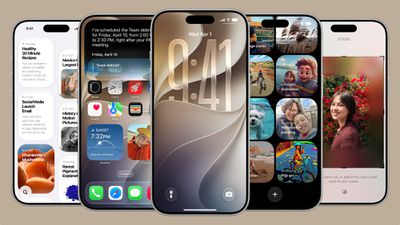
ios 27
Apple shared an image summarizing some of the bug fixes and optimizations it made in ‌iOS 27‌, iPadOS 27, and macOS 27, and there are some interesting changes.

apple keynote changes scaled

Dual Phone Numbers

Apple says you'll be able to switch between two iPhone devices with the same phone number, which presumably means you can set up two iPhones with one number and then swap between them as needed. It could work similar to how an iPhone and Apple Watch can share the same phone number. It should be a useful change for anyone who wants to get a foldable iPhone and a standard iPhone 18 Pro this year.

Sharing numbers between two iPhones may require carrier support, so it's not clear if it's implemented in the beta.

Two FaceTime Cameras

Dual camera in FaceTime is a listed feature, and that likely means you'll be able to use the front and back cameras at the same time during ‌FaceTime‌ calls.

Faster AirPlay and AirDrop

AirPlaying content to the HomePod and Apple TV is faster than before thanks to multiple system improvements. AirDrop transfers from the iPhone to other devices are also faster, and it's quicker for an iPhone to find nearby AirDrop recipients.

Messages Drawing App

There's a drawing app in Messages where you can handwrite a message or draw a picture. It uses the same drawing tools that are available in the Notes app or when annotating images.

Extra Large Widgets

There's a new extra large widget size you can select on the iPhone's Home Screen. The extra large size takes up an entire app page and displays more information from an app.

Shared Album Expirations

You can now set a shared photo album to expire after a set time, so it doesn't exist indefinitely.

Independent Alarm Volume

Alarm volume can be controlled separately from system volume, as can alerts and system sounds. In Settings > Sounds & Haptics, there are toggles to match Alarms, Timers, Alerts, and System Sounds to Ringtone Volume or to decouple them. Toggling off the match option lets you select a preferred volume level for alarms and system sounds.

Markdown in Notes

You can now copy and paste Markdown in the Notes app.

Save a Video Frame

There's a new option to save a video frame as a photo in the Photos app.

Weather

The Weather app has a "Highlights" view with at-a-glance information, plus it includes updated hourly and 10-day views for precipitation and wind speed.

Other iOS 27 Optimizations and Changes

  • Faster message loading in Mail
  • Enhanced Safari power efficiency
  • Improved battery insights
  • Smoother scrolling in App Library
  • Smoother unlocking on iPhone
  • New AutoMix transitions in Apple Music
  • Faster HomeKit accessory pairing
  • Faster start page loading in Safari
  • More accurate Visited Places in Maps
  • Improved Messages syncing across devices
  • More power efficient personal hotspot on devices with N1 chip
  • Failed messages will automatically try resending
  • Improved Bluetooth power management
  • Support for time zone changes in Sleep
  • Improved unread badge accuracy in Mail

These are just some of the improvements and changes that Apple has introduced in ‌iOS 27‌. We'll be sharing more new features in ‌iOS 27‌ as they're discovered by the community. The ‌iOS 27‌ beta is available for developers right now, with Apple planning to introduce a public beta in July. ‌iOS 27‌ will launch this fall.

Related Roundup: iOS 27

Popular Stories

google gemini intelligence

Google Previews Android 17 With 'Gemini Intelligence' a Month Before Apple's iOS 27 Reveal

Tuesday May 12, 2026 12:21 pm PDT by
Google today previewed Android 17, the next version of Android that it is bringing to smartphones and other devices. Android 17 includes multiple new AI features, and it comes about a month ahead of when Apple plans to unveil iOS 27 with new AI capabilities. Google is now calling the AI features on Android "Gemini Intelligence," branding similar to Apple Intelligence. Google said it is...
iOS 27 on iPhone 17 1

iOS 27 to Bring Customizable Camera App, Tweaks to Weather, Safari and Liquid Glass

Tuesday May 12, 2026 1:12 pm PDT by
Apple plans to make the Camera app more customizable in iOS 27, reports Bloomberg. Users will be able to select the features they want to see in the Camera app, like flash, exposure, timer, depth of field, photo styles, and resolution. Camera controls, labeled as widgets, will be able to be placed at the top of the Camera interface in any order. Users will be able to select widgets from a...
Finder Siri Feature

iOS 27 Getting Major Siri Redesign With Chat Interface and Dedicated App

Tuesday May 12, 2026 1:38 pm PDT by
Apple is introducing an overhauled version of Siri in iOS 27, evolving the personal assistant into a more capable chatbot and AI agent able to compete with ChatGPT, Claude, and Gemini. With Siri's transition, Apple will be making multiple Siri-related design changes in iOS 27, according to a new report from Bloomberg. Siri will largely live in the Dynamic Island in iOS 27, but there will also be...

Top Rated Comments

gsmornot Avatar
22 hours ago at 03:28 pm
I'm interested to see more about the two phones. I know the iPhone Air is not as popular as expected but I would really like to have one of those in addition to my heavier Pro for the times I really dont want to mess with my phone but still have it with me. Gym shorts with a Pro vs Air, I could see the benefits.
Score: 15 Votes (Like | Disagree)
ErikGrim Avatar
20 hours ago at 05:43 pm
1. Performance & Speed Improvements 🚀
A huge portion of the list is Apple polishing existing experiences:


* Faster message loading in Mail
* Faster network file browsing
* Faster Safari page loading
* Faster HomeKit accessory pairing
* Faster app launches in tvOS
* Faster media playback in watchOS
* Faster lock screen switching
* Faster browser transfers in Files
* Faster uploads to iCloud Photos
* Faster PDF saving
* Faster Apple Music playback start
* Faster Return to Service
* Faster start-page loading in Safari
* Faster shortcut indexing in Spotlight

Theme: Less waiting, more responsiveness across the entire ecosystem.

[HR][/HR]
2. Apple Intelligence & Smarter Suggestions
Lots of subtle AI-powered enhancements:


* More relevant Spotlight suggestions
* Natural language search in Maps
* Natural language reminder categorisation
* Better photo recipient suggestions
* Search by phone number/contact metadata in Messages
* Improved typing predictions
* Smarter Smart Stack suggestions in watchOS
* On-screen context suggestions for Chinese/Japanese typing
* Improved photo search
* Content-based sharing suggestions

Theme: Apple Intelligence becoming embedded everywhere rather than appearing as one big feature.

[HR][/HR]
3. Photos & Shared Albums 📸
Photos received an enormous number of upgrades:

Organisation

* Filter photos/videos in Shared Albums
* Captured By Me collection
* Album organisation improvements
* Improved photo search
* Improved people and pets recognition

Sharing

* Shared Album participation from Android and Windows
* Additional participant permissions
* Easier invites
* Expanded iCloud Shared Albums support

Editing & Viewing

* Full-resolution shared album photos
* Custom slideshows
* Save slideshow as video
* Save video frame as photo
* Richer collaboration previews

Metadata

* Keywords in Photos
* Identify Documents collection
* More accurate photo date handling

Theme: Photos becomes more collaborative and easier to organise.

[HR][/HR]
4. Messages, FaceTime & Communication 💬
Messages

* Improved syncing
* Better attachment handling
* Failed-message retries
* Poll options
* Multiple Tapback notifications consolidated
* Emoji reactions in Shared Albums
* Improved recipient discovery

FaceTime

* Dual-camera support
* Better quality on poor connections
* FaceTime Live Captions (Traditional Chinese)
* Faster FaceTime launching

Phone & Calling

* Call Recording transcription support
* Better spam/contact identification
* Better multilingual communication tools

[HR][/HR]
5. Maps & Navigation 🗺️
Maps quietly gained a lot:


* Offline map improvements
* More accurate visited places
* Guides in more locations
* Enhanced Flyover
* Natural language routing search
* Better GPS accuracy in CarPlay
* Expanded map availability
* Alternate calendars while travelling
* Improved route maps in Fitness

Theme: Maps becomes more useful internationally.

[HR][/HR]
6. Health & Fitness ❤️
A particularly strong area this release.

Health

* Perimenopause tracking
* Perimenopause education
* Symptom logging
* Better Health app updates

Fitness

* Better workout summaries
* Synced step counts
* Fitness+ improvements
* More accurate route tracking
* Workout app updates

Watch

* Better activity tracking
* Better emergency monitoring
* More Apple Watch battery efficiency

Theme: Significant focus on women’s health and watch-based wellness tracking.

[HR][/HR]
7. Apple Watch & watchOS ⌚
Beyond fitness:


* Dynamic app grid
* New Smart Stack suggestions
* Transit cards in Smart Stack
* Guest key support
* Faster media playback
* Live Activities support
* Better notification handling
* View card balance in Wallet
* Better weather views
* Improved watchOS Control Centre responsiveness

[HR][/HR]
8. Home, HomeKit & Smart Home 🏠
Apple continues its Matter/HomeKit push:


* Faster HomeKit pairing
* Improved Thread connectivity
* More HomeKit camera storage
* Camera streams viewed simultaneously
* Improved accessory updates
* Better Personal Hotspot efficiency
* Switch between iPhones sharing a phone number
* Better smart-home accessory performance

Theme: Reliability improvements rather than flashy new features.

[HR][/HR]
9. Music, Podcasts & Media 🎵
Apple Music

* AutoMix transitions
* Refreshed album pages
* Refreshed artist pages
* More reliable streaming
* Faster playback start

Podcasts

* Search within shows
* Updated video podcast experience

Playback

* Web audio no longer interrupts system audio
* Better CarPlay scrubbing
* Better AirPlay connections

[HR][/HR]
10. Notes, Freeform & Productivity ✍️
Notes

* Copy/paste as Markdown
* Divider lines
* Section links
* Better PDF editing
* Better handwriting support

Freeform

* Dark-mode adaptive canvas
* Better board performance
* Better text editing
* Drawing improvements

General Productivity

* Redesigned Shortcuts editor
* Better shortcut indexing
* More shortcut actions
* More automation options

[HR][/HR]
11. Accessibility ♿
One of Apple’s strongest areas in this update:


* Easier PDF reading with VoiceOver
* Improved Voice Control
* More accessible passwords on Lock Screen
* Better text recognition
* Larger text sizes
* Better accessibility borders in macOS
* Assistive Access improvements
* Guided Access improvements
* Easier sharing of third-party app media

[HR][/HR]
12. Languages & Internationalisation 🌏
Huge international language expansion:

New Languages

* English (Canada)
* English (Philippines)
* Afrikaans
* Basque
* Baybayin
* Galician
* Guarani
* Luxembourgish
* Xhosa
* Zulu

Indigenous Languages

* Blackfoot
* Comanche
* Cree
* Kiowa
* Tsuut’ina

Improved Support

* Hindi
* Chinese
* Japanese
* Traditional Chinese
* Brazilian Portuguese
* Slovenian
* Estonian
* Marathi

Theme: One of Apple’s largest language-support expansions in years.

[HR][/HR]
13. CarPlay 🚗

* Audio scrubbing improvements
* Better navigation accuracy
* Better Siri responsiveness
* Better reliability
* Improved media playback
* Better hearing-device integration

[HR][/HR]
14. iPad & Multitasking

* Undo/redo Home Screen edits
* Better external display handling
* More window persistence
* Curved visionOS-style windows
* Improved app resizing
* More efficient multitasking
* Improved Control Centre access during mirroring

[HR][/HR]
15. visionOS 🥽
A surprising amount of Vision Pro work:


* Extra-small widgets
* Better Control Centre
* Spatial panorama support
* Improved panoramas
* New Mac Virtual Display widget
* Improved notifications
* Better shared content support
* More immersive environments

[HR][/HR]
16. Security, Accounts & Reliability 🔐

* Recovery contacts in Quick Start
* Easier access to recovery codes
* Proactive car-key setup
* Improved unread badge accuracy
* Better iCloud sync status
* Better account creation
* Better password accessibility
* Improved system reliability across apps

[HR][/HR]
Biggest Takeaways
The three biggest stories hiding in this wall of text are:

[LIST=1]
* Apple Intelligence is quietly spreading into every app through search, suggestions, categorisation and prediction.
* Photos received one of the largest upgrade batches of any Apple app.
* Women’s health tracking (especially perimenopause) appears to be a major new Health initiative.

There are very few headline-grabbing features here. This is overwhelmingly a quality-of-life release focused on speed, reliability, internationalisation, accessibility and ecosystem polish. It reads like Apple spent a year sanding down rough edges across iPhone, iPad, Mac, Watch, TV and Vision Pro rather than chasing flashy new features.
Score: 9 Votes (Like | Disagree)
21 hours ago at 03:51 pm

• Improved unread badge accuracy in Mail
Say it isn't so...after years it might actually work across devices.
Score: 6 Votes (Like | Disagree)
JoshBoy Avatar
22 hours ago at 03:29 pm

At the WWDC 2026 keynote, Apple detailed iOS 27 changes like a new version of Siri with a dedicated Siri app and Apple Intelligence features across multiple apps, but there are dozens of smaller but still important changes that Apple didn't have time to go through.

MacRumors content image

Apple shared an image summarizing some of the bug fixes and optimizations ('https://www.reddit.com/r/iphone/comments/1u0jsee/wwdc26_claimed_bug_fixes_and_platform_improvements/') it made in iOS 27, iPadOS 27, and macOS 27, and there are some interesting changes.

MacRumors content image

Dual Phone Numbers

Apple says you'll be able to switch between two iPhone devices with the same phone number, which presumably means you can set up two iPhones with one number and then swap between them as needed. It could work similar to how an iPhone and Apple Watch can share the same phone number. It should be a useful change for anyone who wants to get a foldable iPhone and a standard iPhone 18 Pro this year.

Sharing numbers between two iPhones may require carrier support, so it's not clear if it's implemented in the beta.

Two FaceTime Cameras

Dual camera in FaceTime is a listed feature, and that likely means you'll be able to use the front and back cameras at the same time during FaceTime calls.

Faster AirPlay and AirDrop

AirPlaying content to the HomePod and Apple TV is faster than before thanks to multiple system improvements. AirDrop transfers from the iPhone to other devices are also faster, and it's quicker for an iPhone to find nearby AirDrop recipients.

Messages Drawing App

There's a drawing app in Messages where you can handwrite a message or draw a picture. It uses the same drawing tools that are available in the Notes app or when annotating images.

Extra Large Widgets

There's a new extra large widget size you can select on the iPhone's Home Screen. The extra large size takes up an entire app page and displays more information from an app.

Shared Album Expirations

You can now set a shared photo album to expire after a set time, so it doesn't exist indefinitely.

Independent Alarm Volume

Alarm volume can be controlled separately from system volume, as can alerts and system sounds. In Settings > Sounds & Haptics, there are toggles to match Alarms, Timers, Alerts, and System Sounds to Ringtone Volume or to decouple them. Toggling off the match option lets you select a preferred volume level for alarms and system sounds.

Markdown in Notes

You can now copy and paste Markdown in the Notes app.

Save a Video Frame

There's a new option to save a video frame as a photo in the Photos app.

Weather

The Weather app has a "Highlights" view with at-a-glance information, plus it includes updated hourly and 10-day views for precipitation and wind speed.

Other iOS 27 Optimizations and Changes


* Faster message loading in Mail

* Enhanced Safari power efficiency

* Improved battery insights

* Smoother scrolling in App Library

* Smoother unlocking on iPhone

* New AutoMix transitions in Apple Music

* Faster HomeKit accessory pairing

* Faster start page loading in Safari

* More accurate Visited Places in Maps

* Improved Messages syncing across devices

* More power efficient personal hotspot on devices with N1 chip

* Failed messages will automatically try resending

* Improved Bluetooth power management

* Support for time zone changes in Sleep

* Improved unread badge accuracy in Mail

These are just some of the improvements and changes that Apple has introduced in iOS 27. We'll be sharing more new features in iOS 27 as they're discovered by the community. The iOS 27 beta is available for developers right now, with Apple planning to introduce a public beta in July. iOS 27 will launch this fall.


Article Link: iOS 27 Tidbits: Share a Phone Number on Two iPhones, Independent Alarm Volume, Faster AirPlay and More ('https://www.macrumors.com/2026/06/08/ios-27-tidbits/')
As a business owner who runs his entire business on Apple products I really want them to have mail and calendar to step up their game to that of outlook. Currently they don’t come close to the use and ability - if they integrated into one along with reminders and have it some decent power user ability it would save me having to use other programs.
Score: 5 Votes (Like | Disagree)
braddick Avatar
22 hours ago at 03:29 pm
Downloading it now on my iPhone 12 Pro. I can't wait to experiment and try-out the new SIRI Intelligence features and voices.
Score: 5 Votes (Like | Disagree)
22 hours ago at 03:27 pm
Prob released as a hardware thing, but I'd love more than 2 simultaneous operational lines / esims at the same time.
Score: 5 Votes (Like | Disagree)














