

iOS 27 Lets You Dismiss the 'Now Playing' Lock Screen Widget - MacRumorsOpen MenuShow RoundupsShow Forums menuVisit ForumsOpen Sidebar
Skip to Content

iOS 27 Lets You Dismiss the 'Now Playing' Lock Screen Widget

Apple in iOS 27 has made a small but significant change to how the Now Playing widget works on your iPhone's Lock Screen – you can now swipe it away to get rid of it.
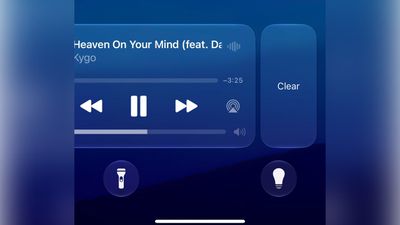
lock screen now playing ios 27%402x scaled
Previously, there was no way to dismiss the Now Playing interface on the Lock Screen. But in the first iOS 27 developer build released yesterday, a leftward swipe on the playback controls slides in a Clear button from the right.

Clearing the controls from the screen also removes the smaller Now Playing widget from the Dynamic Island.

It's not quite clear yet how to bring the widgets back immediately – as 9to5Mac notes, the only workaround appears to be pausing whatever's playing, waiting a few minutes, and then resuming it. It also seems to depend on which app you're using for playback. For example, switching from a podcast to video playback re-invokes the Lock Screen widget.


Being able to make the Now Playing widget go away is admittedly a small tweak, but it will be welcomed by anyone who likes to dismiss whatever is taking up space on their Lock Screen, playback controls included. Apple will make iOS 27 available in public beta next month, with a general release expected in the fall.


Related Roundup: iOS 27

Popular Stories

google gemini intelligence

Google Previews Android 17 With 'Gemini Intelligence' a Month Before Apple's iOS 27 Reveal

Tuesday May 12, 2026 12:21 pm PDT by
Google today previewed Android 17, the next version of Android that it is bringing to smartphones and other devices. Android 17 includes multiple new AI features, and it comes about a month ahead of when Apple plans to unveil iOS 27 with new AI capabilities. Google is now calling the AI features on Android "Gemini Intelligence," branding similar to Apple Intelligence. Google said it is...
iOS 27 on iPhone 17 1

iOS 27 to Bring Customizable Camera App, Tweaks to Weather, Safari and Liquid Glass

Tuesday May 12, 2026 1:12 pm PDT by
Apple plans to make the Camera app more customizable in iOS 27, reports Bloomberg. Users will be able to select the features they want to see in the Camera app, like flash, exposure, timer, depth of field, photo styles, and resolution. Camera controls, labeled as widgets, will be able to be placed at the top of the Camera interface in any order. Users will be able to select widgets from a...
Finder Siri Feature

iOS 27 Getting Major Siri Redesign With Chat Interface and Dedicated App

Tuesday May 12, 2026 1:38 pm PDT by
Apple is introducing an overhauled version of Siri in iOS 27, evolving the personal assistant into a more capable chatbot and AI agent able to compete with ChatGPT, Claude, and Gemini. With Siri's transition, Apple will be making multiple Siri-related design changes in iOS 27, according to a new report from Bloomberg. Siri will largely live in the Dynamic Island in iOS 27, but there will also be...

Top Rated Comments

b0nd18t Avatar
5 hours ago at 05:15 am
This always bothered tf out of me
Score: 4 Votes (Like | Disagree)
alexandr Avatar
2 hours ago at 07:45 am
Such a tiny thing, but soo welcome.
Score: 3 Votes (Like | Disagree)
3 hours ago at 06:30 am
OMG finally! This is the kind of stuff I'm talking about!

Forget genmoji and all that crap, I'm so glad they are finally paying attention to the things we have to deal with every day!
Score: 3 Votes (Like | Disagree)
211 Avatar
2 hours ago at 08:09 am
I just tried it, and everything from Music goes away from the lock screen, including album cover. As for it moves to Dynamic Island, it doesn't for me. There isn't a way for me to get Music back on the lock screen, even after closing the app. I now have to unlock and go to the Music app to do anything now. This is probably a bug, so hope it gets fixed in the next update
Score: 1 Votes (Like | Disagree)
4 hours ago at 05:35 am
Much needed. It used to be annoying sometimes. Glad to have this option.
Score: 1 Votes (Like | Disagree)
chrono1081 Avatar
5 hours ago at 05:15 am
Oh thank God! Literally no trick you see online works to get rid of this, it's just always there for Apple TV users. Hopefully watchOS gets the same.
Score: 1 Votes (Like | Disagree)














