All the Liquid Glass Changes in macOS Golden Gate - MacRumorsOpen MenuShow RoundupsShow Forums menuVisit ForumsOpen Sidebar
Skip to Content

All the Liquid Glass Changes in macOS Golden Gate

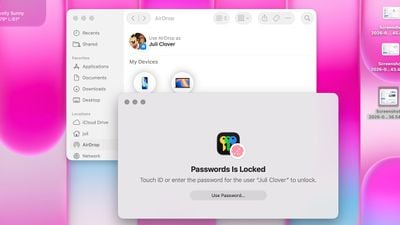
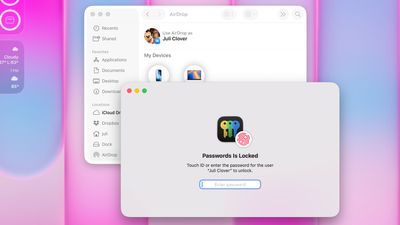
When Liquid Glass launched in macOS Tahoe, Apple faced criticism over how the design looked on the Mac. Some people felt that Liquid Glass in ‌macOS Tahoe‌ was an afterthought with little impact from the design update, while others had issues with contrast, readability, rounded corners, and design consistency. There were long complaint threads on the MacRumors forums and on Reddit, and some people refused to update.
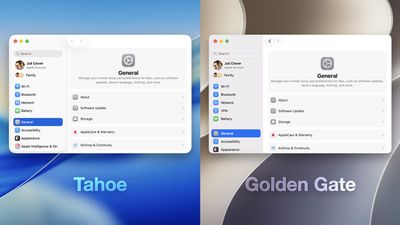
macOS 26 vs 27 Unified Sidebar
Apple is making several changes to Liquid Glass and the overall macOS Golden Gate design, and while subtle, some of the changes could make Liquid Glass on Mac easier to digest.

Transparency and Diffusion

Apple added a full Liquid Glass slider under System Settings > Appearance. It changes the translucency of Liquid Glass elements, and users can choose a clear version of Liquid Glass that allows some of the background to show through, select a more opaque, tinted version that improves the legibility of text, or choose something in between.
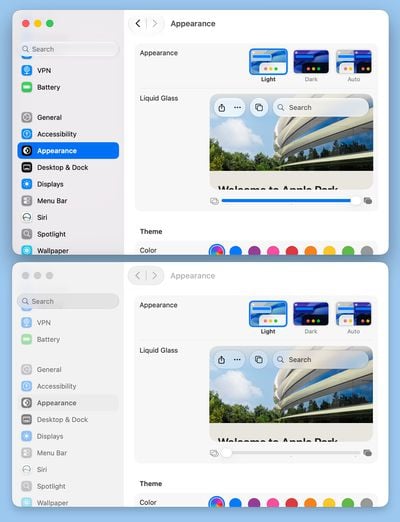
macos 27 liquid glass opacity
Unfortunately, there is no ultra-clear version of Liquid Glass available with the slider. Even the setting that's as clear as possible does not match the original version of Liquid Glass that Apple showed off at WWDC 2025.

Apple changed the overall Liquid Glass opacity, and it now diffuses complex content more effectively. Apple says a darkened edge and brighter specular highlights establish more depth and separation for the UI.

Toolbars and Window Shapes

Apps have uniform toolbars to make text headings and groups of controls more legible. Windows also all have the same corner radius for more consistency between apps.
macos tahoe windows‌macOS Tahoe‌

Corners of apps are not as dramatically rounded in ‌macOS Golden Gate‌, and the difference is noticeable.

macos golden gate windows‌macOS Golden Gate‌

It's easier to tell when a window is active because of the sidebar design, the opacity update, and changes to window shadows.

Sidebars

Sidebars are no longer floating and are instead edge-to-edge. It's a design that's less distracting and more uniform because there's no unnecessary sidebar shadowing that just takes up space.
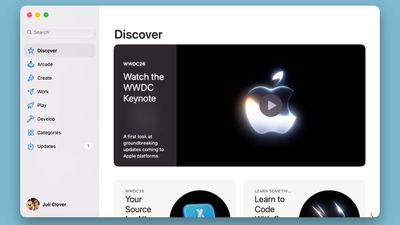
macos golden gate side bar
Sidebar icons have color again, which is something Apple removed in ‌macOS Tahoe‌.

Icons

Apple didn't budge on requiring squircle Mac icons, but it did change icon design. Icons have more layers of Liquid Glass to improve detail and sharpness in light, dark, tinted, and clear icon modes.
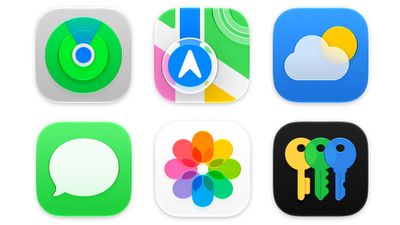
macos golden gate icons
Apple is also using icons for some menu bar items to make it easier to find commonly used actions.

HDR

Apple is using HDR for depth and dimension in the ‌macOS Golden Gate‌ interface.

Launch Date

‌macOS Golden Gate‌ also includes all of the new Siri AI features coming in iOS 27, along with performance improvements that make the Mac feel faster.

The update is limited to developers right now, but Apple plans to release a public beta in July. ‌macOS Golden Gate‌ will launch this fall.

Related Roundup: macOS Golden Gate

Popular Stories

macOS 27 on MacBook Pro

Better MacBook Battery Life Coming With macOS 27

Monday May 11, 2026 3:03 am PDT by
Your MacBook may be getting a battery performance upgrade later this year, thanks to Apple's next major macOS software update, reports Bloomberg's Mark Gurman. In his latest Power On newsletter, Gurman says that beyond the visual tweaks and fixes coming to Liquid Glass in macOS 27, Apple is also zeroing in on "battery-life upgrades and performance improvements." It sounds like the sort of...
macOS 27 on MacBook Pro

macOS 27 Will Mark the End of an Era

Tuesday May 26, 2026 7:16 am PDT by
During its Platforms State of the Union segment at WWDC 2025, Apple revealed that macOS 26 Tahoe is the final major macOS version for Intel-based Macs. The upcoming macOS 27 release will be compatible with Apple silicon Macs only, meaning that you will need a Mac with an M-series chip or a MacBook Neo with an A18 Pro chip in order to install the software update. Apple will unveil macOS 27...
macOS 27 Feature Blue

macOS Emerald to macOS Big Bear: What Will Apple Name macOS 27?

Tuesday June 2, 2026 8:20 am PDT by
Every year heading into WWDC, one thought on many Mac fans' minds is what Apple will choose as the name for the next version of macOS. The tradition dates all the way back to the beginning of Mac OS X with big cat names like Leopard, and Apple eventually shifted to California-themed names with the unveiling of OS X Mavericks. Apple has yet to announce the name for macOS 27, but macOS Emerald ...

Top Rated Comments

3 hours ago at 12:30 pm

Crossing my fingers (but not holding my breath) that they take all of the icons out of the menus!
I'm not a fan of the icons, but they don't bug me nearly as much as the rounded corners everywhere in menues. In Tahoe, the menu title (e.g., "File", "Edit"), the drop down menu, and the selected menu item all have four rounded corners, making them look like disconnected elements. I hope they bring back the previous appearance, where a menu title and its drop-down items appear connected.


Attachment Image

Attachment Image
Score: 21 Votes (Like | Disagree)
tennisproha Avatar
3 hours ago at 12:21 pm
Not enough Liquid Glass! The slider is basically Frosted Glass high or mid. Terrible downgrade in UI, I want a more transparent Liquid Glass option like the initial beta last year.

I'm glad they made the icons more Liquid Glass at least.
Score: 21 Votes (Like | Disagree)
turbineseaplane Avatar
3 hours ago at 12:40 pm
Excellent stuff

Fixing the sidebars seemed like totally low hanging fruit and it was a horrible idea how they have it in Tahoe.

It’s nice to see the corner radius situation getting addressed a little bit and unified also.

Most importantly, it’s clear to me that Apple does actually pay attention to feedback and conversations online about their software.

Anyone suggesting we should all just be quiet and accept however things are is incorrect.
Score: 17 Votes (Like | Disagree)
Eureka20 Avatar
3 hours ago at 12:38 pm
I loathe the liquid glass garbage so much I still have not updated my iPad Pro and I won't be buying another iPad until they let me turn it completely off lol.
Score: 16 Votes (Like | Disagree)
3 hours ago at 12:36 pm
Did Apple really listen to the criticism this time? I'm impressed.
Score: 15 Votes (Like | Disagree)
3 hours ago at 12:28 pm
This looks very promising but I need to see it for myself.

For Apple to basically respond to much of the trenchant criticism from ux pros shows that:

a) they were right
b) this really stung Apple
c) that lots of regular users complained
d) Apple listened and responded in what seems to be a thoughtful way.
Score: 13 Votes (Like | Disagree)