14 Ways Apple Is Improving Messages in iOS 27 - MacRumorsOpen MenuShow RoundupsShow Forums menuVisit ForumsOpen Sidebar
Skip to Content

14 Ways Apple Is Improving Messages in iOS 27

Apple at this year's WWDC emphasized that its approach to iOS 27 development was to add fewer newer features and instead make existing features better. Examples of that approach can be seen across the operating system, but it is arguably most obvious in the changes coming to Messages.
ios 27 messages
That's not to say there's nothing original coming to Messages in iOS 27. For instance, one new Apple Intelligence feature brings content-aware suggestions directly into conversations. If someone asks for photos, for example, Messages can recognize what's being discussed and suggest searching your photo library, using details like people, places, and keywords to surface relevant images.

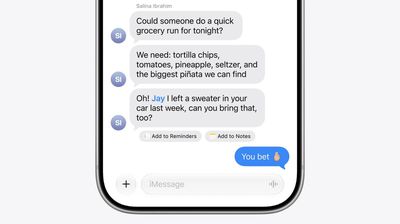
The app can also detect when a conversation would benefit from creating a reminder or note and offer a shortcut to do so without leaving the thread. Apple is also bringing drawing tools directly into Messages, allowing users to create and share hand-drawn sketches within conversations.

Otherwise, Apple's focus has been on making the following enhancements and improvements to its broader Messages platform:

  • Faster message loading: Large conversations, especially those containing years of history and thousands of attachments, should load and scroll more quickly.
  • Improved syncing across devices: Apple says Messages, read states, reactions, and attachments sync more reliably and quickly between iPhone, iPad, Mac, Apple Watch, and Vision Pro.
  • Find offloaded media in Messages: Search can surface photos and videos that have been offloaded from local storage and stored in iCloud.
  • Thumbnails for offloaded media: Offloaded photos and videos now get visible preview thumbnails instead of generic placeholders, making older media easier to identify.
  • Personalized Smart Reply suggestions: Apple Intelligence-generated Smart Reply suggestions can now reflect a user's own writing style, making suggested responses feel more natural and personal.
  • Consolidated notifications for multiple Tapbacks: Multiple reactions to a message are grouped into a single notification rather than generating separate alerts.
  • Continuous sending of photos, videos, and text: Messages continue sending in the background and automatically resume when connectivity returns, reducing interrupted sends.
  • Search conversations by phone number or nickname: Conversation search now works with saved nicknames and phone numbers, not just contact names.
  • Faster access to recent camera captures: Newly captured photos and videos appear more quickly in the Messages media picker.
  • Failed messages automatically retry sending: Messages that fail because of temporary network issues will automatically attempt to resend without the user's intervention.

Early adopters of iOS 27 will receive access to the public beta next month, when they can try out the new features and improvements themselves. Apple is expected to make a general release available in the fall.


Related Roundups: iOS 27, iPadOS 27

Popular Stories

ios 27 messages

Apple Intelligence Introduces Contextual Call and Messages Features

Monday June 8, 2026 12:49 pm PDT by
Apple today announced a set of new communication-focused Apple Intelligence features, including contextual suggestions in Messages and a Call Context tool that surfaces relevant information from Mail when a user phones a business. The new Messages features offer one-tap suggestions based on the content of a conversation. If a contact asks for photos, Messages can surface a suggestion to...
google gemini intelligence

Google Previews Android 17 With 'Gemini Intelligence' a Month Before Apple's iOS 27 Reveal

Tuesday May 12, 2026 12:21 pm PDT by
Google today previewed Android 17, the next version of Android that it is bringing to smartphones and other devices. Android 17 includes multiple new AI features, and it comes about a month ahead of when Apple plans to unveil iOS 27 with new AI capabilities. Google is now calling the AI features on Android "Gemini Intelligence," branding similar to Apple Intelligence. Google said it is...
iOS 27 on iPhone 17 1

iOS 27 to Bring Customizable Camera App, Tweaks to Weather, Safari and Liquid Glass

Tuesday May 12, 2026 1:12 pm PDT by
Apple plans to make the Camera app more customizable in iOS 27, reports Bloomberg. Users will be able to select the features they want to see in the Camera app, like flash, exposure, timer, depth of field, photo styles, and resolution. Camera controls, labeled as widgets, will be able to be placed at the top of the Camera interface in any order. Users will be able to select widgets from a...

Top Rated Comments

Parowdy Avatar
12 hours ago at 04:10 am
The fact that they only this year thought about the miserable experience that was sending multiple photos, videos or texts is telling.
Until there is a way to archive chats, like it’s possible in any other messaging app, iMessage will continue to be looked down by non-US residents. Even grouping chats for like work, private, family, etc. would be a big step up. But no.
Score: 9 Votes (Like | Disagree)
12 hours ago at 04:31 am
I wish they had this focus more often to just fix bugs and improve, and not focus so much on new features.
Score: 8 Votes (Like | Disagree)
12 hours ago at 04:18 am
You still can't pin or star messages lol
Score: 6 Votes (Like | Disagree)
contacos Avatar
12 hours ago at 04:28 am
And still no select all button to mass delete old and useless attachments that I have already saved in the Photo App and don't need twice? I'll continue to stick with WhatsApp for that reason alone. Ain't got no time to open the list of photos in messages to tap on each one by one. Ridiculous
Score: 5 Votes (Like | Disagree)
TheDailyApple Avatar
11 hours ago at 05:45 am

Sure can
You can pin conversations, but as far as I’m aware there’s no way to pin messages.
Score: 4 Votes (Like | Disagree)
PDavidAlexander Avatar
10 hours ago at 06:52 am
How about message previews in the recently deleted section? Trying to recover a specific message with no preview is impossible. So annoying.
Score: 3 Votes (Like | Disagree)