

macOS 27 Beta Reworks Mail's Compose Window Around Siri AI - MacRumorsOpen MenuShow RoundupsShow Forums menuVisit ForumsOpen Sidebar
Skip to Content

macOS 27 Beta Reworks Mail's Compose Window Around Siri AI

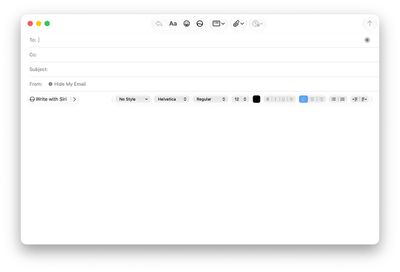
For macOS 27 Golden Gate, coming this fall, Apple appears to be testing a new formatting bar for the Mail app's compose window that promotes Apple Intelligence's Writing Tools and Siri AI, based on findings in the latest beta.
apple working on redesigned formatting bar for mail 2
Feature flags discovered by MacRumors forum member pdfu – who this week also revealed the hidden Siri "voice pad" interface in beta 4 – show the reworked bar in Mail's message composer, which now features "Write with Siri" in the most prominent position.

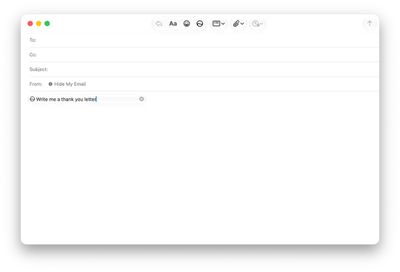
In the current implementation, the classic formatting controls are automatically collapsed to the right edge of the composer and vanish completely once the user selects Write with Siri and starts typing a prompt.
apple working on redesigned formatting bar for mail 3
The redesigned bar adds the ability to display contextual Smart Reply suggestions from Siri AI without necessarily using them in your draft email. (macOS users will know that Smart Reply itself isn't new, having arrived with the first wave of Apple Intelligence features.) The new design lets you preview a suggested reply by hovering over it before inserting it, which is something the previous in-line design couldn't do.

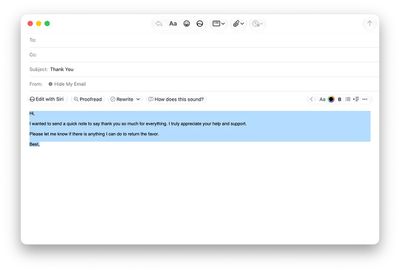
When a suggested composition is selected, the formatting bar shows "Edit with Siri," "Proofread," and "Rewrite" options, as well as "How does this sound?" with the traditional formatting controls minimized.

The new bar isn't switched on by default and remains hidden behind an internal feature flag, so most testers won't see it. It's also still buggy, suggesting this is a work in progress – in Beta 4, for example, the redesign only shows up when replying to a message, but composing a fresh email still brings up the old formatting bar.
apple working on redesigned formatting bar for mail
Whether the redesign makes the general release of macOS 27 is anyone's guess at this point, but it fits the broader pattern of integrating the new contextually aware Siri AI across the system.

macOS 27 Golden Gate is expected to officially launch in September when Apple releases new iPhone 18 Pro models, alongside its first foldable iPhone.


Popular Stories

macOS iOS 27 Siri App Feature

Apple's Siri AI Can Be Swapped Out for Claude, ChatGPT, Code Shows

Monday September 14, 2026 4:37 am PDT by
Code sleuth "pdfu" has uncovered iOS 27 and macOS Golden Gate private frameworks that show Apple has designed its new Siri architecture to work with third-party AI models at what appears to be a surprisingly deep level. One mechanism called Model Delegation allows Claude to appear as a Siri extension in the same way as the existing built-in ChatGPT extension. In pdfu's video, shared on X,...
macOS iOS 27 Siri App Feature

Reminder: iOS 27's All-New Siri AI Has a Waitlist, Here's How to Sign Up

Tuesday September 15, 2026 8:54 am PDT by
Apple this week released iOS 27 following around three months of beta testing. If you just installed the software update on your iPhone, you might be wondering where the new-and-improved Siri AI and dedicated Siri app are. In case you missed it, you must join Apple's waitlist in order to gain access to these new features. Keep in mind that while iOS 27 is compatible with the iPhone 11 and...
iOS 27 Out Now Thumb

Apple Releases iOS 27 and iPadOS 27 With Siri AI and Liquid Glass Update

Monday September 14, 2026 10:04 am PDT by
Apple today released iOS 27 and iPadOS 27, the newest operating system updates for the iPhone and iPad. The software is available for free on all compatible devices, and can be downloaded over the air by going to Settings > General > Software Update. Subscribe to the MacRumors YouTube channel for more videos. It can take several minutes for the updates to propagate to all users due to high...

Top Rated Comments

attohs Avatar
8 weeks ago
Please do not copy the CoPilot litter all over Windows.
Score: 32 Votes (Like | Disagree)
cjsuk Avatar
8 weeks ago
More trash.

The only reason this exists is to dehumanise email to justify the expenditure on AI that no one gives a crap about.
Score: 24 Votes (Like | Disagree)
8 weeks ago
AI slop = No thanks. I just want to write and send e-mail, without any AI rubbish.
Score: 16 Votes (Like | Disagree)
8 weeks ago
This is horrible and I hope it never sees a release. Notwithstanding the prospect of being forced to read even more verbose messages that nobody actually bothered to write, the current integration in the context menu and selections is enough.
Score: 16 Votes (Like | Disagree)
BillyJoeJimBob Avatar
8 weeks ago
A better use of "AI" would be in developing really powerful spam/phishing filters and the ability to "delete and report" as is the case with the Messages app.
Score: 8 Votes (Like | Disagree)
8 weeks ago
I hate AI slop and like formatting tools, so I would never want this. Presumably the bar will be customizable so those who want a Siri button can have it and others can put the tools they want where they want them?
Score: 7 Votes (Like | Disagree)












